
Vibe coding without a platform is chaos with a fast clock. App Store submissions jumped 84% year-over-year in Q1 2026, driven almost entirely by vibe coding tools. Specs live in chat threads. Agents execute on conflicting assumptions. You're shipping fast and losing control of what you've built.
Tekk.coach is the vibe coding platform that puts structure around the whole workflow. It reads your actual codebase, generates structured specs your AI agents can execute against, and gives you a Kanban workspace to manage everything you're building — connected to GitHub, GitLab, or Bitbucket from day one.
This is what adopting vibe coding at a platform level actually looks like: one place for planning, tracking, and orchestrating your agents. Not scattered markdown files and chat history.
[Try Tekk.coach Free →]
How Tekk.coach Works as a Vibe Coding Platform
Most vibe coding tools handle the generation step. Tekk operates as the platform layer that sits before and above generation — where you plan what gets built, structure the spec that guides your agents, and track the work from idea to done. As a vibe coding tool, Tekk is focused on the planning and orchestration layer that makes generation reliable.
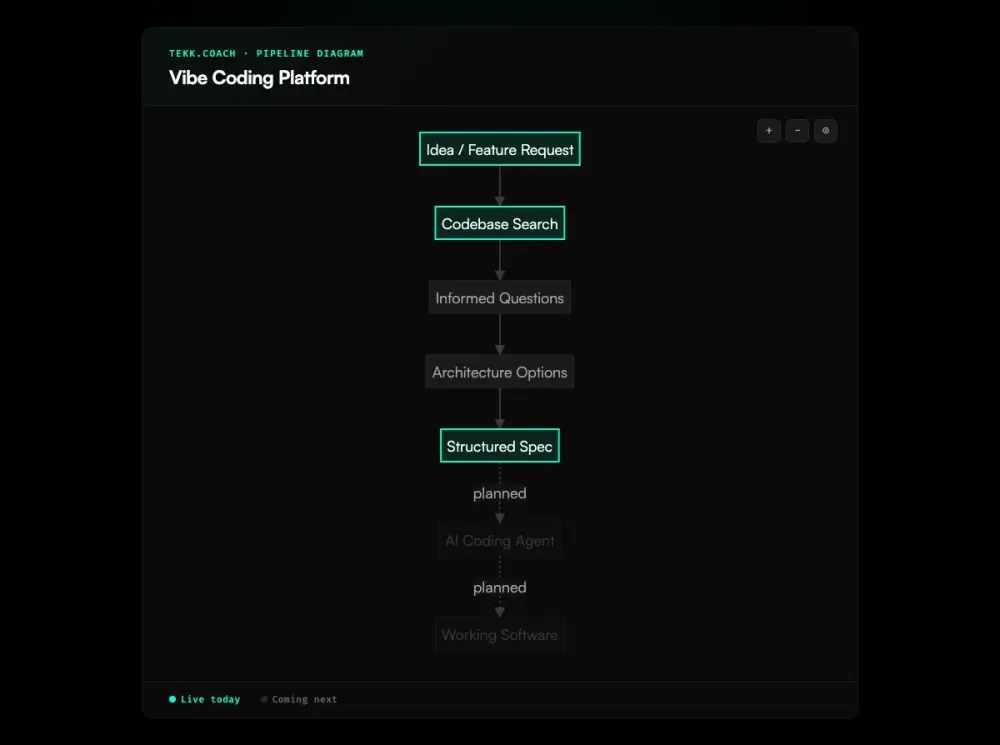
Before Tekk writes a single line of a spec, it reads your codebase. Connect your GitHub, GitLab, or Bitbucket repo and Tekk runs semantic search, file search, regex analysis, and directory browsing across your entire repository. It maps your language, framework, ORM, existing patterns, and dependencies. This is what makes it a platform and not a tool: every spec it generates is grounded in your actual code, not generic boilerplate.
From that foundation, Tekk asks 3 to 6 questions grounded in what it found — not "what stack are you using?" but "you're already using Drizzle ORM, do you want to extend the users table or create a separate auth schema?" Then it presents architecturally distinct approaches with honest tradeoffs. Then it writes the complete spec, streamed live into a rich text editor as a working document — TL;DR, Building / Not Building scope boundaries, subtasks with acceptance criteria and file references, assumptions with risk levels, and validation scenarios.
That spec lives on a Kanban card. You see your full backlog in one workspace: To Do, In Progress, Done. Each card links back to the full planning session and codebase context. When you're ready to execute, Tekk's agent orchestration layer (coming next) will dispatch Cursor, Codex, Claude Code, or Gemini against the spec — decomposing subtasks by dependency order, parallelizing independent work, and delivering a single PR at the end.
What you get is not a better prompt tool. It's an end-to-end platform for AI-assisted software development.
Key Benefits
Codebase-grounded specs, every time. Tekk reads your actual repo before generating anything. GitHub, GitLab, and Bitbucket are all supported. Every spec references your real stack, your real files, your real patterns — not generic architectural assumptions that break when they hit your code.
Scope protection built into every plan. Every spec includes a "Not Building" section. You define the boundaries before any agent writes a line. That's how you prevent scope drift from compounding into months of rework and technical debt.
One workspace for everything you're building. Kanban board, AI planning sessions, codebase context — all connected. No more specs in chat threads, tasks in Notion, and status updates in Slack. If it's in your backlog, it's in Tekk, with a structured plan behind it.
Expert review when the code comes out. Run a security review, architecture review, or performance review after your agents ship. This matters because one in five vibe-coded apps ships with serious vulnerabilities or configuration errors. Tekk reads your repo, finds the gaps AI-generated code introduces, and tells you what to fix — grounded in your actual codebase, not generic checklists.
Multi-agent orchestration, coming next. Tekk connects to Cursor, Codex, Claude Code, and Gemini via OAuth. When the execution layer ships, Tekk will decompose approved specs into dependency-ordered subtasks, parallelize independent work across agents, and deliver a single PR at the end. Bring your existing agents — Tekk orchestrates them.
How It Works
Step 1: Connect your repo. Link your GitHub, GitLab, or Bitbucket repository. Tekk profiles it immediately — languages, frameworks, services, packages, directory structure. This is the foundation everything else is built on. Sessions preserve this context across turns so the agent builds on prior understanding rather than starting fresh.
Step 2: Describe the feature. Tell Tekk what you're building. A sentence or a paragraph — enough to establish intent. The agent will ask the right follow-up questions based on what it found in the code, not based on generic onboarding.
Step 3: Answer targeted questions and pick an approach. Tekk asks 3 to 6 questions grounded in your actual codebase. Then it presents 2 to 3 architecturally distinct approaches with honest tradeoffs. When there's one obvious path, it skips the options and goes straight to the plan. You stay in control of every decision.
Step 4: Get a structured spec. The plan streams live into a rich text editor — not a chat message. Scope boundaries, subtasks with acceptance criteria, file references, dependencies, assumptions, and validation scenarios. This is the document your coding agents actually need to execute correctly.
Step 5: Manage it on the Kanban board. The spec lives on a task card. Your full backlog is visible in one workspace. Track status, revisit the planning context, run follow-on review sessions. Each card carries its planning history — no lost context, no starting over.
Who This Is For
Non-technical founders running their entire product through vibe coding. According to J.P. Morgan, 63% of active vibe coding users are now non-developers — product managers and founders building full-stack apps with natural language alone. You can get code generated — but you can't evaluate whether that code is architecturally sound, secure, or maintainable. Tekk gives you the structure that makes your agents produce output worth keeping, and the review mode to catch what they missed.
Solo developers and small teams using Cursor or Claude Code. You've felt the chaos: specs in chat windows, agents executing on stale context, rework because the intent wasn't clear. Even Inc. reports that non-technical founders who skip structured planning end up rebuilding what their agents shipped. Tekk is the platform layer that ends that. One workspace, codebase-grounded specs, and a backlog you can actually manage.
Teams of 2 to 5 people coordinating multiple agents. You're splitting work across Cursor for implementation, Claude Code for complex logic, and Gemini for UI specs. Without a platform coordinating that, you get conflicts, duplicate work, and lost context. Tekk's Kanban plus coming orchestration layer is built for exactly this.
What Is a Vibe Coding Platform?
A vibe coding platform manages the full lifecycle of AI-assisted development — from planning through execution, tracking, and review — not just the code generation step. This is a meaningful distinction from a vibe coding tool.
Vibe coding itself was coined by Andrej Karpathy in February 2025: you express intent in natural language, an AI generates code, you iterate. The practice exploded in 2025. By early 2026, 92% of US developers use AI coding tools daily and 21% of Y Combinator's Winter 2025 cohort have codebases that are over 90% AI-generated. The tools — Lovable, Bolt, Cursor, Replit, Emergent — are mature, well-funded, and widely adopted across technical and non-technical builders alike.
The problem is that generation is only one step. Without planning, vibe coding produces insecure, unmaintainable code at speed. Security researchers scanning 5,600 vibe-coded applications found over 2,000 vulnerabilities and 400+ exposed secrets, and separate analysis shows AI-generated code carries 2.74x more security vulnerabilities than hand-written code and 1.7x more major bugs. The software engineering community — including ICSE 2026, Microsoft's Azure AI team, and GitLab — has converged on the same conclusion: structured planning before generation is the professional standard. Adopting spec driven development as a baseline is how platforms enforce that standard. A vibe coding platform provides that structure, plus the workflow layer to track, manage, and orchestrate what gets built.
Tekk.coach is a vibe coding platform in this sense. Generation tools like Cursor and Lovable are excellent at writing code. Tekk is what makes them excellent at writing the right code — grounded in your actual codebase, scoped correctly, and executed with precision.
Frequently Asked Questions
What is a vibe coding platform?
A vibe coding platform manages the end-to-end workflow of AI-assisted development: planning what gets built, generating structured specs, tracking work in progress, and orchestrating AI agents across the execution. It's distinct from a vibe coding tool (which handles a single step — usually code generation) because it connects the full development lifecycle. A platform buyer is choosing a workflow, not trying a feature.
How is a vibe coding platform different from a vibe coding tool?
A vibe coding tool (Cursor, Lovable, Bolt) handles one step of the process — usually generating code from a prompt. As one head-to-head comparison concluded, the initial app-building phase is largely commoditized across tools — what differentiates them is workflow and integrations. A vibe coding platform connects the entire workflow: you plan before you generate, track as you execute, and review what comes out. The practical difference is scope. Tools are add-ons to a workflow you build yourself. A platform is the workflow.
What makes Tekk.coach a vibe coding platform?
Tekk combines codebase-aware spec generation, Kanban task management, expert review mode, and multi-agent orchestration in one workspace. It connects to GitHub, GitLab, and Bitbucket. Every planning session persists and links to the task it produced. When the execution layer ships, Tekk will dispatch Cursor, Codex, Claude Code, and Gemini directly from approved specs. The planning workflow (Steps 1–3) is live today; agent execution dispatch is coming next.
Which AI vibe coding agents does Tekk support?
Tekk's orchestration layer (coming next) connects to Cursor, OpenAI Codex, Claude Code, and Gemini via OAuth. Cursor handles primary code execution via Cloud Agents API. Codex is OpenAI's cloud coding agent. Claude Code extends Tekk's existing agent SDK. Gemini handles design-first and UI/UX tasks before handing off to execution agents. You bring the agents you're already paying for — Tekk orchestrates them.
Is Tekk the best vibe coding platform for non-technical founders?
Tekk is built for builders at any technical level — including founders who don't write code themselves. It adjusts depth: detailed explanations and full context for non-technical users, tight architectural specs for engineers. The key value for non-technical founders is that it catches what vibe coding apps miss. You can generate code with Lovable or Bolt — Tekk makes sure that code is architecturally sound and scoped correctly before your agents ship it.
How does Tekk handle security issues in AI-generated code?
After your agents build something, run a security review directly in Tekk. The stakes are real — Retool documented a case where a founder's 100% AI-coded platform launched with newbie-level security flaws that let anyone access paid features or alter data. An ai code review that reads your full codebase catches what static scanners miss. Tekk's agent reads your codebase, searches for current best practices and known vulnerability patterns, and produces actionable recommendations grounded in your specific code — not a generic checklist. Architecture review and performance review work the same way. This is the review mode built for teams that want to catch what AI-generated code introduces before it reaches production.
Do I need Tekk if I already use Cursor or Claude Code?
If you're getting good output without it, you may not. But if you're seeing rework, scope drift, architectural inconsistencies, or agents executing on vague prompts — Tekk addresses the root cause. It reads your codebase before generating a spec, so your agents get a prompt that references your actual files, dependencies, and patterns. The difference between "add auth to my app" and a codebase-grounded spec with schema, routes, acceptance criteria, and scope boundaries is the difference between a coding agent that flails and one that ships.
How do I get started with Tekk.coach as my vibe coding platform?
Connect your GitHub, GitLab, or Bitbucket repo. Describe the first feature you want to build. Tekk reads your codebase, asks targeted questions, and generates a structured spec in minutes. Free to start — no credit card required.
Ready to Try Tekk.coach?
Vibe coding gets you to a working product faster than any previous approach. A vibe coding platform makes sure what gets built is worth keeping. Connect your repo, run your first spec, and manage your backlog from one workspace.
[Start Planning Free →]