
Cursor doesn't drift. Your prompt does. Hand Cursor a vague description and you get scope creep, files touched that shouldn't be, and a third round of corrections because "that's not what I meant." Spec-driven development fixes this — but writing a spec that's actually grounded in your codebase is the hard part.
Tekk reads your repo and generates the spec. Cursor executes it.
[Try Tekk.coach Free →]
How Tekk.coach Does Cursor Spec-Driven Development
The problem isn't Cursor's execution ability. The problem is the input. Cursor is a capable agent — it executes what it's given. A casual prompt leaves it inferring file structure, scope, acceptance criteria, and what "done" looks like. It guesses. Sometimes well, often not. The result is an agent that drifts — touching files it shouldn't, skipping things it should have handled, asking clarifying questions three steps too late.
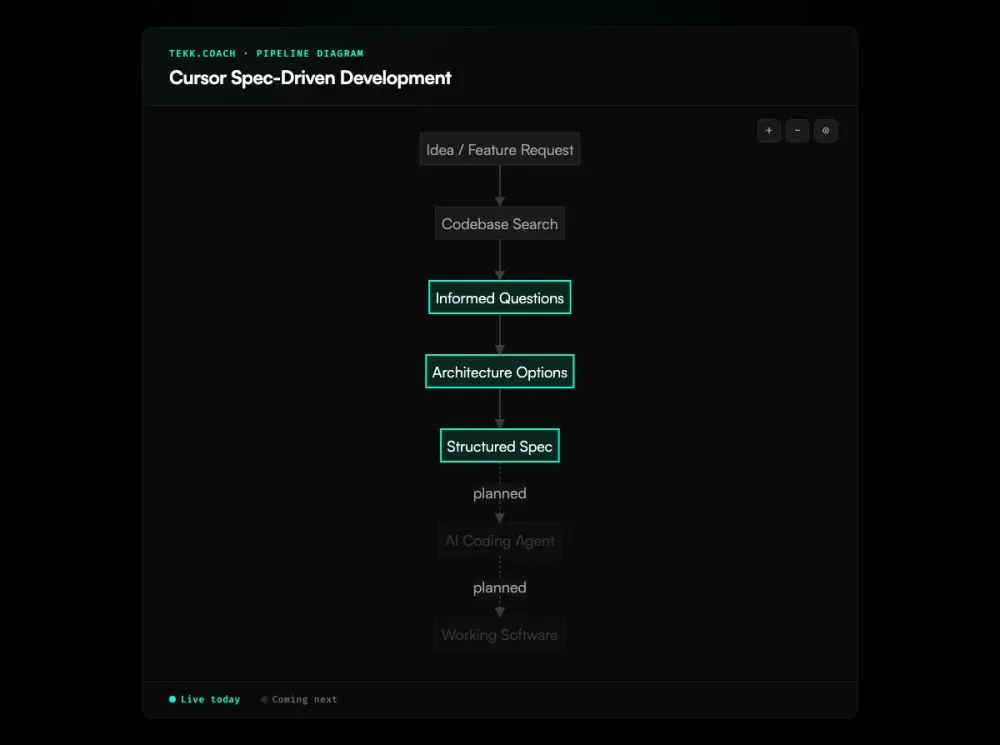
Tekk starts before Cursor does. Connect your repo, describe the feature. Tekk runs a semantic search across your codebase — reading actual files, frameworks, patterns, dependencies — before asking a single question. Its questions are grounded in what it found in your code, not generic prompts like "what framework are you using?" It already knows. The underlying methodology is spec driven development — Tekk automates the spec generation step so Cursor gets structured input instead of a paragraph.
From there, Tekk generates a structured spec: subtasks broken into behavioral slices, acceptance criteria per subtask, explicit file references, scope boundaries, and a "Not Building" section that draws a hard line around what's in and what's out. That's what Cursor gets. Not a paragraph. A working document that tells it exactly what to build, which files to touch, and when it's done.
The spec lives in Tekk's editor — editable, versioned, yours to review and adjust before Cursor touches a line of code. Execution dispatch (Tekk handing the spec to Cursor directly via the Cloud Agents API) is coming next. The planning pipeline — Tekk reading your codebase and generating the spec — is live today.
Key Benefits
Specs built from your actual repo, not your memory Tekk reads your codebase before writing a word. Every subtask references real files, real patterns, real dependencies — not generic boilerplate Cursor has to interpret. You stop writing specs from memory of what your project looks like.
Scope boundaries that prevent execution drift Every Tekk spec includes an explicit "Not Building" section. Cursor knows what's out of scope before it starts. No surprises mid-run. No "while I was in there I also changed..." commits you didn't ask for.
Acceptance criteria per subtask Each subtask has a concrete definition of done. Cursor doesn't have to infer completion — it has a specific condition to check. Fewer clarification loops. Fewer approval interruptions mid-execution.
No context lost between sessions Plans persist in Tekk's editor as living documents. The full spec — questions asked, decisions made, scope defined — is there when you open the next session. No more re-explaining context to a fresh chat window.
Works with your Cursor workflow today The Tekk spec is a structured document you take into Cursor as context. No new IDE, no workflow overhaul. Connect your repo, generate the spec, give it to Cursor. That's it.
How It Works
Step 1: Connect your repo Link your GitHub, GitLab, or Bitbucket repository. Tekk gets read access — nothing else.
Step 2: Describe the feature One or two sentences. What you're building, not how. Tekk figures out the how.
Step 3: Tekk reads your codebase Semantic search, file search, regex search, directory browsing. Tekk builds a structural understanding of your repo — languages, frameworks, services, packages — before generating anything. This is the step no manual spec process does.
Step 4: Tekk asks questions Three to six questions, grounded in what it found in your code. Not "what's your database ORM?" It already knows. It asks about the decisions that actually matter for this specific feature.
Step 5: Choose your approach Tekk presents two or three architecturally distinct options with honest tradeoffs. Pick the one that fits your constraints. If there's an obvious path, Tekk skips this step.
Step 6: Tekk writes the spec The plan streams into a rich text editor as the actual working document: TL;DR, Building/Not Building scope, subtasks with acceptance criteria and file references, assumptions with risk levels, validation scenarios.
Step 7: Take it into Cursor Review the spec, edit anything you disagree with, then hand it to Cursor as context. Cursor has everything it needs to execute without drifting. Execution dispatch — where Tekk hands the spec to Cursor directly — is the next milestone.
Who This Is For
Cursor users who've hit the prompt quality ceiling. You know Cursor works. You've seen it ship clean features and you've seen it produce three files of code that missed the point. You've figured out the difference is the input — 84% of developers are in the same position — but writing a spec that's grounded in your actual repo every time is more friction than you want. Tekk automates that step. If you're also coordinating multiple Cursor sessions across features, ai agent orchestration provides the parallel execution layer.
Solo founders and small teams using Cursor as their dev force multiplier. Cursor is handling most of your coding. Planning is happening in your head, in chat threads, in scattered markdown files. The chaos is building. Tekk gives you one workspace — spec generation, living documents, kanban tracking — so the planning is as reliable as the execution.
Developers evaluating Kiro who don't want to leave Cursor. Kiro brings spec-driven development natively to its IDE. But you're already set up in Cursor. Tekk gives you the same codebase-aware spec generation without switching your editor. The planning layer is tool-agnostic; the execution layer stays in Cursor.
What Is Cursor Spec-Driven Development?
Spec-driven development is a workflow that separates planning from execution. Before a coding agent writes any code, you produce a specification — what you're building, how it fits in the existing codebase, what "done" looks like for each piece, and what's explicitly out of scope. The agent works from the spec, not from your prompt.
In the Cursor context, this matters because Cursor is an autonomous executor. The better the spec it starts with, the better it executes. Cursor's own documentation identifies planning-before-coding as the single most impactful practice for agent quality. The community has built tools around this — spec-kit, cc-sdd, OpenSpec — that provide slash commands and templates to scaffold specs for Cursor. The limitation is they still require you to write the spec manually, without reading your codebase first.
The cursor SDD workflow has converged on a consistent pattern: requirements → design → tasks → execute. Tekk automates the first three steps by reading your repo before generating anything. Instead of filling out a requirements template from memory, you describe what you want to build and Tekk builds the spec from your actual code. Cursor then executes a spec it can follow precisely, rather than inferring the codebase structure it needs to know.
Frequently Asked Questions
What is cursor spec-driven development?
Cursor spec-driven development is the practice of writing a structured specification — with subtasks, acceptance criteria, file references, and scope boundaries — before Cursor's agent begins executing. Rather than prompting Cursor with a paragraph of intent, you give it a working document it can follow from start to finish. The result is tighter execution, fewer mid-run corrections, and output that matches what you actually intended.
How does the cursor AI planning workflow work with Tekk?
Tekk handles the planning phase before Cursor handles execution. Connect your repo, describe the feature, and Tekk reads your codebase — semantic search, file search, directory structure — before asking any questions. It generates a structured spec with subtasks, acceptance criteria, explicit file references, and scope boundaries. You review and edit in Tekk's document editor, then take the spec into Cursor as context. Cursor runs with a complete, codebase-grounded plan instead of inferring everything from a prompt. If you need the product requirements written first, start with the ai prd generator before moving to the implementation spec.
What are cursor structured specs and what should they include?
Cursor structured specs are planning documents written before the agent runs. A complete spec includes: a TL;DR of what's being built, explicit scope boundaries (Building/Not Building), subtasks broken into behavioral slices each with acceptance criteria, references to specific files and patterns in your codebase, assumptions with risk levels, and validation scenarios. This is the format Tekk generates automatically. Manually written specs that skip the file references and scope boundaries leave too much for Cursor to infer.
How does the cursor SDD workflow compare to using Kiro?
Kiro is a spec-driven IDE from AWS that generates specs natively within its own editor. If you use Kiro, spec generation is built into your environment. Tekk takes a different approach: it's a standalone planning platform that works with Cursor (and any other coding agent) without requiring you to switch your IDE. If you're already set up in Cursor and don't want to move, Tekk brings the same codebase-aware spec generation to your existing workflow.
Can I do spec-driven development in Cursor without Tekk?
Yes. Developers write specs manually as markdown files — requirements, design, tasks — and feed them to Cursor as context. Tools like spec-kit-command-cursor and cc-sdd provide slash commands to scaffold this process. The ceiling is codebase awareness: manual specs are written from your memory of the repo, not from a systematic read of it. File names get wrong, patterns get assumed, dependencies get missed. Tekk automates the codebase-read-first step, which is the most time-consuming part to do well manually.
Does Tekk work with Cursor today, or is it coming soon?
The planning pipeline — Tekk reading your codebase, running the multi-turn planning session, and generating a structured spec — is live today. You take that spec into Cursor as context and it executes from there. Direct execution dispatch (Tekk handing the spec to Cursor via the Cloud Agents API without copy-paste) is the next milestone on the roadmap.
Who benefits most from Cursor spec-driven development?
Cursor users who regularly hit scope drift and rework. Solo founders and small teams using Cursor without a dedicated architect. Developers building features in domains where they don't have deep expertise — Tekk's web research during planning surfaces current best practices and folds them into the spec. Anyone who's written the same CLAUDE.md workaround four times and wants an automated planning layer instead.
Start Planning Free
You already know the difference between a Cursor session that ships clean and one that spirals. The input is the variable.
Connect your repo, describe what you're building, and get a spec Cursor can execute.
[Start Planning Free →]