
AI coding agents do exactly what you describe — including everything you left ambiguous. You asked for a button. The agent added a button, refactored the component it lived in, updated three related files, and introduced a dependency you didn't want. Nothing went wrong, technically. The spec just had gaps.
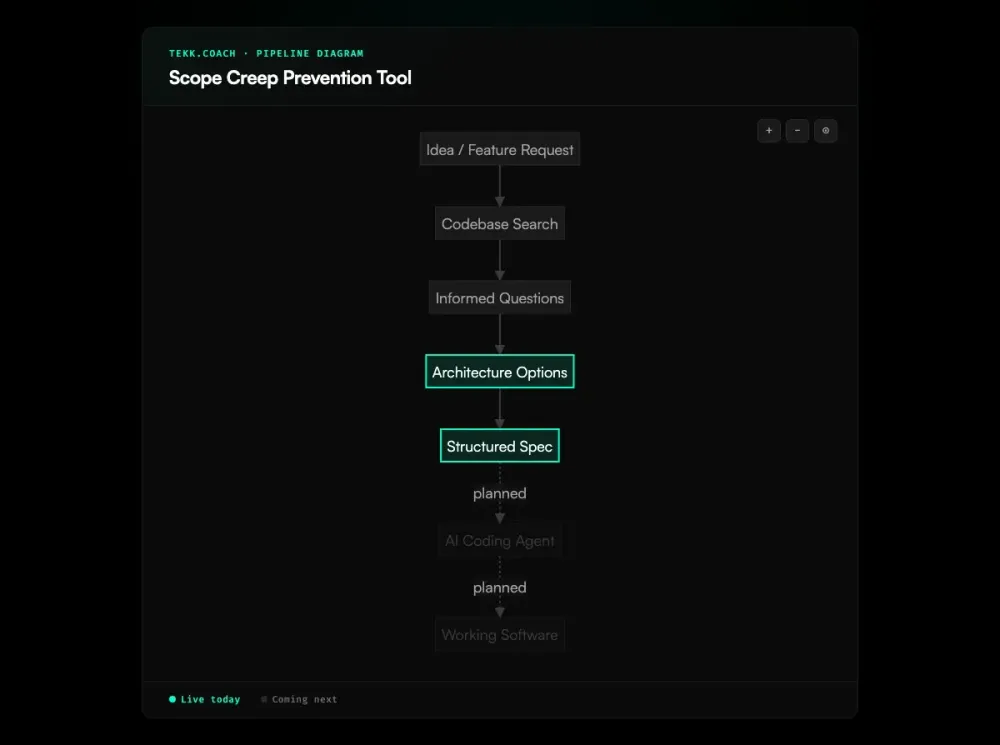
Tekk closes those gaps before any agent touches code. Every Tekk plan includes an explicit "Not Building" section — a list of what's out of scope, written with the same rigor as what's in scope. Agents respect boundaries. Tekk defines them. This scope discipline is built into the ai project planning layer before a single line of code runs.
[Try Tekk.coach Free →]
How Tekk Prevents Scope Creep
Most approaches to scope creep are reactive. You notice the build has gone sideways, you write up a change request, you have a conversation. By then the code exists and the damage is done. PMI's research on the top causes of scope creep consistently points to the same root: requirements that define what's being built but not what isn't.
Tekk is different. The "Not Building" section is a structural part of every plan — not a convention, not a guideline you can skip, not a blank text field waiting for someone to fill it in. Tekk's agent writes it. Before any code is written, you have an explicit record of what this task does not include.
This matters because AI coding agents fill gaps. Give an agent a spec with no boundaries and it will build past the edge every time — not maliciously, just literally. "Add user avatars" can become "add user avatars, refactor the user model, update the API, and add a storage layer" if the spec doesn't say otherwise. Tekk says otherwise.
The "Not Building" section is grounded in your actual codebase. Tekk reads your repo first — understanding your existing patterns, dependencies, and structure — so the scope boundaries reference real decisions in your code, not generic guardrails. When Tekk says "not building: new file upload infrastructure," it knows you already have one.
Key Benefits
Explicit "Not Building" in every plan Every plan Tekk generates includes a dedicated "Not Building" section. Not optional. Not a reminder. Written by the agent before anything is executed.
Scope defined before code is written The boundary is upstream of execution. Your coding agent — Cursor, Claude Code, Codex — gets a spec that says what it should do and what it should not touch. No ambiguity to fill with assumptions. This is the core promise of spec driven development: write the boundary before the agent runs.
Fewer runaway builds When scope is explicit, agents stay on task. You stop debugging builds that went further than you intended. One developer documented receiving 2,847 lines of AI-generated code when only about 40 were useful — a direct consequence of underspecified scope. Rework from overbuilt features drops because the overbuilding never happens.
No more negotiating what's "in scope" When a team member asks "shouldn't we also add X?" you have an answer: it's in the Not Building section. The conversation that used to eat 30 minutes now takes 30 seconds.
How It Works
Step 1: Connect your repo Tekk reads your codebase before asking a single question. It understands your languages, frameworks, existing patterns, and file structure. Supports GitHub, GitLab, and Bitbucket.
Step 2: Describe what you're building Write a task in plain language. No template required. "Add password reset flow" or "build a CSV export for the reports page" — whatever the feature is.
Step 3: Answer a few grounded questions Tekk asks 3–6 questions based on what it found in your code. Not generic questions — questions tied to your actual setup. What auth library are you using? What's the existing email service? These questions define the edges of the task.
Step 4: Get a complete plan with scope boundaries Tekk writes the full spec and streams it into a live document editor. The plan includes a TL;DR, a Building / Not Building section with explicit scope boundaries, subtasks with acceptance criteria and file references, assumptions with risk levels, and validation scenarios.
Step 5: Hand the spec to your coding agent Copy the plan to Cursor, Claude Code, or Codex. The agent has a spec that tells it exactly what to build — and exactly what to leave alone.
Who This Is For
Developers using AI coding agents You've watched Cursor or Claude Code do something you didn't ask for. A "small change" touched six files. A "simple feature" introduced a dependency you didn't want. You know the problem. The Not Building section is the fix.
Founders and solo builders You don't have a PM layer. You're speccing features yourself, handing them to an agent, and hoping the build stays on track. Tekk gives you the discipline without the overhead — a complete spec with clear scope in under ten minutes.
Project managers who've lived through "scope creep as a people problem" It isn't, actually. It's a spec problem. When the spec doesn't define what's out, everything's in by default. Tekk makes the out-of-scope explicit, so there's no room for interpretation. Teams running multiple agents simultaneously benefit most — ai agent orchestration at scale amplifies every spec gap.
What Is Scope Creep (and Why AI Makes It Worse)?
Scope creep is the gradual expansion of a project beyond its original boundaries — features added, requirements extended, deliverables quietly growing without a corresponding change to timeline or resources. PMI's Pulse of the Profession reports that 52% of projects experience it. The Standish Group's CHAOS research puts software-specific scope expansion at over 70%, with only 31% of projects succeeding on time, on budget, and on scope. The average cost overrun it causes: 27%.
The root cause, consistently, is the same: requirements define what's being built but not what isn't. When the spec says "add search to the dashboard," it's silent on whether that means basic text search, filtered search, saved searches, search analytics, and a new indexing layer. So teams build all of it, or they fight about which parts were meant.
AI coding agents make this significantly worse. Traditional scope creep happens in stakeholder meetings. With AI agents, it happens in milliseconds. The agent receives an ambiguous prompt and fills every undefined gap — because that's what agents do. "Vibe coding" — low-friction natural language prompting — accelerates this. You describe what you want in broad strokes, the agent treats silence as permission, and you come back to a build that went three features further than you intended. A 2025 survey of 18 CTOs found that 16 had experienced production disasters directly caused by AI-generated code. Ambiguous specs were a core contributing factor.
The fix isn't better agents. The fix is better specs — specifically, specs that define what's out of scope as explicitly as what's in. That's not a new idea — PMI's scope control framework has advocated for explicit boundaries for decades. It's just one that nobody enforces automatically. Until now.
Frequently Asked Questions
What is scope creep in software development?
Scope creep is when a project grows beyond its original requirements — new features get added, existing requirements expand, and the definition of "done" keeps moving. In software development, it's especially dangerous because complexity is invisible: a "small addition" can require rearchitecting an entire system. PMI data shows 52% of projects experience it, and it's responsible for an average 27% cost overrun.
How does AI cause scope creep?
AI coding agents follow instructions literally — including the gaps in those instructions. When a spec is ambiguous or incomplete, the agent fills in what it thinks is missing. It doesn't ask for clarification. It builds. "Add a profile page" might become "add a profile page, a settings drawer, an avatar upload, and a new user model field" because nothing in the spec said otherwise. Agents move fast, which means scope can expand faster than you can catch it.
What is a scope creep prevention tool?
A scope creep prevention tool is software that helps teams define and enforce project boundaries before work begins. Most existing tools detect scope creep during execution — flagging changes, scanning communications for scope signals, assessing the impact of new requests. Tekk takes a different approach: it defines scope boundaries during planning, before any code is written, so there's nothing to detect later.
How does Tekk's "Not Building" discipline work?
Every plan Tekk generates includes a "Not Building" section — a list of things explicitly out of scope for this task. The agent writes it based on the codebase, the task description, and the answers you gave during the planning session. It's a required part of every plan, not an optional field. Before your coding agent runs a single line of code, there's a written record of exactly what it should not do.
Can I use Tekk to prevent scope creep with Cursor or Claude Code?
Yes. Tekk produces structured plans that you hand directly to your coding agent. The plan includes the Not Building section, subtasks with acceptance criteria, and file references — so Cursor or Claude Code has explicit boundaries, not just a goal. Tekk works as the planning layer before agent execution, regardless of which agent you use.
Why is scope creep especially bad in AI-assisted development?
Speed. Traditional scope creep accumulates in meetings and Slack threads over days or weeks — slow enough that teams can catch and correct it. AI agents execute in minutes. By the time you review the diff, the agent has already built past the edge of what you intended. The faster the execution layer, the more critical it is to get the spec right before anything runs. That's exactly when Tekk operates.
Stop Scope Creep Before It Starts
Scope creep doesn't happen because your team is sloppy. It happens because the spec was silent on something, and silence gets filled — by agents, by assumptions, by the path of least resistance.
Tekk writes the Not Building section every time. Connect your repo, describe the feature, get a plan with clear boundaries. Your agents build what you meant, nothing more.
[Start Planning Free →]