
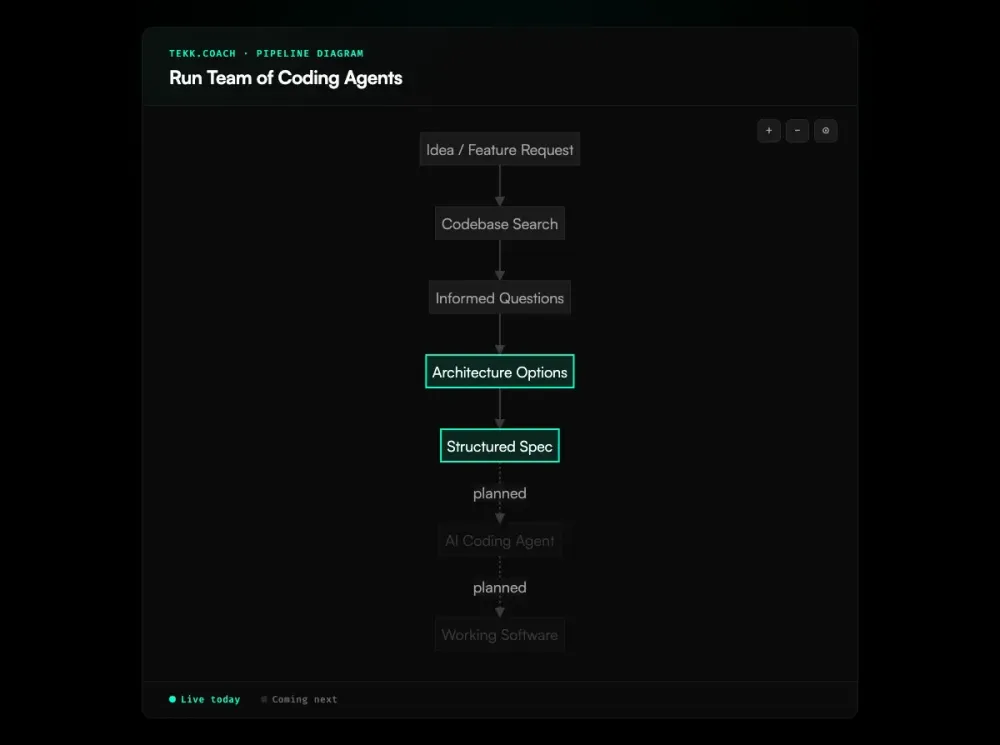
Running a team of coding agents without an orchestration layer means scattered specs, file conflicts, and agents doing duplicate work in different directions. Tekk.coach is the conductor: it reads your codebase, decomposes features into structured specs with clear task ownership, tracks everything on a kanban board, and dispatches to Cursor, Codex, Claude Code, and Gemini. Multi-agent execution dispatch is coming next. The planning and spec layer that makes it viable is live today.
[Try Tekk.coach Free →]
Key Benefits
One planning workspace for all your agents Whether you're using Cursor for editing, Claude Code for extension tasks, Codex for autonomous runs, or Gemini for design-first UI work — Tekk is the single place where you plan, spec, track, and coordinate. Every spec follows spec driven development principles so each agent gets a precise, codebase-grounded task. No more context scattered across multiple chat threads and markdown files.
Specs that prevent agent conflict Each subtask in a Tekk plan has explicit file references. Independent tasks — different files, no shared context — can run in parallel safely. Dependent tasks sequence correctly. The "Not Building" section stops scope creep before the agents start. You get the benefit of parallelism without the file conflict risk.
The right agent for each task Not all coding agents are equal for all tasks. Cursor handles iterative code editing. Codex handles longer autonomous runs. Claude Code extends via MCP tools for complex reasoning-heavy tasks. Gemini handles design-first UI specs before handing off to execution agents. Tekk routes tasks to the right agent based on task type.
Progress visibility across the team The kanban board gives you a unified view: what's planned, what each agent owns, what's in progress, what's done. When execution dispatch launches, each card shows real-time progress from the dispatched agent. No more checking five terminal windows.
Plans survive agent handoffs Each kanban card links back to the full planning session — the codebase context, the questions asked, the options considered, the spec written. When an agent finishes and you review the PR, you can trace every decision back to the plan. Nothing is lost in chat history.
How It Works
Step 1: Connect your repository Connect GitHub, GitLab, or Bitbucket. Tekk runs a full repository profile — languages, frameworks, services, packages, file structure — before asking any questions. It understands your codebase, not just your prompt.
Step 2: Create a task and describe the feature Open the kanban board, create a task, describe what you're building. Tekk reads the codebase and asks 3–6 informed questions grounded in what it found: "You're using Stripe's webhook system here — does this new billing feature use the same webhook handler or a new one?"
Step 3: Get architecturally distinct options For non-obvious features, Tekk presents 2–3 approaches with honest tradeoffs. You pick the direction that fits your constraints.
Step 4: Receive the full structured spec Tekk writes the complete plan, streamed into the task editor in real-time. Every plan includes: TL;DR, Building / Not Building scope boundaries, subtasks with acceptance criteria and file references, assumptions with risk levels, and validation scenarios. This is the spec your agents execute from.
Step 5: Edit and approve The task editor is a rich text document — edit it directly. Tighten scope, adjust subtask order, add constraints. Approve when it's right.
Step 6: Track on the kanban board The kanban board shows the full picture: To Do, In Progress, Done. Each card carries full metadata: type, priority, subtasks with dependencies and time estimates, and the link back to the planning session.
Step 7: [Coming next] Dispatch to your agent team Tekk decomposes the approved spec into parallel execution waves. Independent subtasks dispatch simultaneously. Related subtasks batch per agent. Cursor, Codex, Claude Code, Gemini — each gets the tasks it handles best. Real-time progress on the kanban board. One shared branch. One PR to review and merge.
Who This Is For
Developers who've outgrown single-agent sessions You're already using Cursor or Claude Code. You know what they can do. You're tired of one task at a time, one context window at a time. You want parallelism — and you want it to actually work, not just run three agents into each other.
Founders shipping with AI agents as the engineering team You're not managing a team of people — you're managing a team of agents. That's the same job: decompose the work, assign it, track progress, review output. Good ai project planning is what separates a team that ships from one that spins. Tekk is the system that makes that manageable without ceremony.
Product managers who need technically grounded specs You know what you want to build. You don't have time to write five detailed prompts for five parallel agents. Tekk reads the codebase and generates the specs — you just describe the feature and review the output.
What Does It Mean to Run a Team of Coding Agents?
Running a team of coding agents means coordinating multiple AI coding systems — Cursor, Claude Code, Codex, Gemini — working in parallel or sequence on a software project. Unlike a single interactive agent session, running a team implies orchestration: task decomposition, agent assignment, parallel dispatch, progress tracking, and output integration.
The bottleneck in 2026 isn't the agents. Cursor, Claude Code, Codex, and Gemini are all capable of producing high-quality code. The bottleneck is the coordination layer: decomposing features into independent, well-scoped tasks; giving each agent the codebase context it needs; tracking what's running and what's done; and collecting outputs into a coherent branch without conflicts.
Most teams are doing this manually: multiple terminal windows, copy-pasted specs, scattered progress tracking in markdown files or separate PM tools. Tekk replaces the manual coordination layer with a single workspace that handles planning, spec generation, task management, and agent dispatch.
Frequently Asked Questions
How do I run multiple coding agents in parallel without file conflicts?
The key is task decomposition with explicit file ownership. Before dispatching agents, you need subtasks that specify which files each agent touches — and those file sets should not overlap. Tasks with dependency relationships (one task's output feeds the next) must sequence, not parallelize. Tekk produces this structure automatically from your codebase and feature description, so each agent gets a scoped spec that defines its file territory.
What's the best way to orchestrate Cursor and Claude Code together?
They serve different strengths. Cursor handles iterative code editing and file modifications well through its Cloud Agents API. Claude Code extends via MCP tools for reasoning-heavy tasks that benefit from custom tooling. When they're running in parallel, the coordination requirement is the same: each needs a scoped, codebase-aware spec with clear task ownership. When Tekk's execution dispatch launches, it routes tasks to the right agent based on task type.
Which AI coding agent is best for which tasks?
Based on how these agents work in practice: Cursor is strongest for primary code execution — iterative editing, file modifications, pull request creation. Codex handles longer autonomous runs well. Claude Code extends via MCP for complex tasks that need custom tools or reasoning chains. Gemini handles design-first tasks effectively — UI/UX specs and component work — before handing off to execution agents. The right split depends on your stack and task types.
How many agents should I run in parallel?
The Claude Code documentation recommends 3–5 agents for most workflows. Beyond that, coordination overhead increases faster than parallelism benefit. More important than the number is the quality of task decomposition: 3 agents with well-scoped, codebase-grounded specs will produce better results than 10 agents with vague prompts. Each additional parallel agent multiplies the importance of spec quality.
Is Tekk's multi-agent execution dispatch live today?
Not yet. Multi-agent execution dispatch — dispatching approved subtasks to Cursor, Codex, Claude Code, and Gemini in parallel, with real-time kanban progress tracking — is coming next. The planning layer — codebase-first spec generation, structured subtask decomposition, kanban task management — is live today. The planning layer is where parallel agent workflows actually break down, so the current product addresses the core problem.
How does Tekk handle the merge and branch problem?
When execution dispatch launches, Tekk routes all agent output to a single shared feature branch. Agents get task-specific file assignments so they're not writing to the same files simultaneously. The final output is one PR for the full feature — not five separate PRs from five agents. This is coordinated at the spec level: task decomposition defines file ownership, which defines branch writing patterns.
Can I use Tekk's planning output with agents manually, before dispatch launches?
Yes. The structured spec Tekk produces — subtasks with acceptance criteria, file references, dependency order, scope limits — is designed to be used as spawn prompts for Claude Code agent teams, pasted into Cursor sessions, or given to any coding agent as a task description. The planning output is useful immediately, independent of the execution dispatch feature.
Ready to Try Tekk.coach?
Your agents are only as effective as the specs you give them. Tekk reads your codebase, decomposes your feature into a structured plan with clear task ownership and dependency mapping, and gives you the kanban board to track everything. Connect your repo and build your first agent-ready spec in minutes.
[Start Planning Free →]