
Claude Code is a great executor. It needs a great spec. Without structured input, it improvises — wrong files, scope that crept three features wide, code that technically runs but isn't what you meant. Tekk is the planning tool that gives Claude Code exactly what it needs before it touches a single file.
[Try Tekk.coach Free →]
How Tekk Works as a Planning Tool for Claude Code
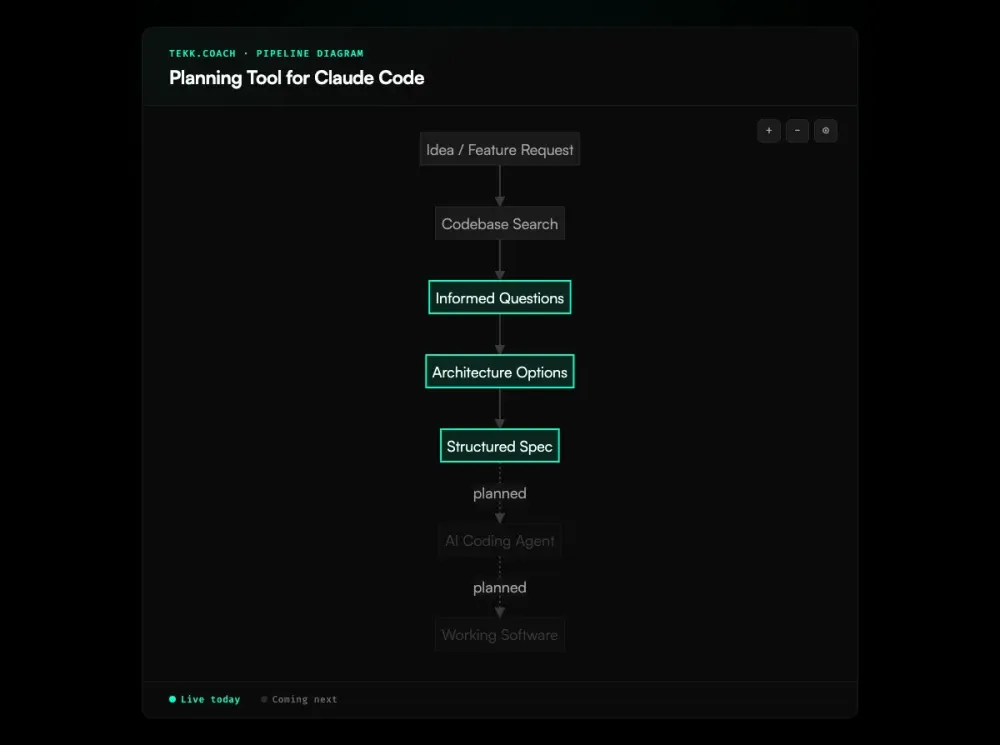
Tekk reads your codebase before asking you anything. Semantic search, file search, directory browsing, repository profiling — it works from your actual code, not a description of it. Then it asks 3–6 questions grounded in what it found. Not "can you describe your requirements?" — something closer to "you're using Drizzle ORM and your user table has no soft delete — should the plan add that, or scope it out?"
After you answer, Tekk surfaces 2–3 architectural options with honest tradeoffs. You pick one. The complete spec writes itself into a rich text editor in real time, and you get a document you can read, edit, and hand off.
That spec is what Claude Code executes against. File targets, acceptance criteria per subtask, explicit scope boundaries, assumptions with risk levels, validation scenarios. One document. No improvisation.
This is a different layer than CLAUDE.md. Your CLAUDE.md tells Claude Code about project conventions — coding style, architecture notes, existing patterns. That's project context. Tekk generates the feature spec — the thing that turns "add magic link auth" into something Claude Code can build correctly the first time.
Key Benefits
Structured specs Claude Code can execute Tekk outputs a complete spec: TL;DR, Building / Not Building, subtasks with acceptance criteria, file references, dependencies, and validation scenarios. Claude Code gets a working document, not a paragraph. This is spec driven development as a default workflow — the spec is the first artifact, not an afterthought.
Codebase-grounded — no hallucinated file paths Tekk reads your actual repository before generating anything. Every subtask, every file reference points to something real in your code. Specs built from memory lead to rework. Specs built from the codebase don't.
Explicit scope — Claude Code only builds what's in the spec Every plan has a "Not Building" section. Scope is locked before execution starts. When the boundaries are written into the spec, Claude Code can't drift into features you didn't ask for.
Acceptance criteria per subtask Each subtask defines what "done" means: a behavioral outcome, not a file change. Claude Code knows when it's finished. So do you.
How It Works
Step 1: Connect your repository Link your GitHub, GitLab, or Bitbucket repo via OAuth.
Step 2: Describe what you're building Create a task. Plain language. No format required — writing the spec is Tekk's job.
Step 3: Tekk reads your codebase Before generating anything, Tekk runs semantic search, file search, and directory analysis. It builds a picture of your stack, your patterns, what's already there.
Step 4: Tekk asks informed questions 3–6 questions, each grounded in what it found. These surface the decisions you'd otherwise make mid-execution, when changing direction is more expensive.
Step 5: Review your options Tekk presents 2–3 architectural approaches with real tradeoffs. You decide the direction before any code gets written.
Step 6: Get the structured spec The complete plan streams into the task editor — a rich text document you own and can edit. Scope, subtasks, acceptance criteria, file references, assumptions. Everything Claude Code needs.
Step 7: Execute with Claude Code (coming next) The MCP dispatch layer — sending the approved spec directly to Claude Code — is in development. Today, you copy the spec from Tekk and give it to Claude Code. The direct integration is coming next.
Who This Is For
Claude Code users who want consistent, predictable results You've run Claude Code enough to know: output quality tracks directly with input quality. You're done with the loop — vague prompt, Claude guesses, rework, try again. You want the spec to be right before execution starts.
Developers building outside their expertise You're integrating Stripe. Setting up an AI agent. Wiring a data pipeline in a framework you've never touched. Tekk's web research runs during planning — it finds current best practices, evaluates approaches, and folds that into your spec. You don't do the research. The spec reflects what's current, not what you half-remember.
Solo founders and small teams without a senior engineer No architect on the team means no one to catch your blind spots before code gets written. Tekk plays that role: it interrogates your assumptions, surfaces complexity you didn't see, and tells you what to cut. You get an architectural opinion before you've committed to the wrong approach. Teams ready to scale can layer in ai agent orchestration to run multiple Claude Code instances in parallel from the same structured spec.
What Makes a Good Planning Tool for Claude Code?
Claude Code is an execution engine. Give it a great spec and it ships. Give it a vague one and it improvises — which is where rework comes from.
A solid planning tool for Claude Code does three things: reads your codebase so the spec references real files and real patterns, forces scope definition so Claude Code knows what's out of scope as clearly as what's in, and breaks the work into subtasks with acceptance criteria so there's a concrete sequence to execute against, not a wall of instructions. This is what structured ai project planning looks like in practice — every feature gets a written plan before Claude Code sees it.
CLAUDE.md alone doesn't get you there for complex features. It's valuable — your linting rules, your architecture decisions, your preferred patterns — but it's project context, not a feature spec. It doesn't scope the work, decompose it into subtasks, or define what "done" looks like per step. A well-maintained CLAUDE.md paired with a vague prompt still leaves Claude Code room to improvise. That's the gap.
The DIY path — write a plan.md, annotate it, iterate until it's right — works, but it's slow, and it breaks down when you're outside your area of expertise. Tekk does the same thing faster, with your actual codebase as the foundation, and without requiring you to already know what a good spec looks like in the domain you're building in.
Frequently Asked Questions
What is the best planning tool for Claude Code?
The best planning tool for Claude Code reads your actual codebase, forces explicit scope definition, and produces structured subtasks with acceptance criteria — not a chat-level plan. Most developers today use Claude Code's built-in Plan Mode, hand-written plan.md files, or both. Tekk.coach is a dedicated planning layer that produces codebase-grounded specs in a persistent, editable document.
How does Tekk work as a planning tool for Claude Code?
Tekk connects to your repository and reads the codebase before generating anything. It asks 3–6 informed questions based on what it found, presents architectural options with tradeoffs, then generates a structured spec: TL;DR, Building / Not Building, subtasks with acceptance criteria, file references, assumptions, and validation scenarios. That's the document Claude Code executes against.
Is CLAUDE.md a planning tool?
No — CLAUDE.md is project context, not a feature spec. It tells Claude Code about conventions, patterns, and constraints at the project level. That's useful. But it doesn't scope a specific feature, decompose the work into subtasks, or define what "done" means per step. For simple one-off tasks, CLAUDE.md plus a short prompt is fine. For anything with multiple subtasks and real architectural decisions, you need a proper spec. That's what Tekk generates.
How is Tekk different from writing specs manually for Claude Code?
Manual spec writing — draft a plan.md, annotate it, iterate — is the right instinct and it works. Tekk does the same thing faster and with your codebase in the loop. The key difference is the search step: Tekk reads your repository before writing a word, so file references and subtask scope reflect your actual code structure. It also surfaces options you might not have considered, especially in domains where you don't have deep expertise.
Does Tekk integrate with Claude Code directly?
The direct MCP integration — dispatching specs from Tekk to Claude Code automatically — is coming next. Today, you generate the spec in Tekk and hand it to Claude Code yourself. The spec is built for that handoff: it has everything Claude Code needs to start executing without asking clarifying questions.
What does Tekk generate that Claude Code can execute?
A structured spec with five parts: a TL;DR (what's being built and why), a Building / Not Building section (explicit scope), subtasks (behavioral slices, each with acceptance criteria, file references, and dependencies), assumptions (with risk levels), and validation scenarios (end-to-end test cases). Claude Code works well against this because the scope is clear, the targets are real, and every subtask has a concrete done condition.
Start Planning Free →
Claude Code does its best work when the spec is solid. Connect your repo, describe what you're building, and get a codebase-grounded spec in minutes.
[Start Planning Free →]