
Coding agents flail when they execute without a plan. You type a sentence, the agent does something, and now you're debugging code that almost works. Tekk fixes this at the source.
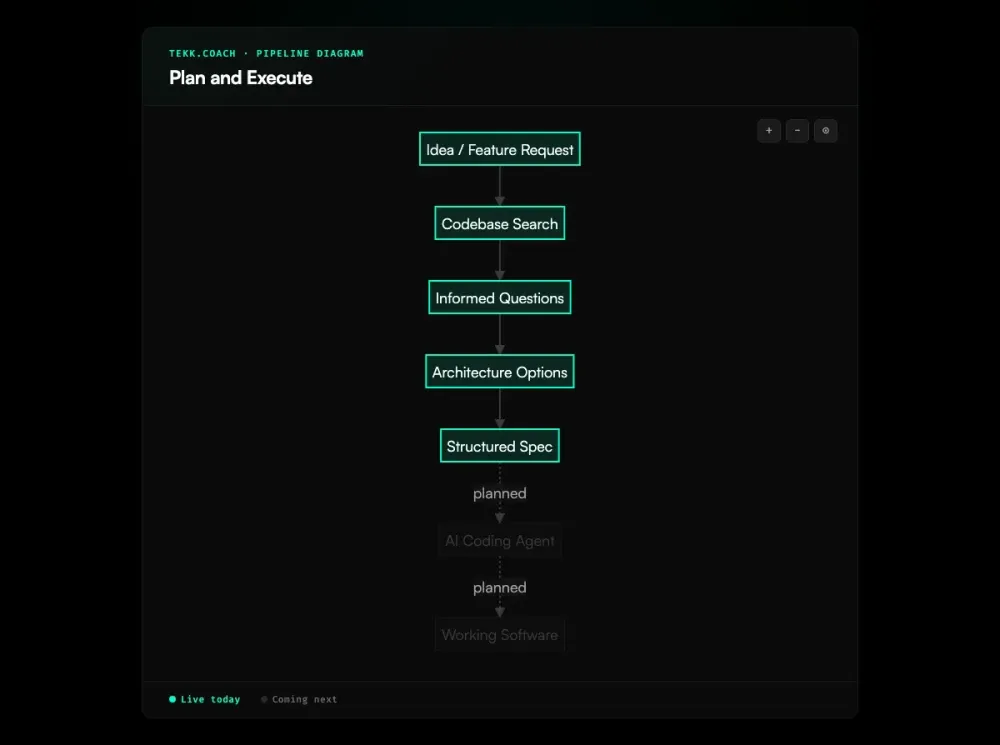
Connect your repo. Describe what you're building. Tekk reads your actual codebase, asks informed questions, and generates a complete structured spec before a single line of code runs. Then you hand that spec to Cursor, Claude Code, or Codex, and they execute against something real.
Plan first. Execute once. Skip the rework.
[Try Tekk.coach Free →]
How Tekk.coach Does Plan and Execute
Most developers give their coding agent a sentence or two. The agent executes fast — and wrong. It doesn't know your conventions, which files to touch, or which architectural decisions you've already made. The output looks plausible for about five minutes.
Tekk is the plan half of plan and execute. Before anything runs, the agent reads your repository: semantic search, file search, structural analysis. It finds your patterns, your dependencies, your actual code. Then it asks 3–6 questions grounded in what it found. Not boilerplate. Questions about the tradeoffs in your specific system.
Then it writes the spec. Not a chat message you paste into Cursor. A document — streamed in real-time into an editable editor — with scope boundaries, subtasks tied to specific files, acceptance criteria, and a "Not Building" section that stops scope creep before it starts.
You review it. You edit it. Then you take it to your coding agent.
That spec is the difference between an agent that ships and one that flails.
Execution dispatch — where Tekk hands the spec directly to Cursor, Claude Code, or Codex — is coming next. The planning workflow is live today.
Key Benefits
Your coding agent gets a real spec, not a paragraph. Most agent failures trace back to weak input. As JetBrains notes, language models are excellent at pattern completion but need structured context — a detailed spec is exactly that context. Tekk produces a structured plan with file targets, acceptance criteria per subtask, and explicit scope. Your agent has what it needs to execute correctly instead of guessing.
The plan is grounded in your actual codebase. Tekk reads your repo before generating anything. Questions, options, and the plan itself reference your specific files and patterns — not what a generic version of your stack probably looks like.
Scope is defined before anyone writes code. Every Tekk plan has an explicit "Not Building" section. You know what's in and what's out before execution starts. Scope creep dies here.
The spec lives in a persistent workspace, not a chat thread. Tekk is an AI task planner for developers, not a chat interface. Each plan streams into a real editable document. Task cards on the kanban board link back to the full planning session. Context doesn't evaporate between sessions. For teams planning across multiple features or a full roadmap, ai project planning keeps the big picture organized alongside the feature-level specs.
How It Works
1. Connect your repository Link your GitHub, GitLab, or Bitbucket repo. This is what Tekk reads before it does anything else.
2. Describe what you're building Open a task. Describe the feature in plain language. A sentence or a paragraph — no special format required.
3. Agent reads your codebase Before asking a single question, the agent runs semantic search, file search, and structural analysis across your repo. It finds the relevant patterns, dependencies, and files. It doesn't ask questions your code already answers.
4. Informed questions The agent asks 3–6 questions grounded in what it found — architectural tradeoffs, edge cases, constraints that actually matter for your setup.
5. Options (when there's a real choice) If there are meaningful architectural paths, the agent presents 2–3 approaches with honest tradeoffs. You pick a direction. If the path is clear, this step is skipped.
6. Agent writes the spec The complete plan streams in real-time into your task editor: TL;DR, Building / Not Building scope, subtasks with acceptance criteria and file references, assumptions with risk levels, validation scenarios. This is the document your coding agent executes against.
7. Execute with your coding agent Take the spec to Cursor, Claude Code, or Codex. They get a prompt built from your actual codebase. Your plan is done. Execution is their job. Teams running multiple agents on the same spec can layer in ai agent orchestration to handle dependency-aware parallel dispatch automatically.
Who This Is For
Developers using Cursor, Claude Code, or Codex who are tired of rework. You've been burned by agents executing half-understood instructions. You've debugged plausible-looking code that turned out to be wrong in ways that took an hour to trace. You want to stop that.
Solo founders and small teams without dedicated architects. You're touching domains where you don't have deep expertise — auth systems, data pipelines, payment integrations. Tekk fills the knowledge gap during planning, not after you've already built the wrong thing.
Small teams (1–10 people) who need structured specs but don't want the overhead of PRDs, alignment meetings, and backlog grooming. Connect a repo, describe the feature, get a spec. That's the whole process.
Tekk is not the right fit if you're a senior architect who already writes airtight specs from memory — you don't need the planning layer. Or if you need enterprise workflow governance: approval chains, custom Jira-style process configuration. Tekk is opinionated and lightweight by design.
What Is Plan-and-Execute?
Plan-and-execute is a two-phase approach to AI-assisted software development. Phase one: produce a complete, written plan. Phase two: execute it. The planning phase is separate — it reasons about the codebase without touching it. Only when the plan is reviewed and approved does any code run.
This isn't a new idea in software engineering. Design-before-implementation has been standard advice for decades. What AI coding agents changed is the cost of skipping it. Give Cursor or Claude Code a one-sentence prompt and they execute immediately, without understanding your conventions, your constraints, or the decisions you haven't made yet. The output looks right and then falls apart in ways that waste hours.
The practice got formal names in 2025. ThoughtWorks called spec driven development "one of the most important practices to emerge in 2025." AWS Kiro built an explicit Specify → Plan → Execute flow into their IDE. GitHub released an open-source Spec Kit. Traycer staked out "spec-first development" as their core phrase. Plan first development started showing up across developer blogs as people documented what was actually working for them.
What all of these have in common: the spec is the first thing you build with AI. Not the code. The spec IS the first artifact.
FAQ
What is plan-and-execute in AI coding?
It's a two-phase workflow for building software with AI coding agents. First, produce a structured spec. Then, execute it. The split matters because agents are fast but reason poorly without context. A spec with scope boundaries, file targets, and acceptance criteria gives the agent something concrete to work from instead of something to interpret.
How does plan first development work?
You start by building the plan with AI before writing a single line of implementation code. The AI reads your codebase, asks questions about the real tradeoffs in your system, and generates a structured spec. That spec — with subtasks, file references, and acceptance criteria — is what you give your coding agent. First the plan, then the code.
What is spec-first development?
Spec-first development (the phrase used by Traycer and popularized alongside Kiro's Specify → Plan → Execute workflow) means the specification is the first artifact you and the AI produce together. You don't start coding until you have a written spec. It's the same idea as plan first development, just named differently by different tools.
What is the best AI task planner for developers?
That depends on your workflow. If you're already using a coding agent like Cursor, Claude Code, or Codex and want codebase-grounded specs — not just a text field to write tasks — Tekk.coach is built for that. It reads your repo, asks informed questions, and produces structured specs with file targets and acceptance criteria. Not a generic chat interface.
What's the difference between plan and execute vs just prompting an AI?
A prompt is a sentence. A plan is a document. When you hand a coding agent a one-sentence prompt, it makes assumptions about your codebase, conventions, and constraints — and frequently gets them wrong. A plan with explicit scope, file references, and acceptance criteria per subtask leaves a lot less room for the agent to go sideways.
Does Tekk.coach support plan execute with Claude Code?
Yes. Connect your repo to Tekk, describe the feature, and Tekk generates the spec against your actual codebase. Then take that spec to Claude Code as context. Claude Code is strong at deep reasoning and architectural changes — what it doesn't have going in is your codebase's full context. That's what Tekk provides. The two tools are sequential, not competing.
How does plan-and-execute prevent rework?
Rework happens when an agent executes against a vague or wrong spec. When the plan has explicit scope boundaries (what's in, what's out), subtasks with concrete acceptance criteria, and file references grounded in your actual codebase, the agent has less room to produce something you didn't want. Less ambiguity going in means less debugging coming out. The plan is the thing that makes execution reliable.
Start Planning Free
Your coding agent is capable. The bottleneck is what you're handing it.
Connect your repo. Describe the problem. Get a spec your agent can actually execute against.
[Start Planning Free →]