
Your spec is in a chat thread. You can't edit it, can't search it, and you lose it when the window closes.
Tekk puts the spec somewhere that actually works. When you plan a feature, the plan streams in real-time into a BlockNote rich text editor — not a chat response. It's stored there. Searchable. Editable. The document your whole build runs from.
[Try Tekk.coach Free →]
How Tekk Does Living Specifications
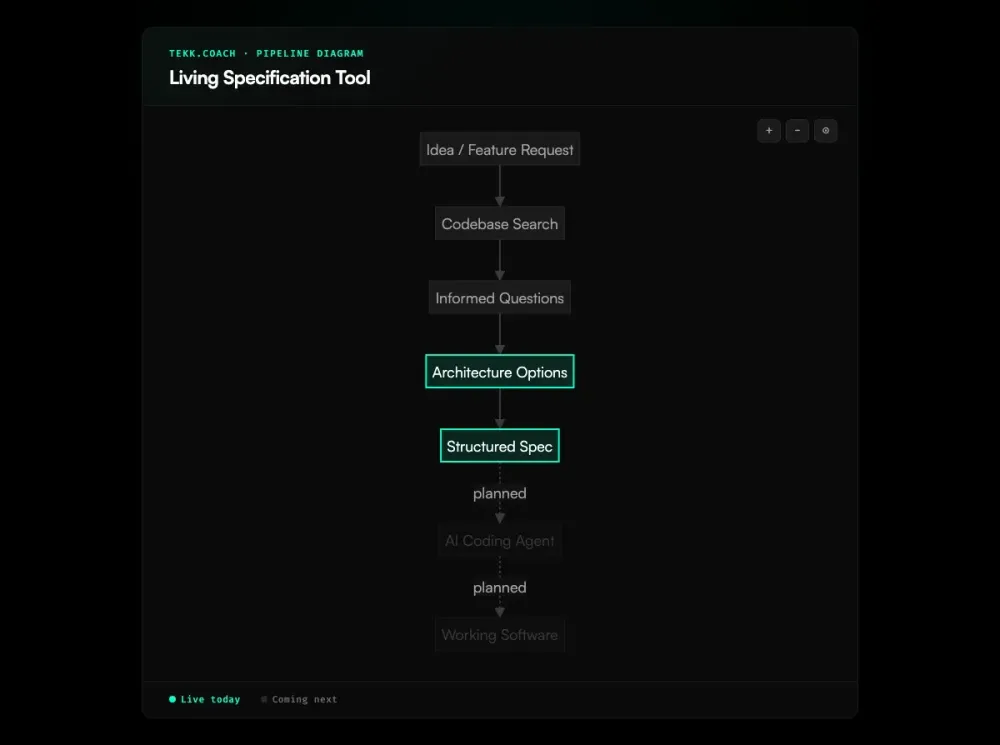
When you describe a feature in Tekk, the agent reads your codebase first — semantic search, file search, repo profiling across GitHub, GitLab, and Bitbucket. It asks 3-6 questions based on what it found in your code. Then it writes the spec.
That spec streams into a BlockNote editor in real-time. Not a chat window. When generation finishes, you have a structured, editable document in your Tekk workspace.
Every Tekk spec has the same enforced structure. TL;DR — what you're building and why. Building / Not Building — explicit scope boundaries so nothing drifts. Subtasks — behavioral slices with acceptance criteria, file references, and dependency order. Assumptions — with risk levels. Validation scenarios — end-to-end tests you can hand to a QA or a coding agent.
Change the scope, adjust acceptance criteria, cut a subtask — right there in the editor. The spec stays in your workspace, linked to its kanban card, searchable alongside every other spec you've built. It doesn't disappear when you close a tab.
That's what a living specification tool actually means: a document you work from, not a message you screenshot.
Key Benefits
The spec is the output, not an export. Most AI planning tools produce a chat message. You copy it into Notion or a markdown file, and it starts going stale immediately. Tekk generates the spec directly into an editor. No copy-paste step.
Edit it after generation. Tekk writing the spec is the starting point. Once it's done, you have a full BlockNote editor to refine it — cut scope, add context, adjust acceptance criteria. No re-prompting. When you're running multiple agents against the same spec, ai agent orchestration coordinates the execution so each agent works from the same structured document.
Stored and searchable across every session. Close the tab, come back Tuesday — it's still there. Search across all your specs by feature, keyword, or file reference. Your planning history is an asset, not a chat log.
Structure you didn't have to write. TL;DR, scope boundaries, subtasks with acceptance criteria, assumptions with risk levels, validation scenarios. Every time. The agent generates this because it read your codebase, not because you filled in a template.
How It Works
Step 1: Connect your repo. Link GitHub, GitLab, or Bitbucket. Tekk reads the codebase before asking a single question. Languages, frameworks, services, file structure — it profiles the repo so every question and plan is grounded in your actual code.
Step 2: Describe what you're building. A rough description is fine — "add Stripe subscriptions" or "build a CSV export." Tekk will ask the questions your description doesn't answer.
Step 3: Answer 3-6 informed questions. The agent asks questions based on what it found in your repo. Not "what's your tech stack?" — it already knows. More like: "your current auth model uses JWTs — do you want subscription state checked at the middleware layer or per-endpoint?"
Step 4: The spec streams into the editor. The plan generates in real-time into BlockNote. You watch the TL;DR, scope sections, subtasks, and validation scenarios appear. When it finishes, you have a complete living specification ready to edit.
Step 5: Refine, reference, build. Edit directly in the editor. The spec is linked to a kanban card and stays in your workspace — ready to reference when you or your coding agent picks up the work.
Who This Is For
Developers building with AI coding agents. If you're using Cursor, Claude Code, or Codex, your agent's output quality depends directly on your prompt quality. A vague description produces bad code. A structured spec produces working code. Tekk is where you build that spec — grounded in your actual codebase, not generic boilerplate.
Solo founders and small teams without an architect. You're planning in your head and executing through a combination of chat, markdown files, and memory. Tekk gives you one place where every feature has a real spec — fast to write, stored cleanly, yours to edit. For teams that need a higher-level product requirements document before drilling into implementation, an ai prd generator can help bridge the gap between product intent and the feature-level spec.
Anyone who copy-pastes from a chat AI into Notion. That's the dominant AI planning workflow right now, and it barely works. The spec goes stale the moment it lands in Notion. Tekk cuts out the copy-paste step and gives the spec a structure that holds up through the build.
What Is a Living Specification?
A living specification stays useful throughout the development cycle — not just at the moment it's written. The term draws a contrast with two failure modes developers know well: the static doc (written before development, never updated, eventually ignored) and the chat-thread plan (no structure, no persistence, gone when the session closes).
The concept goes back to the Specification by Example movement in agile development — the idea that requirements expressed as concrete, testable examples stay honest because they're tied to what the system actually does. In the context of AI-assisted development, it's taken on a second meaning: a spec generated by AI that lives natively as a document, not exported from a chat log. This is what spec driven development looks like as a persistent workflow — not a one-time artifact, but a document that evolves with the build.
The pressure to solve this is real. AI coding agents are everywhere in 2025-2026, but most of them run on bad prompts — a paragraph from a developer who didn't have time to spec properly. Tools like AWS Kiro, GitHub Spec Kit, and SpecTBD are all attacking parts of this problem. None of them fully solves the combination of AI-generated + structured + editable + persistent that a living specification tool requires. Tekk does.
Frequently Asked Questions
What is a living specification tool?
A living specification tool generates structured software specifications and stores them as persistent, editable documents — not chat messages or exported text. "Living" means the spec stays useful through the development cycle: it gets edited, referenced, and refined as the build progresses, rather than going stale the moment it leaves the AI.
How is Tekk's living spec different from a ChatGPT spec?
ChatGPT produces a chat message. You can copy it somewhere, but ChatGPT doesn't know your codebase, doesn't enforce a spec format, and stores nothing. Tekk reads your actual repo before generating anything, produces a spec with required sections (TL;DR, scope, subtasks, acceptance criteria, assumptions, validation), and stores it in a BlockNote editor in your workspace. The spec is there next week. The ChatGPT message is gone when the session closes.
What does Tekk's specification format include?
Every Tekk spec has: a TL;DR (what you're building and why), a Building / Not Building section (explicit scope boundaries), subtasks (behavioral slices with acceptance criteria, file references, and dependency order), assumptions (with risk levels and consequences), and validation scenarios (end-to-end test cases). This isn't a template you fill in — it's what the agent generates every time, based on your codebase.
Can I edit the spec after it's generated?
Yes. The spec streams into a BlockNote rich text editor and stays there as an editable document. Change scope, adjust acceptance criteria, cut subtasks, add context — no re-prompting the agent. The editor is the working document.
Where are Tekk specs stored?
Specs live in your Tekk workspace, linked to their kanban cards. They persist across sessions — closing a tab or coming back days later loses nothing. Every spec is searchable by feature, keyword, or file reference.
How is a living specification different from a PRD?
A PRD is typically long, written before development, and rarely touched after. A living specification is built to be used during the build — shorter, scoped to a single feature, structured around implementation concerns (subtasks with file references, acceptance criteria, scope boundaries), and updated as the work progresses. Tekk generates a living spec, not a PRD: one feature, grounded in your actual code, built to be edited as you ship.
Start Planning Free
Your next feature needs a spec that holds up through the build. Connect your repo, describe what you're building, and Tekk writes the living specification into an editor — structured, stored, and ready to work from.
[Start Planning Free →]