
TL;DR
Your kanban board is full of ticket titles. Nobody remembers what "Refactor auth module" actually means two weeks later. Tekk.coach fixes that. Each card links to a full AI planning session that read your codebase before writing anything. You get context, scope, subtasks, file references — not just a sticky note. Start free, no setup required.
[Try Tekk.coach Free →]
How Tekk.coach Does Kanban
Most kanban board tools give you columns and cards. Tekk does too — To Do, In Progress, Done. Three columns, drag and drop. Simple on purpose.
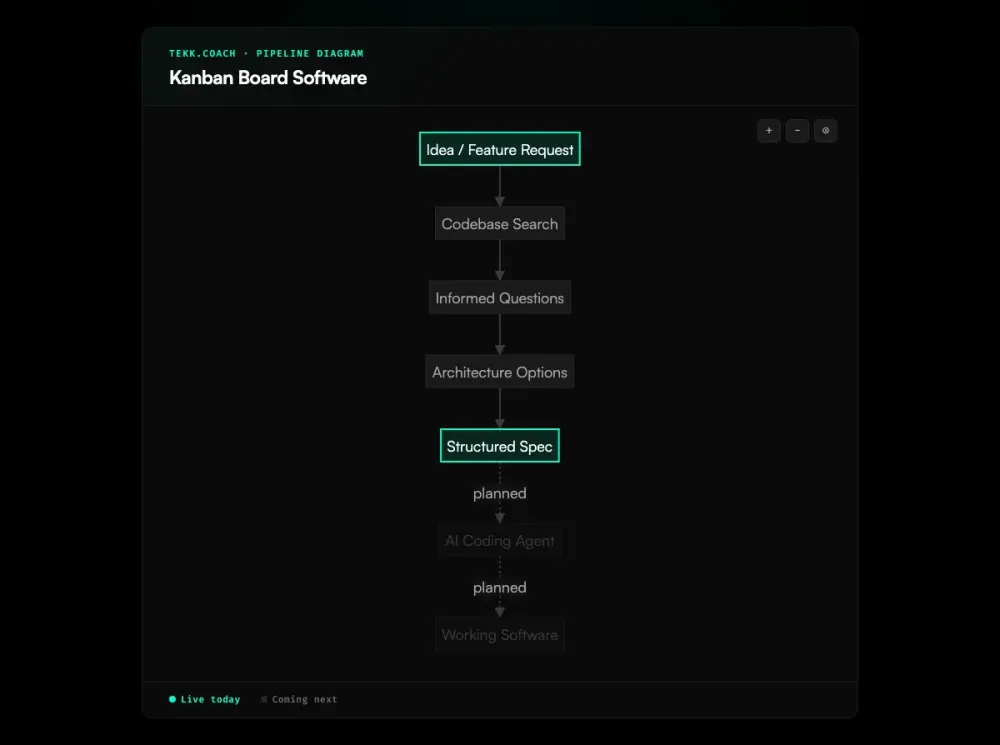
The difference is what's inside each card. Before Tekk's AI writes a plan, it connects to your GitHub, GitLab, or Bitbucket repo via OAuth and reads your codebase. Semantic search, file search, regex, directory browsing, repo profiling — it builds an actual picture of your project before suggesting anything. Then it asks you clarifying questions. Then it writes a spec.
That spec streams into a rich text editor as a living document. Not a chat transcript. Not a locked artifact. An editable plan that includes a TL;DR, explicit scope (what's being built and what's not), subtasks with acceptance criteria tied to real files in your repo, assumptions with risk levels, and validation scenarios. This is spec driven development applied to every card on your board. This is what lives inside a Tekk kanban card.
When you reopen a card three weeks later, you don't have to reconstruct your thinking from a ticket title. The plan is there. When you hand a task to an AI coding agent — Cursor, Claude Code, Codex — the context is there too.
Key Benefits
Context that doesn't disappear. Every card holds the full reasoning behind a task. No more reconstructing decisions from memory or Slack threads.
Codebase-aware specs. The AI doesn't plan in a vacuum. It reads your repo, knows your file structure, and writes subtasks that reference actual files. Generic advice is not an option.
No ceremony. No sprint planning, no backlog grooming, no custom field configuration, no approval chains. 76% of teams that use Kanban rate it more effective than other methods. Open a task, get a plan.
Works with your AI coding tools. If you're building with Cursor, Claude Code, Codex, or Gemini, Tekk is the planning layer that gives those tools real context before they touch your code.
Free to start. No credit card, no seat minimums. Build your first spec in minutes.
How It Works
Connect your repo. Link GitHub, GitLab, or Bitbucket via OAuth. Tekk indexes your codebase immediately.
Create a card. Add a task to your kanban board — any technical intention works. "Add rate limiting to the API." "Migrate from REST to tRPC." Whatever you're building next.
Run the AI planning session. Tekk's multi-turn workflow: searches your codebase, asks clarifying questions, presents options, then writes the full spec.
Get a complete plan. TL;DR, build/no-build scope, subtasks with acceptance criteria and file references, assumptions with risk ratings, validation scenarios. The plan gives you the context that standard kanban metrics like cycle time and throughput can't capture on their own. For teams managing multiple planned features, ai project planning keeps everything structured across the full roadmap.
Move the card. Work through your kanban board with actual specs behind every column. Or pass the plan to your AI coding agent and let it execute with real context.
Who This Is For
Solo founders and indie builders. You're the architect, the PM, and the developer. You don't have a team to rubber-duck with. Tekk is the thinking partner that knows your codebase before it opens its mouth.
Small teams building with AI coding agents. If your stack includes Cursor, Claude Code, or Codex, you know the problem: the agent writes code, but the planning context lives in your head. Tekk closes that loop. Each card is a brief your AI agent can actually use.
Developers who are done with Jira. You don't need sprint velocity tracking, custom workflows, or approval chains. 56% of Agile teams already use Kanban precisely because it strips away that ceremony. You need to know what to build, why it matters, and what files to touch. Tekk gives you that without the overhead.
Not for: Enterprise teams that need process governance, custom field configurations, approval workflows, or team collaboration features like comments and notifications. Tekk is a planning tool, not a project management suite. Teams that need deeper queue management alongside their board should also look at the backlog management tool for prioritizing what gets planned next.
What Is Kanban Board Software?
Kanban is a visual workflow method invented at Toyota in the late 1940s. Taiichi Ohno, then a machine shop manager, studied how supermarkets restocked shelves and adapted that pull-based logic into a card-based system for tracking work through stages — the same logic behind every kanban board tool in use today.
In software, a kanban board is a set of columns (typically To Do, In Progress, Done) and cards (individual tasks). Teams move cards left to right as work progresses. The key practice: WIP (work-in-progress) limits. Cap how many cards can be in any column at once, and you force work to finish before new work starts. Teams that enforce WIP limits improve delivery times by up to 37%. That simple constraint reduces context-switching and surfaces bottlenecks.
Kanban software ranges from dead-simple (Trello) to enterprise-grade (Jira, Businessmap). Most tools now include AI features: auto-prioritization, bottleneck detection, workload balancing, board generation from documents. What almost none of them do: connect the card to your actual codebase. Tekk.coach was built for that specific gap — codebase-aware AI planning, visualized in a kanban board that stays out of your way.
Frequently Asked Questions
What is kanban board software? Kanban board software is a visual project management tool that uses columns and cards to track work through stages of completion. Cards represent tasks; columns represent workflow stages (To Do, In Progress, Done). Teams move cards as work progresses. The method originated in manufacturing and is now used across software development, marketing, operations, and more.
How is Tekk.coach different from other kanban board tools? Most kanban software tracks what you're doing. Tekk.coach tracks what you've planned and why. Each card links to an AI planning session that read your actual codebase before generating a spec. The result: cards with real context — scope, file references, subtasks with acceptance criteria — not just ticket titles.
Is Tekk.coach a full kanban project management tool? No. Tekk's kanban board is intentionally lightweight — three columns, drag and drop, card priorities and subtask lists. It's built for individual developers and small teams, not for teams that need sprint tracking, custom workflows, approval chains, or portfolio reporting. If you need all that, Jira or Linear will serve you better.
Does Tekk work as an ai kanban board? Yes. The AI is not just layered on top — it's central to how cards work. Before generating a plan, Tekk's agent runs semantic search, file search, and regex across your codebase to understand your project. The resulting plan is written into the card as an editable document. This is different from AI features that auto-prioritize tasks or suggest workflow templates.
What coding tools does Tekk work with? Tekk.coach is designed to work alongside Cursor, Claude Code, Codex, and Gemini. Plans include file references and acceptance criteria formatted so AI coding agents can pick them up and execute with real context.
Which repos does Tekk connect to? GitHub, GitLab, and Bitbucket — all via OAuth. Tekk reads your codebase to inform planning. It does not write code or modify your repo.
Is Tekk free to use? Yes, free to start. No credit card required.
What is the difference between Tekk and Trello or Linear? Trello and Linear are task-tracking tools. Tekk is a spec-driven development platform. The kanban board in Tekk surfaces AI-generated plans — not just titles. If your team needs comments, docs, notifications, or integrations with non-technical workflows, Trello or Linear are better fits. If you're a developer who wants codebase-aware planning attached to every task, Tekk is built for that.
Stop losing context between planning and building. Tekk.coach keeps the spec inside the card, grounded in your actual codebase. Start free — no setup, no sprint configuration, no overhead.
[Start Planning Free →]