
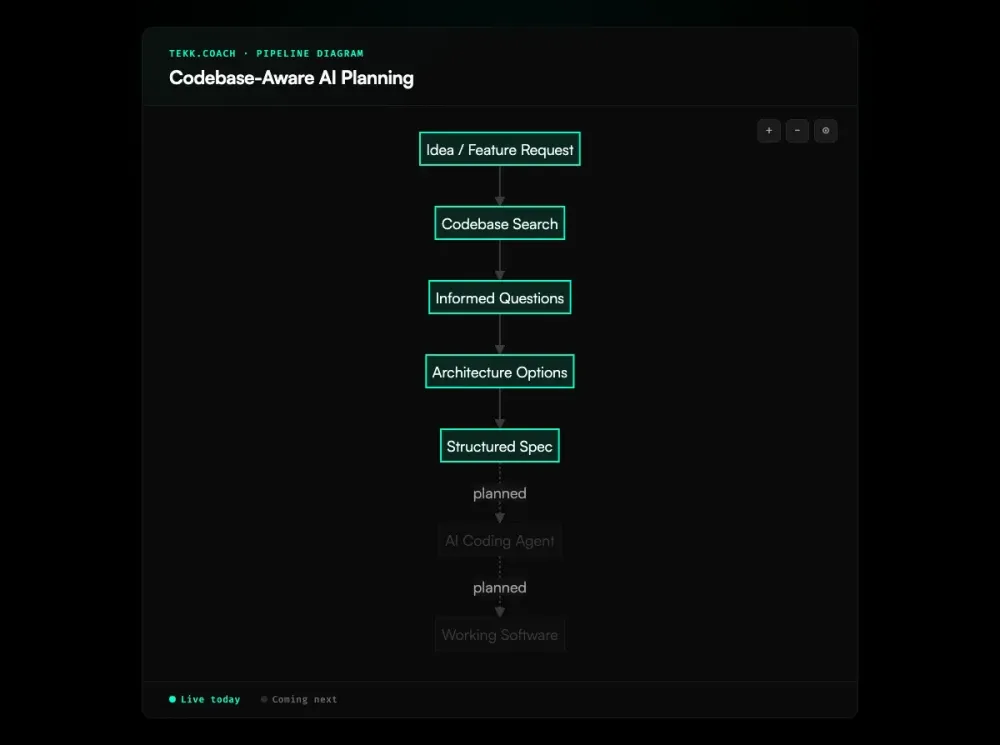
AI planning tools that don't read your code give you generic plans. They ask questions the code already answers. They suggest patterns your stack doesn't use. They miss the file that everything depends on.
Tekk reads your actual repo — GitHub, GitLab, or Bitbucket — before generating anything. Semantic search, embeddings, file search, regex search, directory browsing, repo profiling. Every question, every option, every spec is grounded in what's actually in your code. This is what ai project planning looks like when the AI actually knows your codebase first.
How Tekk Does Codebase-Aware Planning
The first thing Tekk does when you open a planning session isn't ask you a question. It reads your codebase.
Tekk connects to your repository — GitHub, GitLab, or Bitbucket — and indexes it using multiple search strategies in combination. Semantic search via embeddings finds code that's conceptually related to what you're building, even when the exact terms don't match. File search and regex search handle precise lookups: find the auth middleware, find every route that touches payments, find all uses of a specific interface. Directory browsing gives the agent a structural map of how your code is organized. Repository profiling detects your languages, frameworks, services, and package dependencies automatically.
The result is a full picture of your codebase before the first question is asked. When Tekk asks "Are you using soft deletes or hard deletes in this service?" — it's because it found your database models. When it says "You already have a webhook handler in /src/integrations/stripe.ts" — it found it. These aren't generated observations. They're references to files in your repo.
This is what makes codebase-aware planning different from pasting code into a chat window. Pasting is manual, lossy, and resets every session. Tekk's codebase search is persistent, multi-turn, and covers your entire repo — not the snippet you remembered to paste.
Every plan Tekk generates includes file references in the subtasks. Your coding agent — Cursor, Codex, Claude Code — knows exactly which files to open, which functions to modify, which tests to update. No guessing. No wrong files.
Key Benefits
Plans grounded in actual code, not assumptions Tekk reads your repo before asking a single question. The spec it produces references your actual files, patterns, and dependencies — not boilerplate that fits some hypothetical project.
No more hallucinated suggestions AI tools that don't know your codebase invent things: packages that don't exist, functions you don't have, patterns your stack doesn't use. Tekk's codebase analysis closes that gap. If it references something, it found it in your repo.
Questions based on what's in the code Tekk asks 3–6 targeted questions grounded in what it found during codebase search. No generic "What database are you using?" — it knows. Questions surface the decisions the code doesn't answer yet.
File references in specs so agents know exactly where to edit Every subtask in a Tekk spec includes file references. Your coding agent opens the right files on the first attempt. That's the difference between an agent that ships and one that flails.
How It Works
Step 1: Connect your repo Link your GitHub, GitLab, or Bitbucket repository. Tekk handles the OAuth connection. You control which repos are accessible.
Step 2: Tekk reads the codebase Before you type anything, Tekk profiles your repo: languages, frameworks, services, dependencies. When you describe what you're building, it runs semantic search via embeddings plus file and regex search to find every relevant file, function, and pattern.
Step 3: Informed questions Tekk asks 3–6 questions — only the ones your code doesn't already answer. No filler. Each question cites what it found in the codebase that made it relevant.
Step 4: Structured spec with file references Tekk writes a complete spec, streamed into a rich text editor as a living document. The spec includes a TL;DR, explicit scope boundaries (Building / Not Building), subtasks with acceptance criteria and file references, assumptions with risk levels, and end-to-end validation scenarios. This approach is the foundation of spec driven development — producing the plan as the primary artifact before any code runs. Your coding agent has everything it needs.
Who This Is For
If you're building on an existing codebase with AI coding agents and the suggestions keep missing the mark, codebase-aware planning is the fix. Specifically:
Developers using Cursor, Claude Code, or Codex who are tired of their agents flailing on vague specs. The agent is only as good as the prompt. Tekk produces prompts grounded in your actual repo — subtasks with file references and acceptance criteria, not a paragraph of text.
Founders and solo builders maintaining a codebase they know better than any AI does. You don't want to paste context manually on every planning session. You want your AI to read the code like a new hire reads the repo on day one — systematically, completely, before asking a thing.
Small teams without a dedicated architect who are building across domains they don't fully own — adding an AI feature, wiring up a new payment integration, refactoring an aging service. Tekk reads the existing code and folds current best practices into a plan that actually fits what's there. Teams that need to coordinate multiple agents on the same codebase can extend this foundation with ai agent orchestration once the specs are solid.
What Is Codebase-Aware AI Planning?
Codebase-aware AI planning is a category of AI-assisted development workflow where the AI reads and indexes the repository before generating plans, specs, or architectural suggestions. The distinction is structural: the AI has persistent, searchable access to the codebase — not a one-time paste, not a summary you wrote by hand.
Most AI planning tools fail for the same reason: they don't know your code. You describe a feature in a chat box, and the AI generates a plan for a hypothetical version of your project. It doesn't know you're using Drizzle ORM instead of Prisma, that your auth middleware is in a non-standard location, or that you already have a partial implementation in a branch. The plan sounds reasonable and fits nothing. Research from Qodo in 2025 found that 65% of developers say their AI tool "misses relevant context" — that's not an edge case, it's the norm.
Codebase awareness solves this by giving the AI actual knowledge before it speaks. Semantic search via embeddings finds conceptually related code across the repo. File and regex search handles precise lookups. Repository profiling detects the stack automatically. The AI asks questions about the things it genuinely can't determine from the code — not things it would know if it had read the repo.
The difference between this and pasting code into a chat window is persistence and completeness. Pasting is manual, you choose what to include, and the context resets when the session ends. Codebase-aware tooling indexes the full repo and maintains context across a multi-turn planning session.
Frequently Asked Questions
What is codebase-aware AI planning?
Codebase-aware AI planning is an AI-assisted workflow where the AI reads and indexes your actual repository before generating plans or specs. Instead of working from what you describe in a chat box, the AI has direct access to your codebase — your files, dependencies, patterns, and structure — and grounds every question and output in what it finds there.
What is an AI codebase analysis tool?
An AI codebase analysis tool reads a software repository and builds a structured understanding of its contents — languages, frameworks, dependencies, file relationships, and code patterns. This understanding is then used to answer questions, generate suggestions, or produce specs that fit the actual codebase rather than a generic template. Examples include Augment Code's Context Engine, Greptile, Sourcegraph Cody, and Tekk.coach's codebase search.
How does Tekk read my codebase?
Tekk uses four search mechanisms in combination: semantic search via embeddings (finds conceptually related code by intent, not just text matching), file search, regex search, and directory browsing. Before generating anything, it also runs repository profiling — detecting your languages, frameworks, services, and package dependencies. This happens at the start of each planning session, before the first question is asked.
Does Tekk support GitHub, GitLab, and Bitbucket?
Yes. Tekk connects to GitHub, GitLab, and Bitbucket via OAuth. You choose which repositories to link. Once connected, Tekk can read and search those repos during planning sessions.
How is Tekk's codebase-aware planning different from pasting code into a chat AI?
When you paste code into a chat window, you choose what to include — and you usually miss the files that matter. The context is lossy, manual, and resets when the session ends. Tekk indexes your full repository and maintains codebase context across a multi-turn planning session. It finds files you didn't think to mention. It references specific functions and patterns it located during search. And when the session is over, the spec is a living document in a task editor — not a chat message that scrolls away.
What does Tekk's codebase analysis actually look at?
Tekk profiles the repository structure (directory layout, file organization), detects languages, frameworks, services, and package dependencies, and runs targeted searches against the codebase based on what you're planning to build. During a planning session, it may look at your database models, API routes, auth middleware, existing integrations, test patterns, or any other files relevant to the feature at hand. The spec it produces references the specific files and functions it found.
Start Planning Free
Generic AI plans are fast to generate and slow to execute. You end up reworking the implementation because the spec didn't match your stack, your agent edited the wrong files, or neither of you knew about the partial implementation already sitting in the codebase.
Connect your repo. Describe what you're building. Tekk reads the code, asks the questions that matter, and writes a spec your agents can actually execute.