
Claude Code is good. But if you're prompting it cold — no codebase context, no plan, just a paragraph — you're not getting its best work. Anthropic's own best practices documentation emphasizes that quality depends almost entirely on the context Claude receives. You're getting generic output that doesn't know your files, doesn't respect your architecture, and needs three rounds of correction before it's usable.
Tekk is the planning layer you run before Claude Code touches anything.
[Try Tekk.coach Free →]
How Tekk.coach Fits Your Claude Code Workflow
Claude Code needs two things to work well: context and a plan. Most developers try to provide those through CLAUDE.md files, plan mode, and carefully crafted prompts — what Anthropic's documentation calls the Explore, Plan, Implement, Commit workflow. That works — if you're disciplined about it on every single task.
Tekk makes the structured spec the default output, not a discipline you have to maintain.
This is the foundation of spec driven development — building the plan before writing a line of code, so your agent executes correctly the first time.
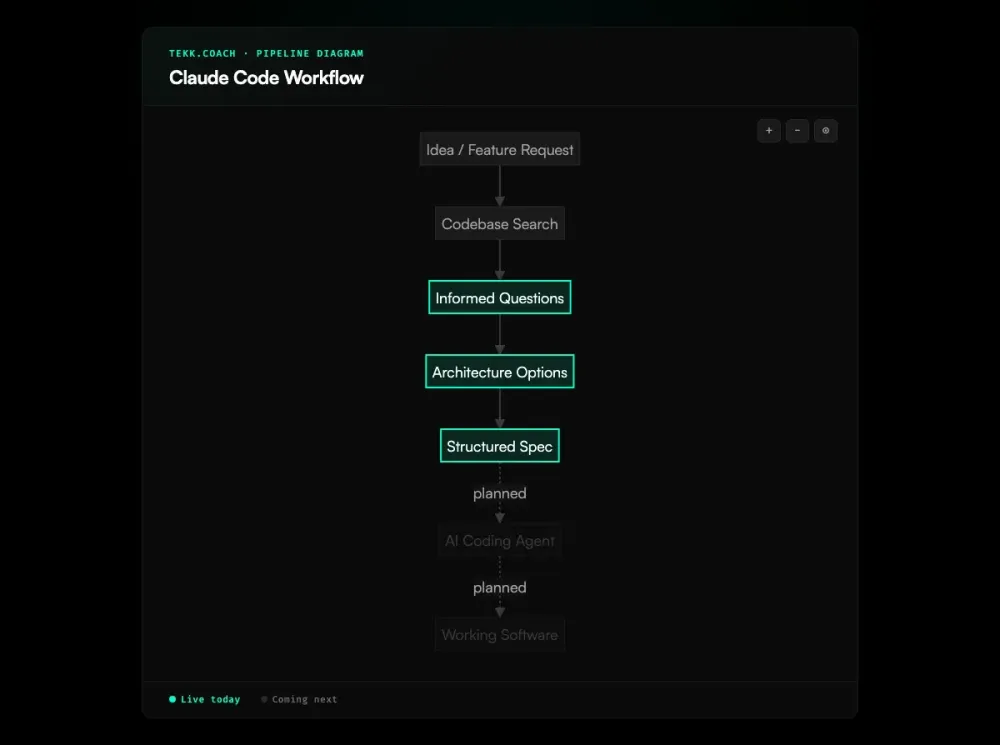
Tekk connects to your repo (GitHub, GitLab, Bitbucket) and reads your codebase before asking you anything. Semantic search. File search. Directory structure. Language and framework profiling. It knows your code.
Then it asks 3–6 questions grounded in what it found. Not generic planning questions — questions about your specific files, your actual dependencies, the real constraints in your repo.
The output is a structured spec: TL;DR, scope boundaries (what's building and what's explicitly not), subtasks with acceptance criteria and file references, assumptions with risk levels, and validation scenarios.
That spec goes to Claude Code via MCP tool extensions. Claude Code gets the context it needs at the file level, not the paragraph level.
Key Benefits
Specs Claude Code can actually execute Not a vague task description. A complete plan with subtasks broken into behavioral slices, file references, and acceptance criteria per step. One developer measured a 40% productivity increase on a large project after switching from ad-hoc prompts to structured specs. Claude Code knows exactly what to do and where.
Codebase-grounded, not guessed Tekk reads your repo before generating anything. The spec references real files, real patterns, real dependencies. No hallucinated suggestions about architecture that doesn't match your codebase.
Scope protection built in Every spec has a "Not Building" section. Claude Code executes what's in the spec — nothing else. Scope creep doesn't happen when the boundaries are explicit before the first line of code.
Kanban tracking in the same workspace Visual To Do / In Progress / Done board. Each card links to the full planning session and spec. You see everything — what's planned, what's in progress, what shipped — without switching tools. When you're ready to scale up, ai project planning across multiple features in parallel becomes the natural next step.
How It Works
- Connect your repo to Tekk — GitHub, GitLab, or Bitbucket. Takes about 60 seconds.
- Describe the feature — What you're building, in plain language.
- Tekk reads your codebase and asks questions — 3–6 questions grounded in your actual files. No generic planning prompts.
- Review options and lock in a plan — Tekk presents architecture options with honest tradeoffs, then generates a complete spec in a live document editor you can edit directly.
- Claude Code executes the spec via MCP — Your approved spec goes to Claude Code, which executes against the shared feature branch. (Execution dispatch is coming next.)
- PR lands on the feature branch — Review and merge when ready.
Steps 1–4 are live today. Step 5 (execution dispatch to Claude Code via MCP) is in progress.
Who This Is For
Claude Code users who want consistent output You know Claude Code works. You've seen it nail something complex. But you need it to work that way on every task — not just when you spend 20 minutes crafting the perfect prompt. As the Claude Code creator shared about his own workflow, the key is making structured input the default, not a discipline you maintain manually. That's exactly what Tekk does.
Developers building on top of Claude Code Building a workflow around Claude Code — custom commands, MCP integrations, spec-to-PR automation? Tekk sits at the front of that pipeline and handles the planning phase. Teams looking to go further can explore ai agent orchestration to run multiple coding agents in parallel on the same codebase.
Solo founders using Claude Code to ship No senior architect on the team. You're making architecture calls in domains you're not deep in. Tekk searches the web for current best practices and puts them in the spec. You get a real plan, not a guess.
What Is Claude Code?
Claude Code is Anthropic's agentic coding tool for AI-assisted development. It runs in your terminal, reads your codebase, and executes multi-step coding tasks on its own — writing code, running tests, fixing failures, opening PRs.
It's not inline autocomplete. It's not a chat window. It's agentic: you give it a task, it works through it end to end. It can read any file in your repo, run any shell command (with configurable permissions), and connect to external tools via MCP.
Quality depends almost entirely on the context it gets. Developers report that context window degradation starts around 70% usage, with hallucinations increasing significantly past 85%. A spec with file references and acceptance criteria produces fundamentally different output than a one-sentence description. That gap is exactly what Tekk fills. Developers running ambitious projects often pair this with claude code parallel agents to execute multiple independent subtasks simultaneously.
FAQ
What is the best Claude Code workflow? The pattern that consistently produces the best results: read the codebase first, plan before coding, give Claude Code concrete acceptance criteria and file references rather than a vague task description, and clear the context window between unrelated tasks. Anthropic's own documentation calls this Explore, Plan, Implement, Commit, and most developers who report strong results follow some version of it. Tekk operationalizes this pattern — it reads your codebase, runs the planning conversation, and generates a spec with the context Claude Code needs before a single line of code is written.
How do I set up a Claude Code workflow? At minimum: create a CLAUDE.md file with your project's conventions, use plan mode before any non-trivial task, and always provide verification criteria (tests, expected outputs) so Claude Code can check its own work. For a more structured approach, Tekk handles the planning phase — codebase reading, spec generation, scope definition — and hands the result to Claude Code via MCP.
What is Claude Code Workflow Studio? There's no official Anthropic product by that name. Developers searching for "claude code workflow studio" are generally looking for a structured environment to manage and run Claude Code workflows. Tekk.coach is the closest match: a spec-driven planning workspace that integrates with Claude Code via MCP, with a kanban board for tracking execution.
Can I use Tekk.coach with Claude Code? Yes. Tekk generates the spec; Claude Code executes it. The integration runs via MCP tool extensions. Planning and spec generation are live today. Execution dispatch (Tekk automatically sending the spec to Claude Code) is coming next — for now, you take the approved spec and run Claude Code against it manually.
How does Tekk.coach improve my Claude Code workflow? The main improvement is the quality of the input Claude Code receives. Most Claude Code friction comes from cold prompts — Claude doesn't know your files, doesn't know your architecture, and has to guess. Tekk eliminates that by reading your codebase first and generating a spec with file references, acceptance criteria, and explicit scope boundaries before Claude Code sees anything. Claude Code goes from guessing to executing against a complete plan.
What is the difference between using Claude Code directly vs with Tekk? Without Tekk: you describe the task, Claude Code starts from a cold context, and output quality depends on how well your CLAUDE.md is configured and how precisely you've prompted it. Some tasks go great. Others go sideways because Claude made an assumption about a file that doesn't match your actual codebase. With Tekk: Claude Code receives a structured spec grounded in your actual repo, with subtasks that have acceptance criteria and file references attached. The difference is the context. Good context is the difference between Claude Code flailing and Claude Code shipping the right thing.
Start Planning Free
Connect your repo. Describe the feature. Get a spec Claude Code can actually execute.
[Start Planning Free →]