
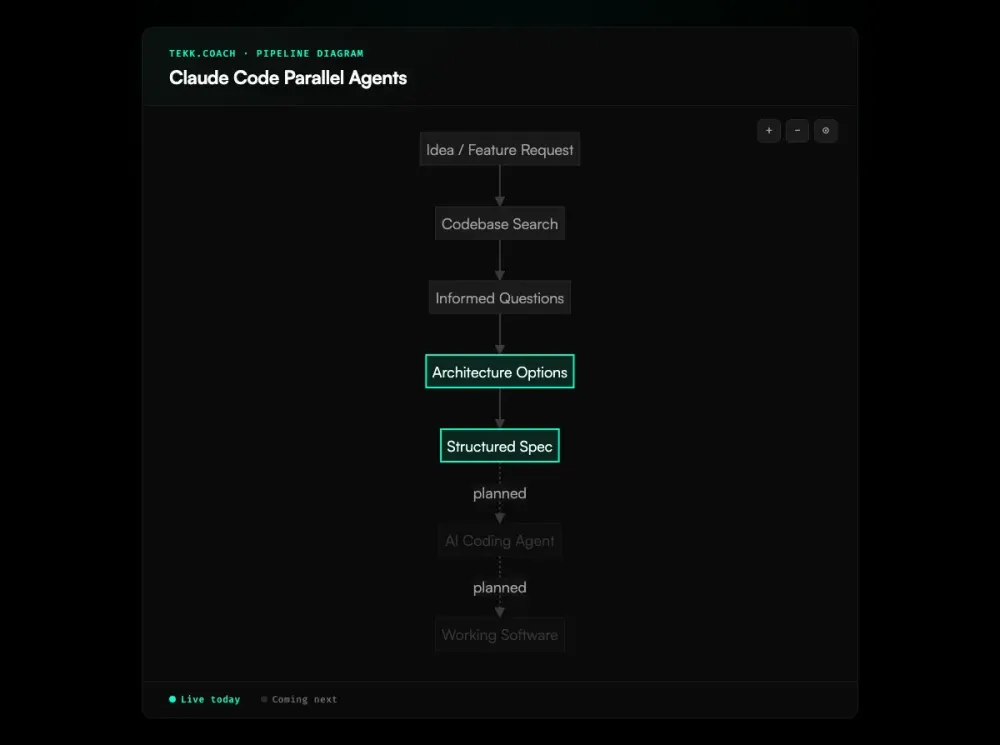
Running Claude Code parallel agents without structured specs is guesswork at scale. Anthropic's 2026 Agentic Coding Trends Report makes the case clearly: ai agent orchestration — task decomposition, agent specialization, coordination protocols — is the defining capability shift of 2026. Your agents need codebase-aware task decomposition — subtasks with clear file ownership, acceptance criteria, and dependency mapping — before you dispatch a single one. Tekk.coach produces that decomposition, grounded in your actual repository. Multi-agent execution dispatch is coming next; the planning layer is live today.
[Try Tekk.coach Free →]
Key Benefits
Specs that agents can actually execute Tekk produces subtasks with acceptance criteria and file references — not "add auth" but a complete spec with database schema, API routes, validation logic, and explicit scope limits. Agents that get this spec don't flail.
Dependency-mapped parallelism Every plan includes dependency relationships between subtasks. You can see at a glance what can run in parallel and what must sequence. No more guessing which tasks will conflict.
Scope protection prevents agent sprawl Explicit "Not Building" sections in every plan define what's out of scope. When multiple agents are running, scope creep multiplies — one agent expands a feature, another implements something adjacent, and you end up with three times the code you intended. Tekk cuts this off before execution starts.
Codebase context without re-pasting Claude Code agents get better results when they have codebase context — but they don't share context across sessions. A METR study on experienced open-source developers found that AI tools without structured context actually made developers 19% slower — even though those developers believed they were faster. Tekk bakes codebase context into the spec itself: file references, current patterns, existing conventions. Every agent that reads the spec understands your codebase, not just the task.
Visual progress tracking The kanban board gives you a unified view of everything you're building — planned, in progress, done. No more cycling through terminal windows to check agent status.
How It Works
Step 1: Connect your repository Connect GitHub, GitLab, or Bitbucket. Tekk reads your codebase before asking a single question — semantic search, file search, regex search, directory browsing, and repository profiling. It understands your stack, frameworks, patterns, and dependencies.
Step 2: Describe the feature Tell Tekk what you're building. Tekk asks 3–6 clarifying questions grounded in what it found in your code — not generic questions, but informed ones: "your existing auth uses JWT in httpOnly cookies — should this new endpoint follow the same pattern?"
Step 3: Review options and pick a direction Tekk presents 2–3 architecturally distinct approaches with honest tradeoffs. Skipped when there's an obvious path. You pick, Tekk proceeds.
Step 4: Get the structured spec Tekk writes the complete plan, streamed in real-time into the task editor. Every plan includes: TL;DR, Building / Not Building scope boundaries, subtasks with acceptance criteria and file references, assumptions with risk levels, and validation scenarios. This is the spec your agents execute from.
Step 5: Edit and approve The task editor (BlockNote) lets you edit the spec directly before dispatching. Adjust scope, rename subtasks, add constraints. The spec is yours.
Step 6: Track on the kanban board The kanban board shows task status across everything you're building. Each card links to the full planning session. When execution dispatch launches, cards will show real-time agent progress.
Step 7: [Coming next] Dispatch to Claude Code and other agents Tekk will decompose your approved spec into parallel execution waves and dispatch to your agents — Cursor, Codex, Claude Code, Gemini — via OAuth. Independent subtasks run simultaneously. Related subtasks (shared files) batch into coherent jobs. Everything lands on one shared branch.
Who This Is For
Claude Code power users who want real parallelism You've read the docs. You know about subagents and agent teams. You've tried it. The coordination overhead is real, and the quality of spawn prompts is everything. Tekk handles the decomposition so your parallel agents get real specs, not rephrased descriptions.
Developers drowning in manual orchestration You're managing multiple Claude Code windows, manually tracking which tasks are done, re-pasting context into each session because agents don't share it. Tekk gives you one planning workspace, one kanban board, and specs that carry codebase context to every agent.
Solo founders and small teams moving fast You're building with AI agents because you have to — there's no team of five engineers behind you. You need to maximize what each agent session produces. Vague prompts waste agent turns. Tekk makes every agent session count by front-loading the hard thinking through ai project planning that's grounded in your actual codebase.
What Are Claude Code Parallel Agents?
Claude Code supports two patterns for running multiple agents simultaneously. Subagents run within a single Claude Code session — each gets its own context window, custom system prompt, and specific tool access. They run in the foreground (blocking) or background (concurrent), report results back to the main agent, and are good for isolating high-volume tasks or enforcing tool restrictions. Claude Code now also supports built-in git worktree isolation, so each subagent can operate in its own worktree without merge conflicts.
Agent teams coordinate separate Claude Code instances with independent context windows. Unlike subagents, teammates communicate peer-to-peer through a shared task list and messaging system. A team lead coordinates work and assigns tasks; teammates claim work, mark it complete, and message each other directly. Agent teams are currently experimental in Claude Code and require explicit enablement.
Both patterns share a core requirement: agents need well-scoped, codebase-grounded prompts to produce reliable output. Even top-tier agents resolve only 11–12.5% of complex feature tasks on benchmarks like FeatureBench — structured decomposition is what closes the gap. The planning problem is upstream of the execution problem — and it's where most parallel agent workflows break down.
Frequently Asked Questions
How do I structure tasks for Claude Code parallel agents?
Tasks that run in parallel need three things: clear file ownership (no two agents touching the same files), explicit acceptance criteria (agents know when they're done), and dependency mapping (which tasks can run simultaneously and which must sequence). The Claude Code docs recommend tasks that are "self-contained units that produce a clear deliverable." Tekk produces this structure automatically from your codebase and feature description.
What's the difference between Claude Code subagents and agent teams?
Subagents run within a single Claude Code session and report results back to the main agent — good for isolating noisy tasks or enforcing tool restrictions. Agent teams are separate Claude Code instances with independent context windows that coordinate via shared task list and peer-to-peer messaging — better for complex parallel work where teammates need to share findings. Subagents are stable; agent teams are currently experimental.
Does Tekk integrate directly with Claude Code agent teams?
Tekk's integration is at the planning layer, not the execution layer — today. Tekk produces the structured spec that Claude Code agent teams need as input: subtasks with clear ownership, acceptance criteria, and dependency mapping. When execution dispatch launches, Tekk will connect to Claude Code via OAuth and handle agent dispatch directly from the kanban board.
How does Tekk prevent file conflicts when running parallel agents?
Every Tekk plan includes file references per subtask — specifying which files each task touches. The dependency mapping makes subtask relationships explicit, so independent tasks (different files, no shared context) can run in parallel, while dependent tasks sequence correctly. The "Not Building" section prevents agents from wandering into adjacent files. This structure, fed into parallel agents as spawn prompts, is what eliminates the conflict risk.
Can I use Tekk with agents other than Claude Code?
Yes. Tekk supports Cursor, Codex, Claude Code, and Gemini in the execution layer. The planning output — structured specs with subtasks, acceptance criteria, and file references — works as input for any coding agent. When multi-agent execution dispatch launches, Tekk will dispatch to agents via OAuth based on task type: Cursor for primary code execution, Claude Code for MCP-extended tasks, Gemini for design-first UI work, Codex for longer autonomous runs. Learn more about the full claude code workflow Tekk is designed to support.
Is multi-agent execution dispatch live today?
No. Multi-agent execution dispatch — the ability to click "Execute," select agents, and have Tekk dispatch subtasks in parallel waves — is coming next. The planning and spec decomposition layer is live today. That's where most parallel agent workflows break down anyway: not the execution, but the decomposition that makes execution viable.
What's the right team size for Claude Code parallel agents?
The Claude Code docs recommend 3–5 agents for most workflows, with 5–6 tasks per agent. Beyond that, coordination overhead starts to exceed the parallelism benefit. The more important factor is task quality: 3 agents with well-scoped, codebase-grounded specs will outperform 10 agents with vague prompts. Tekk produces the well-scoped specs.
Ready to Try Tekk.coach?
Your parallel agents are only as good as the specs you give them. Tekk reads your codebase, decomposes your feature into structured subtasks with clear ownership, and gives every agent exactly what it needs to execute without flailing. Connect your repo and generate your first spec — no PRD ceremony required.
[Start Planning Free →]