
You've tried the vibe coding tools. Maybe Lovable, maybe Bolt, maybe v0. Results are inconsistent — sometimes it nails it, sometimes it builds something completely off from what you had in mind. You tweak the prompt. Still off. You spend an hour correcting the output.
The tool isn't the problem. Your prompt is.
The best vibe coding tool in the world still needs something good to work with. What it needs is a spec — not a paragraph, not a chat message, but a structured document that defines what you're building, what you're not building, and what "done" actually means. That's what Tekk.coach generates through spec driven development — plan first, then execute.
How Tekk.coach Does Vibe Coding
Tekk is the planning layer that sits before your vibe coding tool. It doesn't replace Lovable, Bolt, Replit, or v0. It generates the input that makes them work correctly.
Here's what that looks like in practice. Most people type something like "build me an app that tracks my expenses" into a vibe coding tool and then iterate through five confused outputs. The tool didn't fail — the spec did.
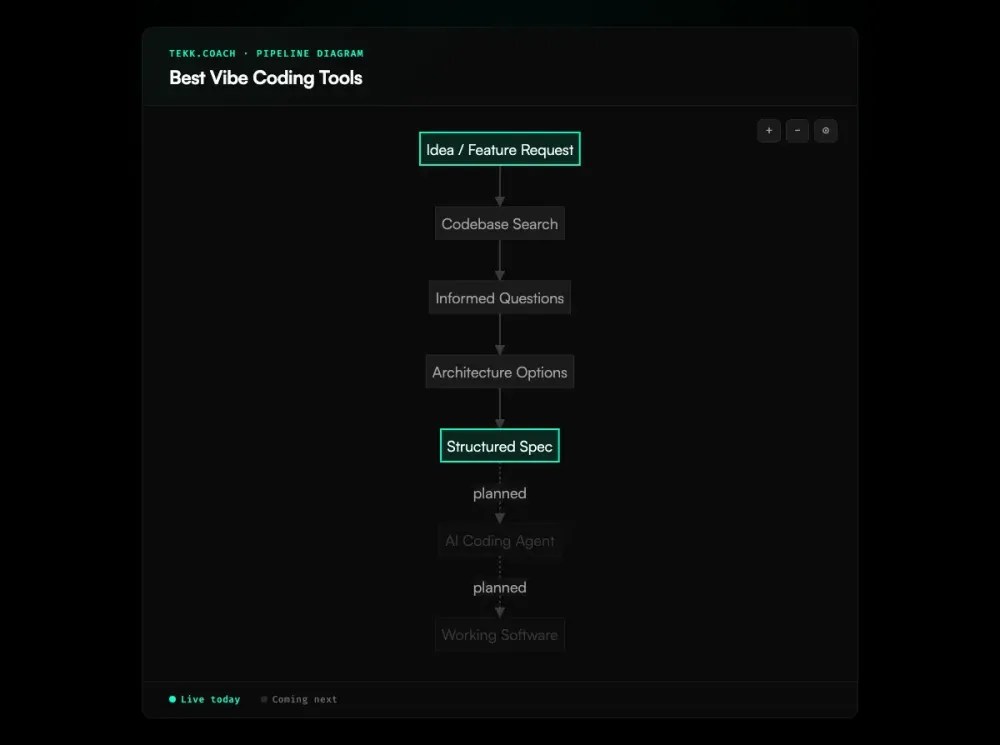
Tekk fixes that upstream. Connect your codebase, describe the feature or product you want to build, and Tekk's agent reads your repo, asks a few targeted questions, and writes a complete spec. Building/Not Building scope. Subtasks with acceptance criteria. File references for anything in your existing code. An explicit list of assumptions and their risks.
That spec is what your vibe coding tool actually executes against. The difference in output quality is not subtle.
Key Benefits
Structured specs your coding tool can actually execute. Vibe coding tools are as good as their input. Tekk generates plans with subtasks, acceptance criteria, and explicit scope — the kind of structured input that turns "mostly right" into "actually right."
Codebase-aware — no hallucinated suggestions. Tekk reads your actual repo before generating anything. Every spec references your real files, your real patterns, your real dependencies. No generic boilerplate that contradicts what you've already built. Works with GitHub, GitLab, and Bitbucket.
Scope protection prevents runaway builds. Every Tekk plan has a "Not Building" section. You define what's in scope and what isn't before anyone writes a line of code. As Simon Willison argues, the distinction between undirected vibe coding and structured AI-assisted development matters — Tekk keeps you on the structured side. Scope creep is the default in vibe coding. This stops it before it starts.
Works with any tool — Lovable, Bolt, Replit, v0, Claude Code. Tekk doesn't lock you to a coding tool. It generates the spec; you pick what executes it. Lovable for no-code app building, Cursor or Claude Code for developers with an existing codebase, v0 for frontend components. The spec is tool-agnostic.
How It Works
1. Connect your repo. Link your GitHub, GitLab, or Bitbucket repository. No special format required — Tekk reads what's there.
2. Describe what you want to build. Plain language is fine. "Add a dashboard that shows monthly spend by category." "Build a webhook handler for Stripe payment events." You don't need a structured brief — that's what Tekk produces.
3. The agent reads your codebase. Before asking anything, Tekk runs semantic search, file search, and directory browsing across your repo. It profiles your stack. Every question it asks is grounded in what it actually found in your code.
4. Options, then a spec. The agent presents 2–3 distinct approaches with honest tradeoffs. Pick one. The full spec streams in real time into the task editor — a living document you can edit, not a chat message you copy-paste.
5. Hand it to your vibe coding tool. Copy the spec into Cursor, Claude Code, Lovable, or whatever tool you're using. The execution dispatch layer — where Tekk sends specs directly to your agent via OAuth — is coming next.
Who This Is For
Non-technical founders who want to build a real product, not just a demo. You know what you want to build. You've tried describing it to Lovable or Bolt and the results are hit or miss. With Apple now cracking down on low-quality vibe-coded submissions, the bar for "good enough" is rising. Tekk turns your idea into a spec precise enough to get consistent output.
Solo builders using AI coding agents. You're already using Cursor or Claude Code to move fast. The problem is the specs are in your head, in a chat thread, or in a markdown file you wrote in 10 minutes. Tekk formalizes that into something your agents can actually execute.
Anyone frustrated with inconsistent vibe coding results. If you've noticed that your results depend more on how you describe something than on the tool itself — you've identified the spec problem. Tekk solves it.
Not the right fit if you want to describe an app and have it deployed in the browser in five minutes with no setup. Lovable, Replit, and v0 are better for that. Tekk requires a codebase to read and works best when you're building something you'll maintain.
What Is a Vibe Coding Tool?
Vibe coding is building software by describing what you want in natural language and letting AI generate the implementation — iterating through conversation instead of writing code manually. Andrej Karpathy coined the term in February 2025, describing it as "fully giving in to the vibes, embracing exponentials, and forgetting that the code even exists." The phrase was named Collins Dictionary's Word of the Year for 2025.
The category took off fast. Searches for vibe coding-related terms jumped 6,700% in Q2 2025 alone, and App Store submissions surged 84% year-over-year — the largest spike in a decade — as vibe coding tools made it possible for non-developers to ship real apps. The core tools span two audiences:
For non-technical users: Lovable (beginner-friendly UI builder), Bolt (fast full-stack prototyping), Replit (full cloud apps with data persistence), and v0 by Vercel (design-to-code, React-focused). These tools generate and deploy code from natural language descriptions in the browser.
For developers: Cursor (AI-powered VS Code fork, dominant among professionals with $1.2B in ARR), Windsurf (comparable to Cursor with multi-step AI agents), Claude Code (terminal-based), and GitHub Copilot (widespread for autocomplete and chat-in-IDE).
The honest challenge with all of them: every tool is only as good as what you give it. Research from Trend Micro found that AI-generated code fails security checks on 90% of tasks even when functionally correct — making ai code review an important step before shipping vibe-coded output to real users, and Retool reports that vibe-coded projects accumulate technical debt 3x faster than traditionally developed software. The quality gap between a vague prompt and a structured spec is the actual bottleneck — not which tool you're using.
Frequently Asked Questions
What is the best vibe coding tool in 2026?
There's no single answer — it depends on what you're building and your technical level. For browser-based no-code app building, Lovable and Replit are the strongest options. For frontend React components, v0 by Vercel is hard to beat. For developers with an existing codebase using AI coding agents, Cursor is the most widely adopted. For planning and spec generation before you use any of these tools, Tekk.coach fills a gap none of them address.
What are the best vibe coding tools for beginners?
Lovable is the most beginner-friendly — it builds stylized UIs that turn into working prototypes with minimal friction. Replit is a close second if you need a full cloud app with persistence. Bolt sits in between: faster than Lovable, more full-stack than v0, but with slightly more friction. All three let you build without writing code. The main limitation for beginners: you still need to describe what you want clearly. That's where the results diverge.
How do vibe coding tools work?
You describe what you want in natural language — either in a chat interface or a prompt box — and the AI generates code based on your description. Most tools then display the result (a running app, a component, a diff) and let you iterate by refining your description. The better tools add a deployment layer so you can see and share the result immediately. The underlying mechanism is a large language model trained on code and prompted with your description plus context about the existing project.
What's the difference between a vibe coding tool and a spec-driven development tool?
A vibe coding tool generates code from a description. A spec-driven development tool like Tekk.coach generates the specification first — the structured document that defines what to build, what to exclude, and what "done" means — and then you execute that spec with a vibe coding tool. They're complementary. The spec-driven layer addresses the upstream planning problem that vibe coding tools leave unsolved.
Can I use Tekk.coach with Lovable or Bolt?
Yes. Tekk generates a spec; you decide which tool executes it. If you're using Lovable or Bolt as your app builder, Tekk helps you produce a clear, structured description of what you want to build before you start — which leads to more consistent results from those tools. Tekk is most valuable for developers with an existing codebase using Cursor or Claude Code, but the planning layer is useful regardless of which tool you're executing with.
What makes a vibe coding tool actually good?
Output quality that stays consistent as the project grows. Context retention across sessions — tools that lose track of what was already built introduce errors and duplications. Scope handling: the best tools give you some way to define what you're building before generation starts. Honest pricing. And enough flexibility to handle real production features, not just demos. That last point is where most tools struggle at scale — which is why planning before generation matters more the further along you are.
Start Planning Free
If your vibe coding results are inconsistent, the fix is upstream. Give your tool a spec worth executing.
Connect your repo, describe what you want to build, and see what Tekk generates. It takes about five minutes.