
TL;DR
Your backlog isn't the problem. The tickets in it are. Most backlog items are vague one-liners — enough to remember the idea, not enough to build it. When an AI coding agent reads "improve search performance", it has nothing to work with. Early tests of AI-driven backlog assistants found that 40% of open tickets were too vague to act on without rewriting. Tekk.coach solves this by turning each backlog item into a full, codebase-grounded spec before anyone writes code. Connect your repo, describe the task, get a structured plan your agents can actually execute.
How Tekk.coach Does Backlog Management
Tekk has kanban board software built in — To Do, In Progress, Done. The To Do column is your backlog. But what sets it apart is what happens when you plan a task.
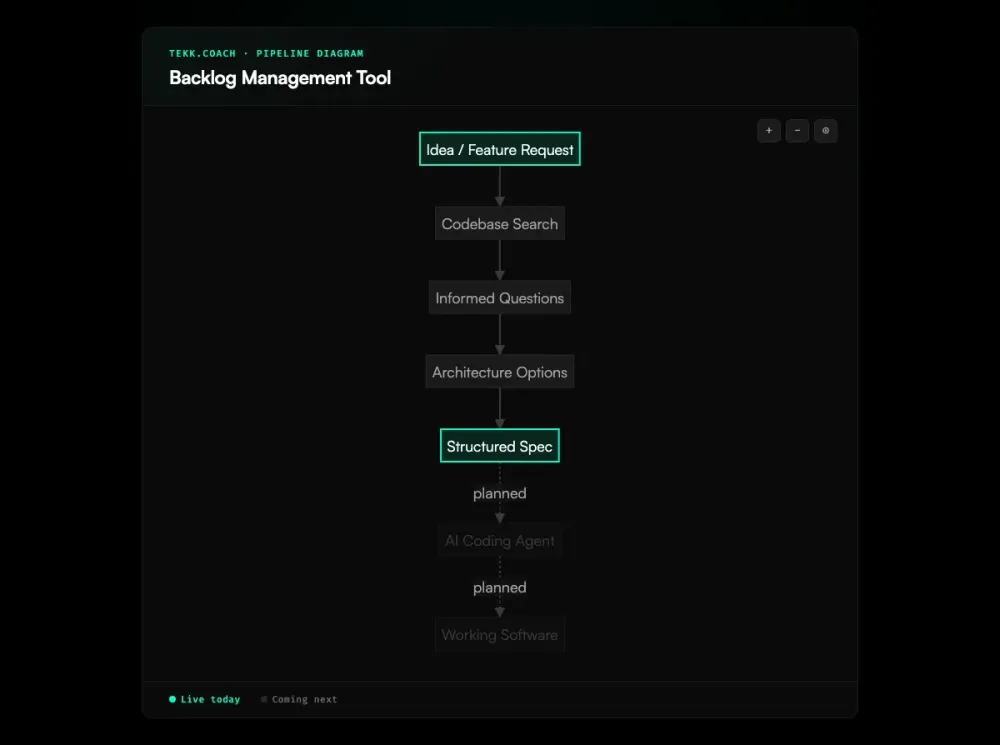
When you open a card and start planning, Tekk's AI agent reads your actual codebase first. Not a description of your codebase. Not a paste of some files. It connects to GitHub, GitLab, or Bitbucket via OAuth and searches your repo — semantic search via embeddings, file search, regex, directory browsing, repository profiling. It understands your stack, your patterns, your actual files.
Then it asks you questions grounded in what it found. Not generic questions — specific ones: "You're using Passport.js for auth — should this flow reuse that session layer or run separately?" The questions are shaped by your code.
The result streams into a rich text editor as a living document — not a chat message. Every plan includes a TL;DR, an explicit Building / Not Building scope boundary, subtasks with acceptance criteria and file references, assumptions with risk levels, and validation scenarios. That plan lives on the card. That's your backlog item. Not a one-liner. A spec.
For teams building with AI coding agents — Cursor, Claude Code, Codex — this is the difference between an agent that flails and one that ships. A spec with scope boundaries, acceptance criteria, and file targets is what these agents need. A vague ticket is not.
Key Benefits
Backlog items that are actually buildable. Each task becomes a full spec grounded in your codebase. No interpretation required. Developers and AI agents know exactly what to build, where to build it, and what done looks like.
No grooming ceremonies. The Scrum Guide recommends spending up to 10% of sprint capacity on refinement — for a two-week sprint, that's roughly eight hours. Open the task, run the planner, get a spec. The grooming happens in the planning session — fast and async.
Scope protection built in. Every plan has an explicit "Not Building" section. You define the boundary before code gets written. Scope creep has to argue with a document to win.
One workspace for planning and tracking. Your board and your AI planner are in the same place. No switching between a PM tool and a chat window. The spec lives on the card.
Codebase-aware by default. Generic AI story generators produce the same user story regardless of your tech stack. Newer AI refinement tools can auto-generate acceptance criteria and estimate effort using NLP, but they still don't know your codebase. Tekk reads your actual repo. Every spec references real files and real patterns — not boilerplate.
How It Works
- Add a task to your backlog. Create a card in the To Do column. Give it a name.
- Connect your repo. Link GitHub, GitLab, or Bitbucket via OAuth. One-time setup.
- Run the planner. Tekk's agent reads your codebase, asks 3–6 targeted questions, and presents 2–3 implementation approaches with honest tradeoffs.
- Lock in the spec. Approve an approach. The agent generates a full plan — TL;DR, scope boundaries, subtasks with acceptance criteria and file references, assumptions, validation scenarios — streamed directly into the task editor.
- Move the card, build it. Your backlog item is now a spec your team or your coding agents can execute.
Who This Is For
Solo founders and builders. You're managing the product in your head. You need to capture ideas fast, prioritize ruthlessly, and actually build them — without a PM process. Tekk gives you a lightweight board and a planner that turns your vague ideas into buildable specs.
Small teams building with AI coding agents. If Cursor or Claude Code is doing your implementation work, your backlog items need to be specs, not one-liners. Tekk produces the structured output these agents need. It's the missing layer between "idea in the backlog" and "agent executing correctly."
Developers who hate backlog grooming. You'd rather build than attend refinement ceremonies. Teams that refine effectively report sprint planning becoming up to 3x faster, but the ceremony itself is the bottleneck. Tekk removes it. You still get well-defined tasks — you just get them through a planning session instead of a meeting.
What Is a Backlog Management Tool?
A backlog management tool is software that helps teams capture, organize, and prioritize the work they need to do. In software development, the product backlog is the ranked list of everything the team might build — features, bug fixes, technical improvements, experiments. A backlog management tool gives that list structure: you can add items, reorder them, assign owners, and move them through stages.
The dominant tools in this category are Jira, Linear, Notion, ClickUp, and Shortcut. According to The CTO Club's 2026 review, key evaluation criteria include prioritization frameworks like RICE and ICE, dependency mapping, and collaboration features. Jira is the enterprise standard — deeply customizable, with sprints, epics, velocity tracking, and workflow automation. Linear is the developer-favorite alternative — faster, cleaner, and increasingly popular as a Jira replacement for small-to-mid-size teams. Notion and Trello serve teams that want flexibility over agile-specific features.
Most backlog management software solves the organization problem: how do you track all the things you might build? What most of them don't solve is the execution problem: how do you make sure each item contains enough information to actually build it? That's the gap that matters most for teams using AI coding agents. An agent reading "add dark mode" has nothing to work with. Tekk.coach addresses that gap directly — each backlog item becomes a codebase-grounded spec through a spec driven development workflow before execution begins. For teams that need a full planning layer across multiple projects, Tekk's ai project planning brings the same codebase-aware reasoning to the entire build queue.
Frequently Asked Questions
What is a backlog management tool? A backlog management tool is software that helps teams capture, organize, and prioritize work items — features, bug fixes, and technical tasks — into a ranked list. Most tools focus on tracking and ordering items. Tekk.coach goes further: it turns each backlog item into a structured spec grounded in your actual codebase.
What's the difference between backlog management software and a task tracker? A task tracker manages work in progress. Backlog management software manages work that hasn't started yet — the full queue of potential tasks, ordered by priority. The key challenge isn't just organizing the list; it's making sure items are specified well enough to actually build. Most backlog management software handles the first part but not the second.
Does Tekk.coach replace tools like Jira or Linear? No. Tekk is intentionally lightweight and built for individual builders and small teams. It doesn't have sprint velocity tracking, story points, epic hierarchies, custom fields, or approval workflows. If your team needs those, Jira or Linear is the right choice. If you want a simple board paired with AI planning that reads your codebase, Tekk is a better fit.
Is Tekk.coach a backlog grooming tool? Not in the traditional sense. Traditional backlog grooming tools support refinement ceremonies — meetings where teams review, estimate, and prioritize items together. Tekk replaces the grooming ceremony with a planning session: you open the task, the agent reads your codebase and asks targeted questions, and you get a spec. Faster, async, no meeting required.
How does AI backlog management work in Tekk.coach? When you plan a task in Tekk, the AI agent connects to your GitHub/GitLab/Bitbucket repo and reads your codebase first. It uses semantic search, file search, and directory browsing to understand your stack and patterns. Then it runs a multi-turn planning workflow — questions, options, plan — and generates a full spec as a living document attached to the Kanban card.
What makes Tekk's backlog different from other product backlog tools? Most product backlog tools track what you're going to build. Tekk specifies how you're going to build it — grounded in your actual code. Each item gets a full plan with scope boundaries, acceptance criteria, file references, and validation scenarios. That's not just a tracked task. That's a spec.
Who is Tekk.coach's backlog management for? Solo founders, solo developers, and small teams (1–10 people) building software with AI coding agents. Especially useful if you're using Cursor, Claude Code, or Codex — and want your backlog items to be structured enough for those agents to execute correctly.
Is Tekk.coach free to use? Yes, Tekk.coach is free to start. No credit card required to try the planning workflow and Kanban board.
Stop Managing a Graveyard
Your backlog shouldn't be a list of things you might build someday. It should be a queue of things that are ready to build — with specs attached. Connect your repo, plan the tasks, and let your coding agents do the rest.