
Generic task managers don't understand code. "Implement auth" is not a developer task — it's an intention. A developer task has subtasks, acceptance criteria, file references, and dependency order. Only 29% of developers trust the accuracy of AI tool output — structured tasks with verifiable acceptance criteria are what close that trust gap. Reclaim can reschedule your calendar. Asana can track that something is "In Progress." Neither can tell your coding agent what to actually build.
Tekk.coach generates developer-quality tasks from your actual codebase. The AI reads your repository, generates a structured spec, and the spec becomes a task on your kanban board — part of a broader ai project planning workflow that keeps your entire build queue grounded in your actual code — with subtasks, acceptance criteria, file targets, and the full planning context attached. Your coding agent gets a task it can execute, not a sentence it has to interpret.
[Try Tekk.coach Free →]
Key Benefits
Tasks with real subtasks, not flat items Every Tekk task includes subtasks ordered by dependency. Each subtask is a behavioral slice — "user can complete magic link login flow" — not a file change. Your coding agent executes against behavior, not implementation guesses.
Acceptance criteria built in Each subtask has verifiable acceptance criteria. You know what done looks like before execution starts. No ambiguity about whether the agent finished the job or just stopped.
File references in every task Subtasks reference your actual files — the ones found in your repository, not hypothetical paths. Your coding agent targets the right files on the first run.
Codebase-grounded, not generic Tasks are generated from reading your code, not from a template. The tech stack, existing patterns, current architecture — all of it shapes the task structure. Generic task generators start from scratch. Tekk starts from your codebase.
One workspace: planning + tracking Plan in Tekk, track in Tekk. Each kanban card links to its full AI planning session. You see what's planned, what's in progress, what's done — with the full spec one click away. No separate planning tool, no copy-paste to your tracker.
How It Works
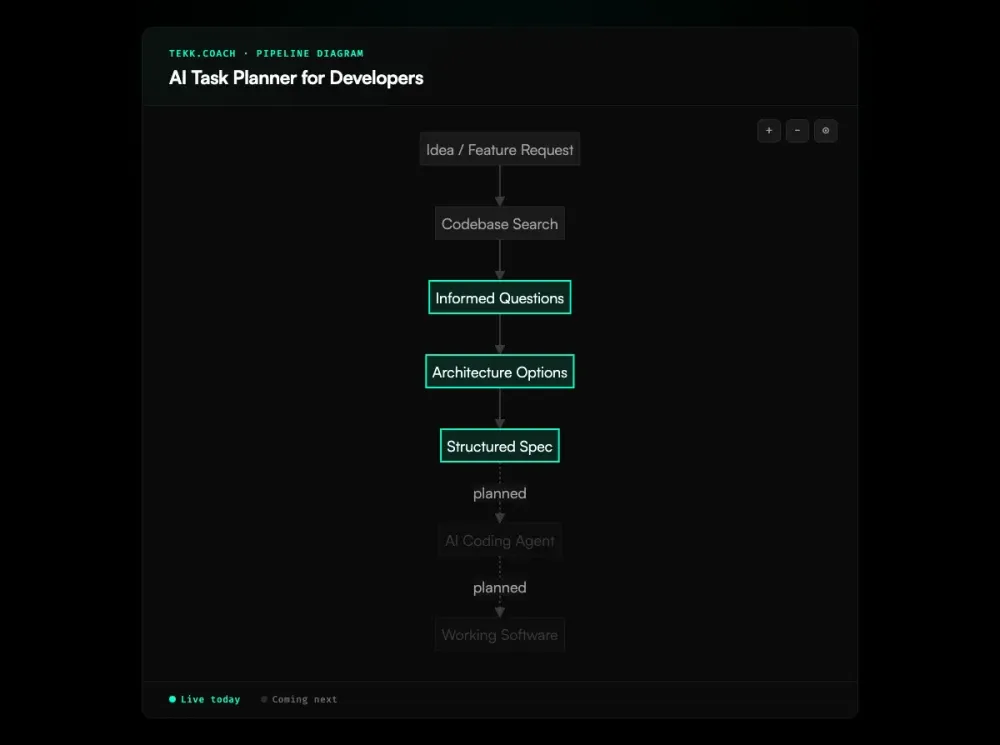
Step 1: Create a task Describe what you need to build. One sentence works — you're describing intent, not writing the spec. Tekk handles the rest.
Step 2: Tekk reads your codebase The agent searches your repository: semantic search, file discovery, framework and dependency detection. Every question and planning decision is grounded in what actually exists in your code.
Step 3: Answer grounded questions The agent asks 3-6 questions based on your code — not generic discovery. It asks the hard questions: scope boundaries, edge cases your current schema doesn't cover, migration order, dependency risks.
Step 4: Review the task spec The plan generates in real time into a structured document: TL;DR, Building / Not Building, numbered subtasks with acceptance criteria and file references. Edit anything. Confirm the scope boundaries.
Step 5: The spec becomes the task Approve the plan and it lives on your kanban board — To Do / In Progress / Done. Each card carries the full spec. Hand it to your coding agent, or use Tekk's execution layer (coming next) to dispatch directly.
Who This Is For
Developers building with AI coding agents who've noticed that their tasks in Linear or Jira don't give the agent enough context. You hand Cursor or Claude Code an issue description and it spends the first few messages asking clarifying questions that should have been in the spec. Simon Willison's analysis of agentic coding shows that agents given vague tasks fill in missing context with their own architectural decisions — often wrong ones. Tekk puts those clarifying answers into the task itself, before execution starts.
Solo founders and small teams without a dedicated tech lead. You're the planner, the developer, and the QA. You need tasks that are structured enough for an agent to execute without you babysitting each run. Tekk generates that structure from your codebase.
Product managers who need technically-grounded task breakdowns. Not a PRD template — a working spec with subtasks, acceptance criteria, and file references that engineers and agents can actually use.
What Is an AI Task Planner for Developers?
An AI task planner for developers is a tool that generates and manages development tasks with the structural depth that software work requires — subtasks, acceptance criteria, dependency ordering, and code references — using AI to do the generation work.
This is categorically different from general-purpose AI task managers, which optimize calendars and to-do lists. Developer work doesn't map to calendar blocks. A "task" in software development is a specification: what to build, in which files, in what order, with what verification conditions. ThoughtWorks identifies spec-driven development as the defining practice for high-performing AI-assisted engineering teams — and a developer-specific AI task planner is how that practice becomes operational. Tekk's spec driven development workflow ensures every task starts from a codebase-grounded specification, not an informal description.
The category has emerged as AI coding agents (Cursor, Claude Code, Codex) have become the primary execution layer for many developers and teams. These agents execute from instructions. The quality of those instructions determines the quality of the output — agent scaffolding matters as much as model selection. An AI task planner for developers produces instructions — structured tasks — that coding agents can execute without additional context-gathering.
Frequently Asked Questions
What is an AI task planner for developers?
An AI task planner for developers generates structured development tasks — with subtasks, acceptance criteria, file references, and dependency order — using AI. Unlike generic task managers (which track to-dos), a developer-specific AI task planner produces the kind of structured breakdown that AI coding agents can execute from directly.
How is Tekk different from generic AI task managers like Asana or Reclaim?
Generic AI task managers optimize schedules and manage to-do lists. They don't understand code. Tekk reads your actual codebase before generating tasks, so every subtask references your real files, your framework, and your existing patterns. As Addy Osmani's AI coding workflow research shows, codebase-grounded planning is what separates disciplined AI development from chaos. The output is a structured spec, not a calendar entry.
What should an AI-generated developer task include?
At minimum: a clear description of what's being built, explicit scope (what's not being built), numbered subtasks that are behavioral slices (not file changes), verifiable acceptance criteria per subtask, specific file references, and dependency ordering. Time estimates and assumptions are also valuable. A task without acceptance criteria is an intention, not a plan.
How does Tekk generate developer tasks?
Tekk reads your codebase first, then asks grounded questions based on what it finds. From your answers, it generates a complete spec that streams into an editable document. The spec — including subtasks, acceptance criteria, and file references — becomes the task card on your kanban board. The full spec stays attached to the card.
Can Tekk tasks be used directly with AI coding agents?
Yes. Each task includes the full spec with behavioral subtasks, acceptance criteria, and file references — exactly the context a coding agent (Cursor, Claude Code, Codex) needs to execute correctly. In the execution layer coming next, Tekk's ai agent orchestration will dispatch tasks directly to coding agents in parallel waves via OAuth. Today, you copy the spec into your agent of choice.
How does Tekk differ from Linear or Jira for developers?
Linear and Jira track tasks you define manually. They don't generate tasks from your codebase. They don't produce subtasks with acceptance criteria or file references. And they don't have AI planning sessions attached to each task card. Tekk generates the task and keeps the planning context alive — Linear manages tasks, Tekk creates them with structure.
Does Tekk work for solo developers or only for teams?
Tekk is specifically designed for solo developers and small teams. It's intentionally lightweight — no approval chains, no process governance, no Jira-style configuration. Describe the problem, get a structured task, execute with your agents. The kanban board scales down to one person managing their own build queue.
Ready to Try Tekk.coach?
Your coding agents need tasks with structure, not sentences with intention. Connect your repo and let Tekk generate developer-quality tasks — subtasks, acceptance criteria, file references — from your actual codebase.
[Start Planning Free →]