
Most ai project planning tools don't know your code exists. They give you templates and task lists — plans for a hypothetical app, not the one you're actually building. You still have to translate generic output into something your coding agent can act on. That translation is most of the work you were trying to skip. And as GitHub's spec-driven development research makes clear, coding agents need unambiguous, structured specs — not freeform prompts — to produce reliable output.
Tekk reads your codebase first. Every question it asks, every architectural option it presents, and every spec it generates is grounded in your actual repo — your framework, your file structure, your existing patterns. The output isn't a chat message. It's a structured specification your coding agent can execute without flailing.
[Try Tekk.coach Free →]
How Tekk Does AI Project Planning
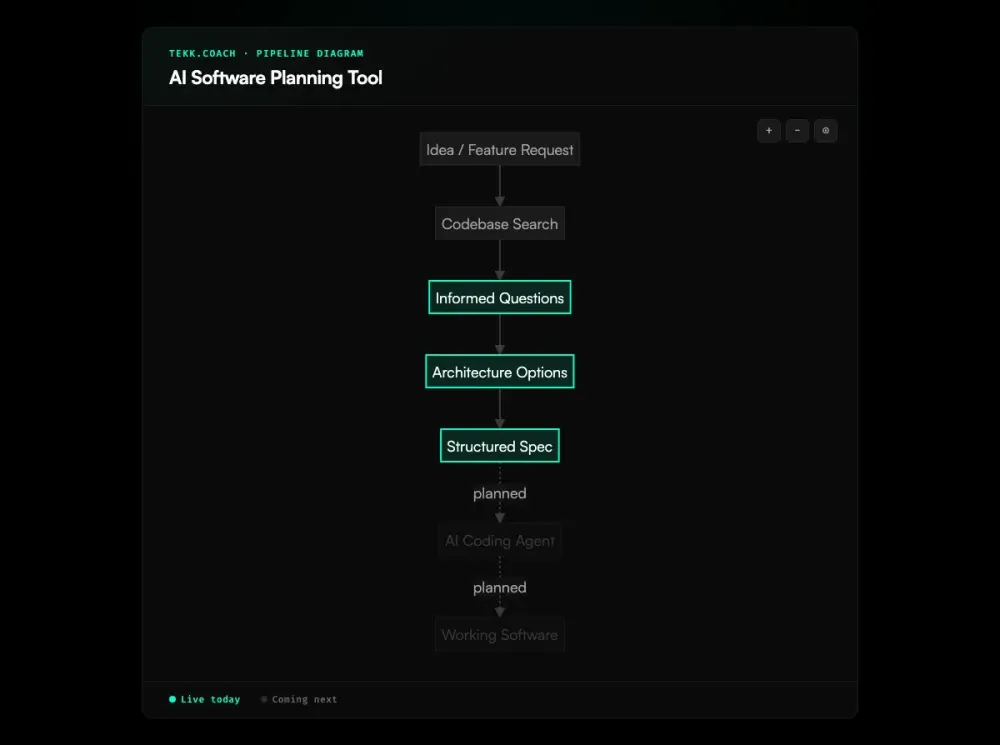
Before Tekk generates anything, it searches your repository. Semantic search via embeddings, file search, regex lookup, directory browsing, full repo profiling — it reads what's actually there. Say "add magic link auth" and Tekk already knows your ORM, your existing auth patterns, and what files will be touched. It doesn't ask you to paste context. It already has it.
Tekk then asks 3–6 questions grounded in what it found. Not generic questions — questions that reference specific files and patterns in your codebase. Then it presents 2–3 architecturally distinct approaches with honest tradeoffs. Not labels like "Option A" and "Option B." Actual consequences: what each approach costs in complexity, what breaks, what you're trading off.
The plan streams into a BlockNote rich text editor in real time — a living document, not a chat message. It includes a TL;DR, explicit scope boundaries (Building / Not Building), subtasks with acceptance criteria and file references, assumptions with risk levels, and concrete validation scenarios. That's what your coding agent needs to execute correctly. A paragraph in a chat window is not.
The same workspace holds your Kanban board. Every card links back to its full AI planning session — context intact, history preserved. No more juggling AI chat tabs, markdown files, and a separate project board.
Key Benefits
Plans grounded in your actual codebase, not a hypothetical one Tekk reads your repo before it generates anything. Questions, options, and specs all reference your specific files, framework, and patterns. Generic AI planning tools don't do this — and that gap shows up in every rework cycle. Red Hat's analysis of how spec-driven development improves AI coding quality confirms that grounding specs in actual code context is what separates working output from rework loops. Tekk's approach to spec driven development builds this directly into every planning session.
Architectural tradeoffs surfaced before you write code You see 2–3 distinct approaches with specific consequences before committing. Not "here's the plan" — "here's what each path costs you." That's the conversation you'd want with a senior engineer. Tekk brings it to every feature.
Explicit scope boundaries on every spec Every plan has a "Not Building" section. Scope creep doesn't happen by accident — it happens because no one wrote down the boundaries. Tekk makes that structural, not optional.
One workspace for planning and tracking Connect your repo, plan the feature, track execution on the same board — without switching tools. As your specs grow more complex, ai agent orchestration handles dispatching work across multiple coding agents in parallel. Each Kanban card carries the full AI planning session that produced it.
How It Works
Step 1: Connect your repository Link your GitHub, GitLab, or Bitbucket repo. Tekk runs a full profile — languages, frameworks, services, packages. This happens once per repo. Every planning session from here draws on that context automatically.
Step 2: Describe what you're building Open a task, tell Tekk what you need. A sentence is enough to start — Tekk uses the codebase to fill in the context it needs rather than asking you to.
Step 3: Answer a few targeted questions Tekk asks 3–6 questions that reference actual files and patterns it found. These aren't generic "what's your timeline?" questions. They're architectural: "Your current auth layer uses X — do you want the new flow to extend that or run parallel?"
Step 4: Choose your architecture Tekk presents 2–3 approaches with honest tradeoffs. You pick a direction. That decision gets locked into the spec.
Step 5: Get the spec The complete specification streams into your task editor in real time: TL;DR, Building / Not Building scope boundaries, subtasks with acceptance criteria and file references, assumptions with risk levels, validation scenarios. Hand it to Cursor, Claude Code, or Codex. That's what they need to ship.
Who This Is For
Developers doing AI project planning with coding agents You're using Cursor, Claude Code, or Codex. You've felt the difference between a good spec and a bad one — the agent either executes cleanly or spends three sessions backtracking. A Techreviewer survey of 2,000+ development teams found that 53.2% now use AI in requirements analysis, yet most still lack a structured spec workflow. Tekk eliminates the bad specs. Every feature starts with codebase-grounded architectural reasoning and ends with a structured spec your agent can follow.
Product managers who need technically grounded plans You're writing specs that engineers actually use, not templates and PRD documents that get ignored. Tekk produces subtasks with acceptance criteria and file references — the kind of output that bridges product intent and engineering execution without a long interpretation meeting in between.
Solo founders and small teams building with AI You're moving fast and you don't have a senior architect to sanity-check every technical decision. Tekk gives you that architectural reasoning layer on demand — not "what should I build" advice, but "here are your options for this specific problem in your specific stack."
What Is an AI Software Planning Tool?
A software planning tool helps teams structure, scope, and sequence development work before anyone writes code. Traditionally, that meant PRDs, architecture docs, and sprint planning sessions. The AI-assisted version of this category has grown fast alongside AI coding agent adoption — Capterra's 2025 PM Software Trends Report found that 55% of teams now cite AI capability as their top reason for purchasing new project management software — but most of what's been built doesn't actually understand software.
The majority of tools claiming the "AI software planning" label are general project management platforms with AI features. Asana, ClickUp, Notion, Motion — they can generate task breakdowns from prompts, auto-schedule work, and summarize project status. Genuinely useful, but not built for development. They produce task lists. Not technical specifications.
A smaller, newer category is trying to fix that: developer-specific planning tools that produce structured specs grounded in codebase context. AI coding agents need more than a task name and a due date. They need acceptance criteria, file references, scope boundaries, and architectural context. As Martin Fowler's analysis of spec-driven development tools details, tools like Tekk.coach and AWS's Kiro are built on that premise — the spec is the product, and it has to come from your actual code, not a template.
Frequently Asked Questions
What is an AI software planning tool?
An AI software planning tool uses artificial intelligence to help teams structure, scope, and sequence software development work. The category ranges from general project management platforms with AI features (Asana, Notion, ClickUp) to developer-specific tools that generate structured technical specifications grounded in codebase context. The key differentiator in the developer-focused segment is whether the tool reads your actual code before generating plans — or produces generic output regardless of your stack. The LogRocket AI dev tool power rankings track this distinction across the current tool landscape.
What are the best AI project planning tools for developers?
The most commonly used options are ChatGPT and Claude (for ad-hoc planning in chat), Linear (for engineering task tracking), and Notion AI (for lightweight docs). For codebase-aware planning specifically — generating structured specs that reference your actual files and architecture — the relevant tools are Tekk.coach and Kiro (AWS). The distinction matters if you're feeding specs into coding agents: generic tools produce generic input, and coding agents perform accordingly.
How is Tekk different from other software planning tools?
Most software planning tools start with your description and generate a plan from there. Tekk starts by reading your codebase — semantic search, file search, directory browsing, repo profiling — before asking a single question. That means every architectural option, every subtask, and every file reference in your spec is grounded in your actual repo, not a generic template. The output is a living document (not a chat message) with explicit scope boundaries, acceptance criteria per subtask, and validation scenarios.
How does AI project planning for developers work in Tekk?
Connect your repo, describe what you're building, answer 3–6 targeted questions Tekk generates from your codebase, choose from 2–3 architectural approaches with honest tradeoffs, and receive a complete structured spec. The spec streams directly into a task editor — TL;DR, Building / Not Building, subtasks with file references and acceptance criteria, risk-flagged assumptions, test scenarios. Hand it to your coding agent. Sessions persist: chat history and codebase context carry forward across turns.
Can Tekk do AI project planning for an existing codebase?
Yes — that's the primary use case. Tekk is built for existing repos, not greenfield projects. The codebase search runs before any planning starts, which means the architectural options and subtasks it generates account for what's already there: existing patterns, current dependencies, and the files that a new feature would actually touch.
How is Tekk different from using ChatGPT for software planning?
ChatGPT produces plans for a generic app based on what you describe. It has no access to your codebase, so every architectural recommendation is disconnected from your actual stack. There's also no persistence — each session starts fresh. Tekk reads your repo, asks codebase-grounded questions, presents architecture options specific to your setup, and produces a living document that persists across sessions. The spec it generates references real file targets, not hypothetical ones.
What does a good software planning tool produce?
A well-structured spec has a TL;DR of what's being built and why, explicit scope boundaries (in and out), subtasks broken into behavioral slices with acceptance criteria, file references, assumptions with risk levels, and validation scenarios. That's what a coding agent needs to execute without backtracking. Most project management tools give you a task list. A good software planning tool gives you a spec your team — or your AI coding agent — can actually work from.
Start Planning From Your Actual Codebase
Generic planning tools give you a starting point. Tekk gives you a plan that's already grounded in your repo, your architecture, and your stack — so your coding agent has what it needs to ship instead of guess.
Connect your repo. Describe the feature. Get the spec.
[Start Planning Free →]