You're building with Cursor, Claude Code, or Codex. The agents are capable. The plans you're feeding them aren't. Vague prompts produce inconsistent code, rework cycles, and features that don't fit the existing architecture.

Tekk.coach is AI project planning built for developers — not PMs, not project managers. It reads your codebase before planning, generates specs with file references and acceptance criteria, and produces the precision input your coding agents need to execute correctly the first time.

Try Tekk.coach Free →


How Tekk.coach Does AI Planning for Software Developers

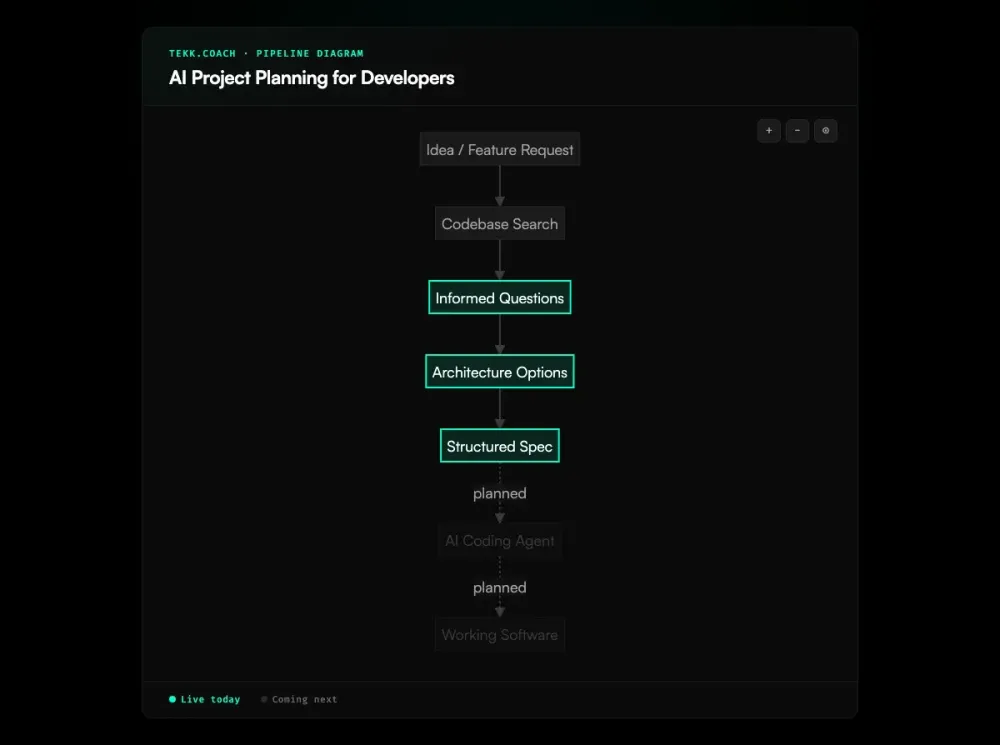
Every Tekk planning session starts with a codebase read. Semantic search via embeddings, file search, regex search, directory browsing, repository profiling. Tekk knows your language, framework, ORM, auth patterns, and existing services before you've described a single feature. The plan that follows references your actual codebase — specific files, real patterns, established dependencies.

From there, the agent asks 3-6 questions grounded in what it found. These are not generic developer planning questions. If you have an existing auth model, Tekk asks whether to extend it. If you have a shared utility layer, Tekk asks whether the new service belongs there. Questions that a senior engineer would ask after reading the code.

For features with real choices, Tekk presents 2-3 architecturally distinct approaches with honest tradeoffs. Which one scales, which one is simpler, which one fits your existing patterns better. You decide. Then the spec generates in real-time — streamed into a BlockNote editor as a living document your team builds from.

The output is built for AI coding agent execution: subtasks with acceptance criteria and file references, dependency ordering, explicit scope boundaries (Building and Not Building), assumptions with risk levels, and validation scenarios. This is what your agents need — not a paragraph they have to interpret.

Key Benefits

Plans grounded in your actual codebase Tekk reads your repo before asking questions. The plan references real files, real patterns, real dependencies. You don't get a spec that sounds right and architecturally conflicts with what's already built.

Developer-executable output format Subtasks include acceptance criteria at the code level, specific file targets, and dependency ordering. Hand this to Cursor or Claude Code and the agent knows exactly what to build and where. No engineering translation required between the plan and the execution.

Scope protection built in Every plan has an explicit "Not Building" section. Your coding agents will implement adjacent functionality if you don't define the boundary. Tekk forces that discipline on every feature, before any code is written.

Web research during planning Building something outside your expertise — a data pipeline, an AI agent integration, a payments system? Tekk searches the web for current best practices while generating the plan. You get architectural guidance specific to your stack without having to research the domain separately.

Expert review on demand Same codebase context, four review modes: architecture, security, performance, agent improvement. Planning and review in one workspace. You don't maintain separate tool integrations for each type of question about your code.

How It Works

Step 1: Connect your repository GitHub, GitLab, or Bitbucket via OAuth. Read access. No instrumentation, no agents to install, no changes to your existing development setup.

Step 2: Describe what you're building "Add magic link auth." "Refactor the payments service." "Build a background job for PDF export." Plain language. The agent has already read your codebase — the questions it asks next will be specific, not generic.

Step 3: Answer codebase-grounded questions 3-6 questions based on what the agent found in your code. Your existing session model, your current API patterns, your database structure — the questions reflect actual architectural context, not a PM template.

Step 4: Choose your approach For features with architectural choices, Tekk presents 2-3 distinct options with honest tradeoffs. You pick the direction. The spec generation reflects your decision.

Step 5: Get the structured spec TL;DR, Building / Not Building scope boundaries, subtasks with acceptance criteria and file references, assumptions with risk levels, validation scenarios. Streamed in real-time into an editable living document. Connected to your Kanban board.

Step 6: Execute with your coding agents Open Cursor, Claude Code, or Codex. Hand them the spec. They have the precision instructions they need — the right files, the right acceptance criteria, the right scope — and they don't flail.

Who This Is For

Developers using AI coding agents and doing too much rework You give Cursor a feature description. It builds something. It's not quite right. You spend two hours iterating. The spec was the problem, not the agent. Tekk produces the spec that Cursor actually needs — codebase-grounded, with explicit scope and acceptance criteria.

Solo founders who need a senior engineer without hiring one You're building your product. You don't have a senior engineer reviewing your architectural decisions before every feature. Tekk asks the questions they'd ask, presents the tradeoffs they'd surface, and produces the specs they'd write. Speed, quality, no headcount.

Small teams (1-10) shipping with AI coding agents Context is scattered across chat threads and markdown files. Features conflict because the specs didn't account for each other. Tekk gives the team one place where plans are generated, stored, and connected to the Kanban board — all grounded in the shared codebase.

Developers building in domains outside their expertise You're implementing a payments integration for the first time, or setting up an AI agent pipeline, or building a data warehouse. Tekk's web research during planning means you're building against current best practice for that domain — not best-guessing from a general understanding of programming.

What Is AI Project Planning for Developers?

AI project planning for developers is a category of tools that generate and structure software development plans specifically for technical builders — not general project managers. The distinguishing characteristic is implementation-level grounding: plans include file targets, acceptance criteria at the code level, dependency sequencing, and explicit scope boundaries that AI coding agents can execute directly.

The category emerged from the collision of two shifts. First, AI coding agents became mainstream — Cursor, Copilot, Codex, Claude Code. These agents are highly capable at function-level implementation but require precise, structured input to operate at their best. Vague prompts produce inconsistent, architecturally incorrect output. Second, traditional PM tools (Linear, Jira, Asana) were not designed to produce the technical specifications these agents need. They manage tasks; they don't generate codebase-aware implementation plans.

Kiro (AWS) was the first major entry in codebase-aware developer planning, embedding spec generation within its IDE. Codepoet uses intent-based planning that studies the codebase before generating plans. Repomix packages codebases for LLM consumption. GitHub Copilot Workspace generates implementation plans within GitHub's ecosystem. The differentiation across these tools centers on how deeply they read the codebase before planning, and how well the output format serves AI coding agent execution.

The key insight driving the category: the plan is the prompt. The quality of the specification handed to a coding agent directly determines the quality and consistency of what that agent produces. AI project planning for developers is the discipline of producing those precision specifications — and the tools that make it fast, repeatable, and grounded in the actual codebase.


Ready to Try Tekk.coach?

Your coding agents are capable. The plans you're feeding them aren't. Connect your repo, describe a feature, and see what a codebase-grounded spec actually looks like — and what your agents produce when the input is right.

Start Planning Free →