
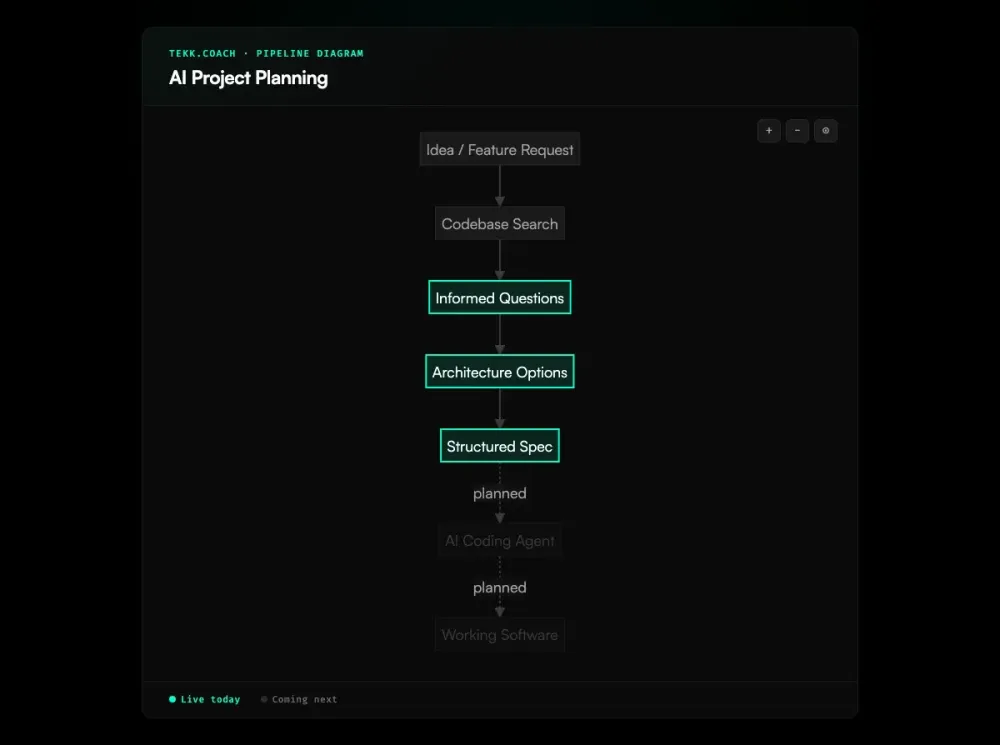
AI project planning is only as good as the context the AI has. Drop a feature idea into Claude or paste a description into your coding agent and you'll get a reasonable-sounding architecture — that doesn't fit your database schema, references a library you're not using, and skips the edge case your existing auth flow creates. A METR study on experienced open-source developers found that developers using AI actually took 19% longer on tasks — while believing AI had sped them up. The plan sounds right. It's wrong for your project.
Tekk.coach reads your codebase before planning anything. The agent searches your repository, identifies your stack and patterns, asks questions grounded in what it finds, and generates a structured spec — scope boundaries, subtasks with acceptance criteria, file references. Planning that fits your actual project, not a hypothetical one.
[Try Tekk.coach Free →]
Key Benefits
Codebase context before any planning begins The agent reads your repository before asking a single question. Every plan references your actual files, frameworks, and patterns. Generic plans that don't fit your architecture are a planning tool problem, not a developer problem.
Structured spec output, not a chat message Plans stream into a living document with scope boundaries, subtasks, acceptance criteria, and file references. This is the artifact your coding agent needs — not a wall of text to interpret.
Multi-turn planning that persists Planning sessions are stateful. Context builds across turns. You can come back to a session without re-explaining your architecture. Plans live in your workspace, not in chat history.
Web research during planning Building outside your expertise? Tekk researches current best practices and folds them into the spec. McKinsey's research on generative AI in product development found that gen AI improved product manager productivity by 40% when integrated into planning workflows. Payment integrations, AI pipelines, security patterns — you plan with the knowledge you need, not the knowledge you happen to have.
Expert review built in At any point, you can request a security review, architecture review, or performance review — grounded in your actual codebase. Planning that includes identifying what's wrong before you build it is planning that prevents expensive fixes later.
Planning and tracking in one workspace Plans become kanban tasks. Every card links to its full planning session. You see what's planned, what's in progress, what's done — without switching tools or translating specs into tickets manually. The plan and execute workflow keeps planning and implementation connected in one place.
How It Works
Step 1: Connect your repository Link your GitHub, GitLab, or Bitbucket repo. Tekk indexes it once and keeps it updated. No manual context-pasting required.
Step 2: Describe what you're planning Describe the feature, the refactor, the integration — whatever you're building next. One sentence to a full paragraph. You're giving intent; Tekk builds the plan.
Step 3: Multi-turn planning with grounded questions The agent asks questions based on what it found in your codebase. Not "what database are you using?" — it already knows. The questions surface scope boundaries, architectural tradeoffs, and edge cases your initial description didn't cover.
Step 4: Options (when there are real choices) When there are architecturally distinct approaches with genuine tradeoffs, the agent presents 2-3 options with honest tradeoffs. When there's an obvious path, it skips the options and moves directly to the plan.
Step 5: Review the spec The plan streams into the editor in real time. Read it. Edit it. The "Building / Not Building" section locks scope before execution starts. Approve when it's right.
Step 6: The plan becomes a task Approved plans live on your kanban board — with the full spec attached to the card. Track what's planned, what's in progress, what's done. Hand the spec to your coding agent, or dispatch via Tekk's execution layer (coming next).
Who This Is For
Founders and solo builders shipping software products who've stopped trusting generic AI planning because the output doesn't fit their architecture. You've tried dropping a feature description into Claude or pasting context into your coding agent and gotten something that looked right but broke when you started building against your actual database schema. Tekk plans against your actual schema.
Small engineering teams (1-10 people) without a dedicated architect. Planning in areas outside your expertise — security, AI integrations, data pipelines — is expensive when knowledge gaps produce bad specs. PMI's research on project success factors shows that having a clear vision of success gives a +41 Net Project Success Score, compared to -18 without one. Tekk fills those gaps with web research during the planning session.
Product managers who need technically grounded specs that engineers and coding agents can work from. Not a PRD template — a working document with subtasks, acceptance criteria, and file references that survives handoff to implementation. For teams running multiple agents in parallel across those plans, ai agent orchestration coordinates the execution layer so agents don't step on each other.
What Is AI Project Planning?
AI project planning is the use of artificial intelligence to generate, structure, and organize software project plans — translating rough intent into structured specifications that developers and coding agents can execute from.
In practice, it means: instead of manually decomposing a feature into tasks, writing acceptance criteria from scratch, and identifying dependencies yourself, an AI generates that structure. The quality of the output depends almost entirely on the quality of the context the AI has when planning.
Generic AI project planning — dropping a prompt into a chat AI or your coding agent without codebase access — produces generic plans. Without access to your codebase, the AI plans against a hypothetical architecture. PMI data shows that 37% of projects fail due to a lack of clear goals, and inaccurate collection of requirements remains a top cause of failure. For simple greenfield projects, generic planning works adequately. For anything built on an existing codebase, generic planning produces plans that don't fit.
Codebase-aware AI project planning reads your actual repository before planning. The difference in output quality is significant: subtasks reference real files, architectural decisions reflect existing patterns, and edge cases are surfaced before implementation starts rather than discovered mid-build.
Frequently Asked Questions
What is AI project planning?
AI project planning is using AI to generate structured plans for software projects — breaking features into subtasks, defining scope boundaries, identifying dependencies and risks, and producing the documentation that development teams and coding agents work from. The quality depends heavily on how much context the AI has about your actual project.
How is AI project planning different from prompting Claude or a coding agent directly?
Chat AI and coding agents plan against what you describe — which is rarely your entire project context. Tekk reads your actual repository before planning — semantic search, file discovery, framework detection. The plans it produces reference your real files, frameworks, and patterns. Generic AI planning vs. codebase-aware AI planning is the difference.
What makes AI project planning effective for software development?
Effective AI project planning requires three things: codebase context (so the plan fits your actual architecture), structured output (so coding agents can execute from it), and persistent sessions (so context builds rather than resetting each time). An APM survey found that AI use in project management has nearly doubled in two years, with 70% of project professionals reporting their organization now uses AI — but most tools still lack codebase awareness. Tekk provides all three.
What's the difference between AI project planning and AI project management?
AI project management adds AI features to project tracking workflows — sprint planning, timeline prediction, status summarization. It works with information you've already entered. AI project planning generates that information — the spec, the subtasks, the scope boundaries — from AI analysis of your codebase and requirements. Different problem, different tool.
Can AI project planning replace an architect?
For teams that lack architectural expertise in specific domains (security, AI systems, data pipelines), codebase-aware AI planning can fill knowledge gaps that would otherwise require a consultant or a senior hire. Research shows that knowledge workers spend 60% of their time on "work about work" — coordination, status updates, and context-gathering rather than actual planning. Tekk's web research during planning brings current best practices into the spec. It doesn't replace experienced judgment for complex architectural decisions, but it prevents the most common planning failures: wrong scope, missing dependencies, unresearched approaches.
How does Tekk handle AI project planning?
Tekk reads your codebase before generating any plan — semantic search, file discovery, framework detection. Multi-turn planning sessions surface questions based on what the agent found in your code. Options are presented when there are real architectural tradeoffs. The complete plan — TL;DR, scope boundaries, subtasks with acceptance criteria and file references — streams into an editable living document that becomes a task on your kanban board.
What does Tekk produce as the output of AI project planning?
A structured plan in a living document: a TL;DR, a "Building / Not Building" section with explicit scope boundaries, numbered subtasks with behavioral acceptance criteria and specific file references, assumptions with risk levels, and end-to-end validation scenarios. The document is editable before execution. It persists as a task card on the kanban board with the full planning session attached.
Ready to Try Tekk.coach?
Your projects deserve planning that fits your actual codebase — not generic advice that sounds right until you start building. Connect your repo and let Tekk plan your next feature from the ground up.
[Start Planning Free →]