
You're using Cursor or Claude Code. You're shipping fast. And you're rebuilding things you already shipped.
The problem isn't your coding agent. It's the spec you gave it. "Add magic link auth" isn't a spec — it's a prompt that produces code that almost works, in the wrong place, missing half the edge cases. Tekk.coach reads your codebase and turns rough ideas into structured, executable plans before your agent writes a single line.
No process overhead. No PRDs. Connect your repo, describe the problem, get a spec, execute.
How Tekk.coach Works as an AI Dev Tool for Startups
Tekk is the planning layer between you and your coding agents. It doesn't replace Cursor or Claude Code — it makes them dramatically more effective by giving them specs they can actually execute.
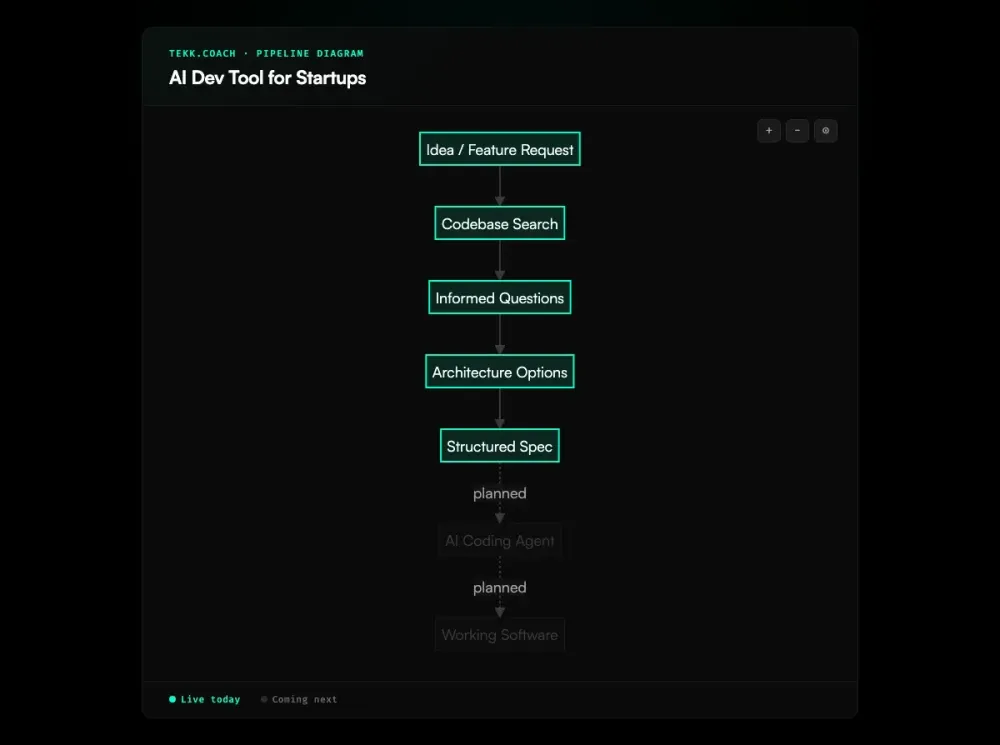
When you create a task in Tekk, the AI agent reads your codebase first. Not a generic overview — a deep pass: semantic search across your files, dependency mapping, framework detection, pattern recognition. It knows your stack before it asks a single question. You connect via GitHub, GitLab, or Bitbucket. Thirty seconds and it knows your repo.
Then it asks 3–6 questions grounded in what it found. Not "what language are you using?" — it already knows. It asks about the behavior you want, the tradeoffs you care about, what's in scope and what isn't. From there it presents 2–3 architecturally distinct approaches with honest tradeoffs, then writes the full spec into a living document you can edit directly.
The spec isn't a chat message. It includes a TL;DR, explicit scope boundaries (Building / Not Building), subtasks with acceptance criteria and file references, assumptions with risk levels, and validation scenarios. Your coding agent gets a plan it can actually follow.
Key Benefits
No more rework from vague prompts. When your coding agent has a codebase-grounded spec, it builds the right thing the first time. The accept criteria are in the plan, the file targets are in the plan, the edge cases are in the plan.
Senior engineering judgment without senior engineering headcount. Need a security review? Architecture check? Performance audit? Tekk reads your actual code and flags what needs fixing — the same judgment a senior engineer would apply, without the hire.
Scope defined before code is written. Every plan has an explicit "Not Building" section. You know what's in and what's out before your agent starts. Scope creep is the default without this — Tekk makes scope protection automatic.
One workspace, not three disconnected tools. Stop juggling AI chat for planning, Linear for tracking, and Cursor for coding. Tekk combines codebase-aware planning, a visual kanban board, and expert review in one place.
Free to start, no contracts. Subscription pricing. No enterprise commitments. You can be up and running in the time it takes to connect your GitHub repo.
How It Works
Step 1: Connect your repo. Authenticate with GitHub, GitLab, or Bitbucket. Tekk indexes your codebase — semantic search, file structure, frameworks, dependencies. This takes under a minute and needs to happen only once per repo.
Step 2: Describe what you're building. Type a task description in plain language. "Add Stripe webhook handling for subscription events." "Build a CSV export for the admin dashboard." Tekk does not need perfect input — it will ask the clarifying questions.
Step 3: Answer 3–6 targeted questions. The agent interrogates your description against what it found in the codebase. It surfaces hidden complexity, flags assumptions, and asks about the behavior you actually want. Each question is grounded in your real code, not a generic template.
Step 4: Review your options (when applicable). For decisions with real architectural tradeoffs, Tekk presents 2–3 approaches with honest pros, cons, and consequences. You pick the direction. When there's an obvious path, this step is skipped.
Step 5: Execute the spec. The complete plan streams into the task editor — TL;DR, scope boundaries, subtasks with acceptance criteria and file references, assumptions with risk levels, and test scenarios. You edit directly if needed. Then hand it to Cursor, Claude Code, or your agent of choice. They have everything they need to build it right.
Who This Is For
You're a startup founder who writes code — or leads a small team that does. You've adopted AI coding agents because they're genuinely fast. But you're spending a day every week fixing things that got built wrong, or rebuilding features because the first version missed the point. The problem isn't your tools. It's that no one sat down and specified what "done" looked like before the agent started. Adopting spec driven development up front is how fast-moving startups avoid the rework tax.
You're a developer on a team of 2–8 people. You don't have a dedicated architect. You don't have a senior engineer with 15 years of security and infrastructure experience. When you hit a domain you haven't worked in before — payments, auth, data pipelines, AI agents — you Google it, read some docs, make judgment calls, and hope. An ai technical co founder fills that gap — expert judgment on demand, grounded in your actual code.
You're a non-technical founder who needs real specs. You're working with a developer or using Claude Code yourself. You know what you want to build. You don't know how to translate it into something a coding agent can execute without going sideways. An ai prd generator grounded in your actual codebase bridges that gap — it asks the right questions and structures the output your agent needs.
This is not for you if you need custom Jira-style approval chains or enterprise governance workflows. Tekk is opinionated and lightweight by design.
What AI Dev Tools Are Startups Using?
The startup dev stack in 2026 has two layers: coding tools and everything else.
The coding layer is dominated by Cursor, Claude Code, GitHub Copilot, and Aider. These are the execution layer — they write and edit code across your codebase. Cursor is especially popular for refactoring MVP code into production-ready systems. Claude Code handles complex multi-file tasks with strong reasoning. GitHub Copilot has the widest IDE coverage. Aider is the open-source option for cost-conscious teams.
The planning layer is where most startups cobble things together. Claude or a coding agent for drafting rough ideas. Linear or Notion for task tracking. Slack threads for alignment. These tools aren't designed to work together, and context gets lost between each handoff.
Tekk sits at the boundary. It's not a coding tool — it's the AI planning layer that feeds your coding tools. You still use Cursor or Claude Code to write the code. Tekk makes sure they're building the right thing, in the right place, with the right scope, the first time.
Frequently Asked Questions
What is an AI dev tool for startups?
An AI dev tool for startups is software that uses AI to accelerate some part of the software development process — code generation, testing, code review, planning, or deployment. For startups specifically, the most valuable tools are ones that let small teams move at the speed of larger, better-funded organizations. In 2026, the most adopted categories are AI coding agents (Cursor, Claude Code, GitHub Copilot) and AI planning tools like Tekk.coach.
How do AI development tools help startups move faster?
AI development tools cut time on tasks that would otherwise require senior expertise or significant research — writing boilerplate code, generating tests, reviewing security, planning architecture. The compounding advantage for startups is that a 2–4 person team with good AI tooling can build and ship at the pace of a 10–15 person team. The caveat: that speed only compounds if the specs are right. Shipping fast in the wrong direction is slower than not shipping at all.
What AI coding tools do startups actually use?
The most widely adopted coding tools in the YC/startup ecosystem as of 2026: Cursor (repository-level agent, best for multi-file work and refactoring), Claude Code (strong reasoning, complex tasks), GitHub Copilot (inline suggestions, widest IDE coverage), and Aider (open-source, CLI-based, budget-friendly). Most teams pick one primary coding agent and use Claude or another chat AI for planning — though those aren't purpose-built for it.
How does Tekk.coach work as an AI dev tool for startups?
Tekk.coach is the planning layer above your coding agents. You connect your repo, describe what you want to build, and Tekk's agent reads your codebase, asks targeted questions, presents options when there are real tradeoffs, and writes a complete spec into an editable living document. That spec — with scope boundaries, subtasks, acceptance criteria, and file references — is what you hand to Cursor, Claude Code, or your agent of choice. Tekk doesn't write the code; it makes sure your coding agent writes the right code.
Can a startup use AI tools without a senior engineer?
Yes — that's the core use case for Tekk. You don't need a senior engineer to plan well if you have a tool that reads your codebase, surfaces architectural tradeoffs, and applies expert review to your code on demand. Tekk's review modes (security, architecture, performance, agent improvement) give solo founders and small teams access to the kind of judgment that used to require a senior hire. It won't replace a great senior engineer, but it closes the gap considerably for teams that can't yet make that hire.
Do AI dev tools create technical debt?
Yes — if used without good specs. Stack Overflow documented this in January 2026: "AI can 10x developers... in creating tech debt." The average developer checked in 75% more code in 2025 versus 2022, but maintenance costs grew alongside it. The root cause: AI coding agents generate code based on patterns, not your architecture. They don't know what your system assumes, what your conventions are, or what you're not building. Good specs fix this. That's what Tekk produces.
What's the difference between Cursor and Tekk.coach?
Cursor writes code. Tekk writes the spec that Cursor uses. They're complementary, not competing. Cursor is the execution layer — it takes a task and implements it across your codebase. Tekk is the planning layer — it reads your codebase, asks the right questions, and produces a structured spec with scope boundaries, acceptance criteria, and file targets. The YC Requests for Startups document said it plainly: "Cursor and Claude Code are great at helping teams build software once it's clear what needs to be built."
Is Tekk.coach free for startups?
Tekk.coach is free to start. It runs on subscription pricing — no enterprise contracts, no custom negotiations. You connect your GitHub repo, run your first planning session, and see exactly what you're getting before you pay anything.
Ready to Build Without the Rework?
You already have the coding agents. What you're missing is the planning layer that makes them worth what you're paying for them.
Connect your repo, describe your next feature, and get a spec in minutes — grounded in your actual codebase, scoped correctly, ready for Cursor or Claude Code to execute.