
You have the product vision. You have Cursor, or Lovable, or Claude Code. And you keep hitting the same wall: the AI asks you a question you don't know how to answer.
"What's your database schema?" "Should this use a webhook or a polling mechanism?" "What's your session management pattern?" You're not a developer. You don't know. So you guess, or you skip it, and the AI builds something that almost works — or doesn't work at all.
Tekk solves the part none of the AI coding tools solve: the translation layer between your product vision and a spec your coding agent can actually execute. Tekk reads your codebase, asks you questions you can answer, and produces a structured plan grounded in what's already in your repo. You stop managing the AI. You start building. For founders who want dedicated technical guidance beyond spec generation, an ai technical co founder fills the broader gap.
[Try Tekk.coach Free →]
How Tekk Works for Non-Technical Founders
Most AI coding tools hand you a blank input field and expect you to know what to type. Tekk works differently: it does the technical legwork first, so you don't have to.
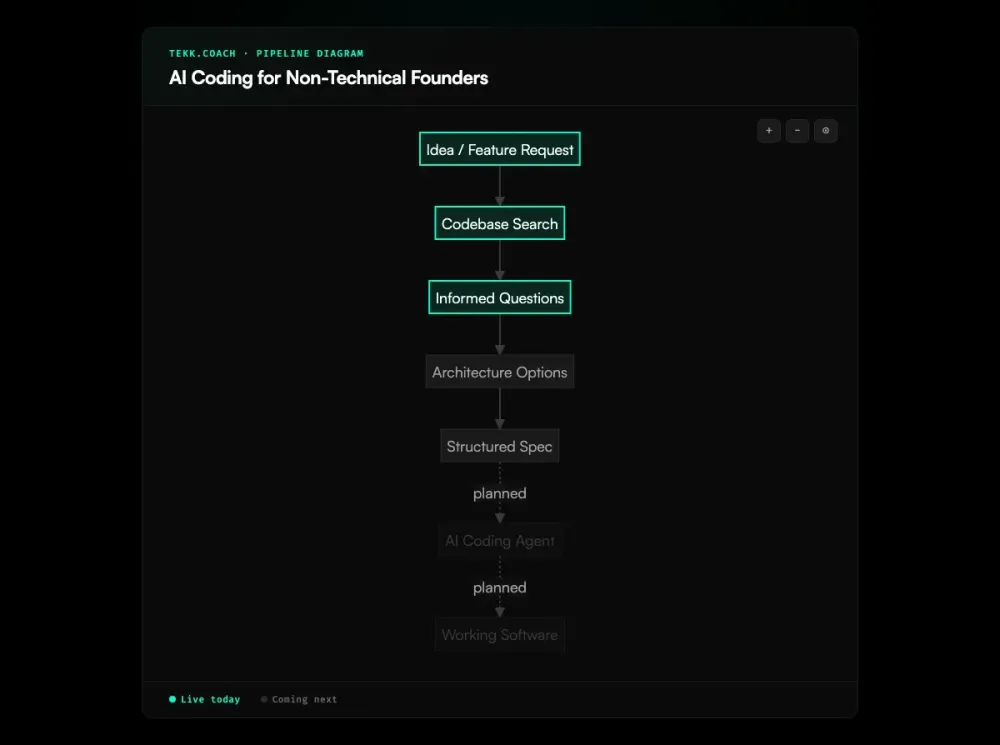
Before asking you a single question, Tekk reads your actual codebase. It maps your file structure, identifies your language, framework, and database patterns, and finds the relevant code related to what you're trying to build. You don't tell it any of this. It finds it. A non-technical founder who has no idea whether their app uses "Drizzle or Prisma or something else" doesn't need to know — Tekk knows.
Then Tekk asks you questions grounded in what it found. Not generic technical questions — questions you can actually answer. "Your app currently stores user permissions as a boolean flag. Should the new admin role use the same pattern, or do you want different permission levels?" That's a product decision, not a technical one. You have an answer.
From there, Tekk presents two or three architectural approaches with honest tradeoffs in plain language — not jargon. You pick the direction. Then Tekk writes the spec: a complete, structured plan with scope boundaries, subtasks with acceptance criteria, and explicit "Not Building" sections. You hand that spec to Cursor or Claude Code. The agent executes correctly the first time instead of building something that misses the point.
Key Benefits
No technical vocabulary required Describe what you're building in plain language. Tekk extracts the technical context from your codebase — you don't have to provide it.
Tekk translates vision into spec There's a gap between "I want a dashboard for team admins" and what a coding agent actually needs to execute that. Tekk bridges it, producing a structured spec with subtasks, acceptance criteria, and file references that your agent can work from.
Grounded in your actual codebase General AI assistants hallucinate solutions that conflict with your existing code. Tekk reads your repo before generating anything, so the plan fits what's already there. No invented patterns, no wrong ORMs, no "oh it assumed I was using MongoDB."
You approve before anything is built Tekk shows you the plan — with explicit scope on what's being built and what isn't — before your coding agent writes a line. You stay in control. No surprises.
How It Works
Step 1: Connect your repository Link your GitHub, GitLab, or Bitbucket repo. Tekk's agent reads your codebase — file structure, language, framework, dependencies, patterns. This happens automatically. You don't configure anything.
Step 2: Describe what you want to build In plain language. "I want users to be able to invite teammates by email." "I need a way for admins to see all active subscriptions." No technical vocabulary required. Tekk figures out the rest.
Step 3: Answer questions you can actually answer Tekk asks 3–6 questions grounded in what it found in your code. These are product decisions, not technical ones. You have the answers because they're about your product, not your implementation.
Step 4: Review the plan Tekk writes a complete spec and streams it into a living document editor. You see the full plan: what's being built, what's explicitly out of scope, the subtasks with acceptance criteria, the assumptions and their risk levels. You edit anything you want to change.
Step 5: Hand the spec to your coding agent Copy the spec to Cursor, Claude Code, or Codex. The agent has everything it needs: context about the codebase, clear scope, behavioral subtasks, file references. It builds what you wanted, the first time. This structured handoff is at the core of spec driven development — defining what gets built before any code is written.
Who This Is For
You're building a software product. You have a clear product vision. You're using Cursor, Lovable, Claude Code, or some combination — but you keep hitting a wall where the AI asks you a question and you don't know the answer. You're spending more time managing the AI than building. That's the gap Tekk fills.
Specifically:
Solo founders without a technical co-founder — You have no one to translate between your product thinking and your coding tools. You've been spending hours trying to phrase prompts correctly, watching the AI build the wrong thing, and starting over. Tekk is the technical translator you've been missing.
Idea-stage builders who've moved past "just get something running" — Lovable or Bolt.new got you to a working prototype. Now you need to build the features that make the product real — auth flows, data models, admin tools — and the no-code builder can't handle it. You need to direct an AI coding agent precisely.
Non-technical founders who've hired one developer — Your developer is AI-assisted but still needs clear direction. You can't review their code. You can communicate at the product level, but the gap between your product description and a clear technical spec keeps creating rework. An ai prd generator grounded in your codebase gives both of you the same document to work from — so the developer knows exactly what to build.
Founders who know they're not catching what the AI gets wrong — The code looks fine to you. But you've had the experience of an AI building something confidently that turned out to be broken, insecure, or incompatible with the rest of the app. You want a layer that grounds the AI's output in your actual codebase, not generic patterns from its training data.
What Does an AI Coding Tool for Non-Technical Founders Actually Do?
Most tools marketed to non-technical founders are no-code builders: describe your app, get a running prototype. That's genuinely useful for MVPs. But it covers a narrow slice of what founders actually need once they're building something real.
The harder problem is directing AI coding agents — Cursor, Claude Code, Codex — when you don't have the technical vocabulary to give them precise instructions. These tools are not no-code builders. They need context about your codebase, architectural constraints, and explicit scope to produce good output. When a non-technical founder types "add magic link auth to my app" into Cursor, Cursor doesn't know what ORM you're using, what your session pattern looks like, or what the "Not Building" boundaries are. It guesses. Sometimes it guesses right. Often it doesn't.
The translation layer matters because technical vocabulary is a real barrier. When Cursor asks "should this use optimistic UI updates with local state rehydration?" and you don't know what that means, you're stuck. You can't evaluate the question, you can't give a good answer, and you're not in a position to catch if the AI makes a wrong assumption. This is where most non-technical founders lose hours — not in the AI building the wrong thing, but in the back-and-forth trying to course-correct without the vocabulary to describe what's wrong.
Tekk addresses this by flipping the order: read the codebase first, extract the technical context, ask the product questions the founder can answer, then produce a spec the coding agent can execute without ambiguity. The founder stays in their domain — product decisions — and the agent stays in its domain — implementation. The spec is the bridge.
Frequently Asked Questions
Can non-technical founders use AI coding tools?
Yes — though the tools vary significantly in what they actually require from you. No-code builders like Lovable and Bolt.new work well for MVPs that can be generated from scratch. AI code editors like Cursor are more powerful but require more technical context. The gap most non-technical founders run into isn't access — it's knowing how to give these tools enough context to build what you actually want.
What is the best AI coding tool for non-technical founders?
It depends on where you are in the build. For a greenfield MVP, Lovable or Bolt.new are the fastest paths to something working. For founders with an existing codebase who need to direct AI coding agents precisely, you need a planning layer that reads your actual code — which is what Tekk provides. The best stack is often: Lovable to get started, Tekk + Cursor to build features once you have a real product.
How does Tekk help non-technical founders?
Tekk reads your codebase before you describe anything. It extracts the technical context — language, framework, database patterns, file structure — so you don't have to explain it. Then it asks you questions you can answer (product questions, not technical ones), presents architectural options in plain language, and produces a structured spec your coding agent can execute. You skip the part where the AI asks you something you don't know how to answer.
Do I need to understand code to use Tekk?
No. You need to understand your product — what it should do, who uses it, what the rules are. Tekk handles the technical translation. You'll see references to files and code patterns in the spec it produces, but you don't need to understand them — the spec is for your coding agent, not for you to read as a developer.
What's the difference between Tekk and Lovable for non-technical founders?
Lovable builds full-stack apps from scratch using natural language — no codebase required. It's ideal for getting from idea to deployed prototype fast. Tekk is for founders who already have code (or are working with a developer) and need to direct AI coding agents to build specific features precisely. They solve different stages of the same problem: Lovable for "I need something running," Tekk for "I need to build this feature correctly in my actual product."
How does Tekk translate a non-technical idea into a technical spec?
The process runs in four stages: Tekk reads your repository (semantic search, file search, directory analysis), then asks you questions grounded in what it found, then presents architectural options with tradeoffs in plain language, then generates a complete spec with scope boundaries, subtasks with acceptance criteria, and explicit "Not Building" sections. The key is that Tekk extracts technical context from your code — it doesn't ask you to provide context you don't have.
Start Planning Free →
You shouldn't need a technical co-founder to direct an AI coding agent. Tekk reads your codebase, asks the right questions, and produces the spec your agent needs to build what you actually want.
Connect your repo and describe what you're building. The first session is free.
[Start Planning Free →]