
You've got a solid AI coding agent — Cursor, Claude Code, Codex. It's fast. It writes real code across real files. And it still keeps producing rework, scope creep, and implementations that technically run but aren't what you asked for. VentureBeat reports the core issues: brittle context windows, butterfly-effect changes, and silent failures.
The problem isn't the agent. It's what you gave it.
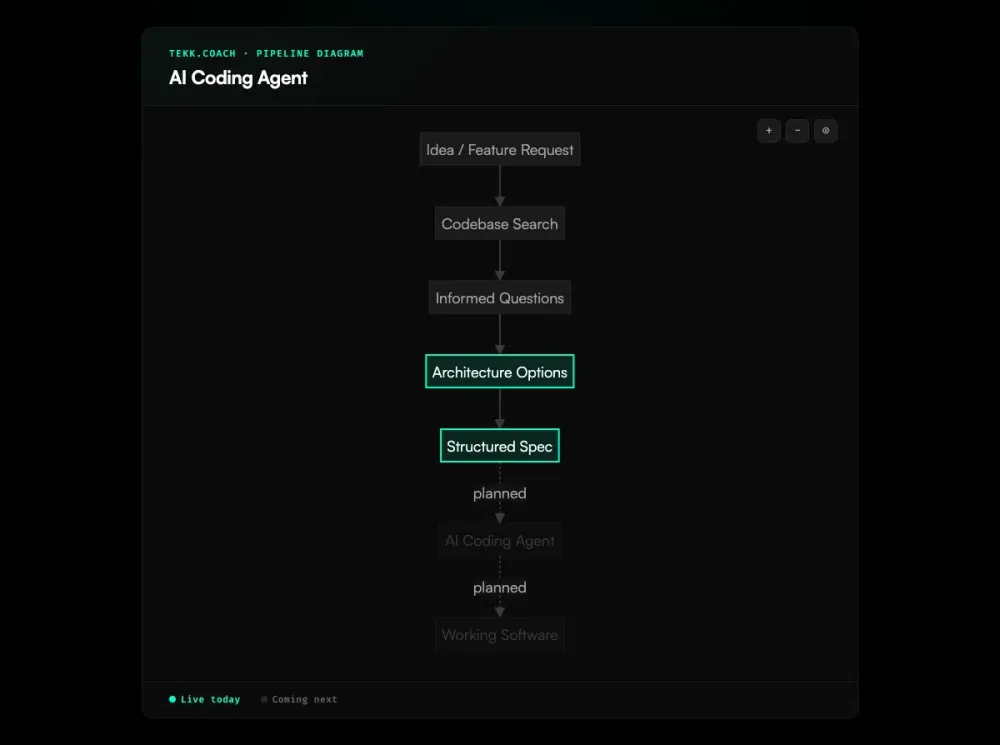
Tekk.coach is the intelligence layer above your coding agent. It reads your codebase, asks informed questions, generates a structured spec — then hands it to your agent. Your agent finally knows exactly what to build, what not to touch, and what done looks like.
[Try Tekk.coach Free →]
How Tekk.coach works with AI coding agents
Cursor is good. Claude Code is good. Codex is good. The gap isn't the agent — it's the input.
Most developers hand their agent a sentence. "Add OAuth to my app." "Fix the checkout flow." The agent doesn't have your codebase in its head. It makes assumptions, builds from those assumptions, and you spend an hour untangling output you wouldn't have chosen. As The Gnar Company explains, LLMs are biased toward forcing solutions rather than asking for missing context. That's a spec problem, not an agent problem.
Tekk fixes the spec. Before generating anything, it reads your codebase via semantic search, file search, and directory browsing across GitHub, GitLab, or Bitbucket. It asks 3-6 questions grounded in what it actually found — not generic questions. Real ones: "You're using Passport.js for Google OAuth — should magic links share that session model or use a separate JWT flow?" This is spec driven development applied to the planning layer — producing specs your agent can actually execute instead of interpret.
You answer. Tekk presents two or three architecturally distinct approaches with honest tradeoffs. You pick one. Tekk writes the full spec.
What an ai powered coding agent actually needs: what's being built, what's explicitly not being built, subtasks described as behavior rather than file names, acceptance criteria per subtask, file references, assumptions with risk levels, and validation scenarios. That spec streams into a working document in the editor. Not a chat message. A document your team works from — and edits before handing off.
The contrast is concrete. What you type into Cursor: "Add magic link auth." What Tekk hands to Cursor: database schema, API routes, acceptance criteria per subtask, file targets, dependencies, and a "Not Building" section — specific to your repo's actual language, framework, and ORM.
That's why the agent ships the right thing.
Key benefits
Codebase-grounded specs your agent can actually execute Tekk reads your repo before writing anything. Every subtask references actual files and patterns from your codebase. No generic boilerplate. No "I assumed you were using Express" surprises mid-implementation. Simon Willison found that agents work best on well-defined tasks with clear acceptance criteria — exactly what Tekk produces.
Explicit scope boundaries — no more runaway builds Every plan includes a "Not Building" section. Your coding ai agent knows exactly what to touch and what to leave alone. Addy Osmani's AI coding workflow confirms it: break work into small, well-scoped chunks with clear boundaries. This directly addresses the most common frustration in agentic coding: changing one thing and watching three others break.
Structured subtasks with acceptance criteria "User can log in with a magic link" with acceptance criteria and file targets executes differently in an agent than "update the auth flow." The spec you feed in determines what you get back.
Works with any coding agent — Cursor, Claude Code, Codex, Gemini Tekk is agent-agnostic. The spec it produces is a structured document you hand to whatever agent you're already using. You choose the execution layer. Tekk gives it what it needs to perform.
How it works
Step 1: Connect your repo Link GitHub, GitLab, or Bitbucket. Tekk reads your codebase via semantic search, file search, and directory browsing. It understands your stack before you describe the problem.
Step 2: Describe the feature A sentence or a paragraph — either works. Tekk uses your codebase as the real context, not the words you used to describe the goal.
Step 3: Answer a few questions 3-6 questions grounded in what Tekk found in your code. If the code already answers a question, Tekk doesn't ask it.
Step 4: Review your options Two or three architecturally distinct approaches, each with honest tradeoffs. Pick one. If there's one obvious path, Tekk skips this and moves straight to the spec.
Step 5: Get the spec — hand it to your agent Tekk writes the full plan into the task editor in real time. Review it, edit if needed, then copy it to your ai agent coding workflow. Paste into Cursor. Hand it to Claude Code. Run it with Codex. Your agent has what it needs.
Execution dispatch — where Tekk sends the approved spec directly to your connected agent and tracks progress on the kanban board — is coming next. For teams coordinating multiple agents across complex workflows, ai agent orchestration provides the coordination layer above the individual coding agent.
Who this is for
You're already using a coding agent. You've shipped real things with it. You also know the results are inconsistent — sometimes the agent nails it, sometimes you spend more time reviewing and correcting than you would have spent writing the code yourself.
That inconsistency almost always traces back to the spec. Not the agent.
- Solo founders and indie builders who can't afford rework. Plan it right once and know it's going to work.
- Developers using Cursor, Claude Code, or Codex who get inconsistent results and want to understand why. The answer is almost always the prompt.
- Small teams (1-10 people) without a dedicated architect — Tekk fills the knowledge gaps that would otherwise take days to research or thousands to consult. AI project planning grounded in your codebase is what separates teams that ship correctly from teams that rework repeatedly.
- Product managers who need technically grounded specs — real specs a coding agent can execute, not AI-summarized notes or blank templates.
Tekk is not for senior engineers who already write tight specs, or enterprise teams that need Jira-style process governance. It's for people who want to move fast and get it right the first time.
What is an AI coding agent?
An AI coding agent is an autonomous system built on a large language model that performs software engineering tasks without step-by-step human guidance. Unlike earlier AI assistants that responded to a single prompt and waited, a coding agent reads code, plans changes, writes across multiple files, runs tests, observes results, and iterates — often for minutes at a stretch without a human in the loop.
The category evolved fast. According to the Stack Overflow 2025 Developer Survey, 84% of developers now use AI tools — but only 29% trust the outputs to be accurate. Gartner projects that 90% of software engineers will use AI code assistants by 2028. A Morph LLM study testing 15 agents found that agent scaffolding matters as much as the model — the same model scored 17 problems apart depending on which agent wrapper it ran inside. The major players each bring something different to the table:
- Cursor — the most widely adopted IDE-based agent among individuals and small teams. Visual diffs, multi-file editing, Background Agents for longer runs.
- Claude Code — fastest-growing in the category. CLI-based, strong contextual reasoning, 46% "most loved" rating in early 2026 developer surveys.
- OpenAI Codex — repo-scale reasoning, deterministic multi-step execution, coordinates changes across the full codebase.
- GitHub Copilot — enterprise standard. Inline suggestions, agent mode added in 2025, lowest entry cost.
- Windsurf — ranked #1 for value-for-money (LogRocket, February 2026). Fully agentic Cascade feature.
Any ai agent for coding is only as good as the input it receives. The agents have gotten genuinely capable. The bottleneck has shifted — it's not the model, it's the spec. Tekk makes the spec precise.
Frequently asked questions
What is the best AI coding agent in 2026?
Cursor leads in adoption among individuals and small teams. Claude Code has the highest developer satisfaction in early 2026 surveys (46% "most loved," compared to Cursor at 19%). Windsurf ranks #1 for value-for-money. OpenAI Codex handles multi-step repo-scale tasks well.
The honest answer: the best ai coding agent for your team is probably the one you're already using. Because what separates consistently good results from inconsistent ones isn't which agent you picked — it's the quality of the spec you gave it.
What is an AI agent for coding?
An ai agent for coding is an LLM-based system that executes software development tasks autonomously. It reads code, plans changes, writes across files, runs tests, and iterates — without requiring a human prompt at every step. Tools like Cursor, Claude Code, Codex, and Copilot are coding agents. They differ from earlier AI assistants in that they take actions, not just offer suggestions.
How does an AI powered coding agent work?
An ai powered coding agent operates in a loop: read the codebase, plan the changes needed to reach the goal, write code, run tests, observe results, adjust, repeat. The loop continues until either the task is done or the agent hits a state it can't resolve. The quality of the output depends heavily on how clearly the goal was defined at the start. An agent given a precise spec with explicit scope boundaries and acceptance criteria performs differently than one given a vague paragraph — even if both are technically responding to "the same request."
What's the difference between an AI coding agent and a planning tool?
A coding agent writes code. A planning tool — like Tekk — generates the spec that tells the coding agent what to write. They're different layers in the same workflow. Tekk is not a coding agent. It doesn't write a single line of production code. What it produces is the structured document — with scope, subtasks, file references, and acceptance criteria — that makes the coding agent's output correct.
Which coding AI agent should I use?
It depends on your stack and workflow. Cursor is the power user favorite for IDE integration. Claude Code is the choice for CLI workflows and strong contextual reasoning. Codex handles multi-step repo-scale tasks. Copilot is the lowest-friction enterprise entry point. Windsurf is the value pick.
The more important question: are you giving whichever coding ai agent you use the inputs it needs? Most inconsistent results have nothing to do with which agent you chose.
How do I get better results from my AI agent coding workflow?
Replace vague paragraphs with structured specs. Your ai agent coding workflow breaks down when the agent doesn't know the scope, doesn't have the file context, and hasn't been told what "done" means per subtask. Tekk generates exactly that. Most of the frustration in agentic development — butterfly-effect breaks, wrong implementations, hour-long untangling sessions — traces back to prompts that were too vague.
Is Tekk.coach an AI coding agent?
No. Tekk.coach is the planning layer above AI coding agents. It reads your codebase, asks informed questions, generates structured specs — and then you hand those specs to your coding agent of choice. Tekk doesn't write production code. It makes the agent you're already using significantly more effective by giving it a spec instead of a paragraph. Think of it as the intelligence layer between you and the agent — not a replacement for the agent itself.
Start planning free
Every coding agent you're paying for is capable of better output. The bottleneck is the spec.
Connect your repo, describe the feature, get a structured plan your agent can actually execute. No PRDs. No alignment meetings. Just specs that work.
[Start Planning Free →]