
Your coding agent just shipped code that duplicated a function that already existed. It ignored your ORM. It didn't know about the service layer it was supposed to call. That's what codebase-unaware AI looks like — and according to Microsoft Research, developers already spend the majority of their time understanding code rather than writing it.
Tekk.coach reads your repository before it plans anything. Four retrieval mechanisms — semantic search, file search, regex, and directory browsing — find exactly what's relevant to what you're building. Not a file dump. A purposeful investigation.
Connect your GitHub, GitLab, or Bitbucket repo and get a spec grounded in your actual code.
How Tekk.coach Does Codebase Analysis
Before the agent asks its first question, it reads your codebase. This isn't a one-time scan you trigger manually. It happens automatically when you describe what you want to build, and the analysis shapes everything that follows.
Tekk uses four retrieval mechanisms in combination:
- Semantic search via embeddings finds code that's conceptually related to what you're planning — even if the file names don't match and you wouldn't have known to look there
- File search for precise lookups when paths or names are already known
- Regex search for pattern matching across the full repo — finding all usages, all implementations of a convention
- Directory browsing for structural understanding — how the project is organized, where services live, what the module boundaries are
On top of that, Tekk profiles your repository: languages, frameworks, services, package dependencies. By the time the agent asks its first question, it knows your stack.
The analysis persists throughout the session. Every question the agent asks, every architectural option it presents, every subtask in the final spec — all of it references what was found in your actual codebase. Not generic boilerplate. Not pattern-matched suggestions from training data. Your code. That codebase grounding is also what makes ai project planning reliable — the plan fits the system that actually exists.
This is the difference between an AI tool that reads your code and one that understands your system.
Key Benefits
Specs that fit your codebase The agent reads your existing patterns, frameworks, and service boundaries before generating anything. Subtasks in the output reference specific files. The plan fits the system that already exists — which is why this is the foundation of spec driven development.
No manual context pasting Connect your repo via OAuth (GitHub, GitLab, Bitbucket) once. Tekk handles the rest. You don't curate file lists. You don't paste code into chat windows. You describe what you want to build. As the DX Newsletter's research on onboarding shows, new developers take one to two months on average to reach productivity — mostly because codebase understanding is the bottleneck, not access.
Persistent context across a session The analysis isn't discarded at the end of each message. The agent builds on prior context across multi-turn planning sessions. It doesn't start fresh every turn.
Analysis grounded in intent Tekk doesn't retrieve files randomly. It searches based on what you're planning to build. The retrieval is purposeful — the agent follows leads, checks related files, and investigates before it concludes.
Scope protection built in Every plan includes an explicit "Not Building" section. The analysis informs what's out of scope as clearly as what's in it. You know the boundaries before anyone writes a line of code.
How It Works
Step 1: Connect your repo Link your GitHub, GitLab, or Bitbucket account via OAuth. Tekk indexes your repository using embeddings and builds a structural profile — languages, frameworks, services, dependencies.
Step 2: Describe what you're building Tell the agent what feature you want to add, what you want to review, or what problem you're solving. One sentence is enough to start.
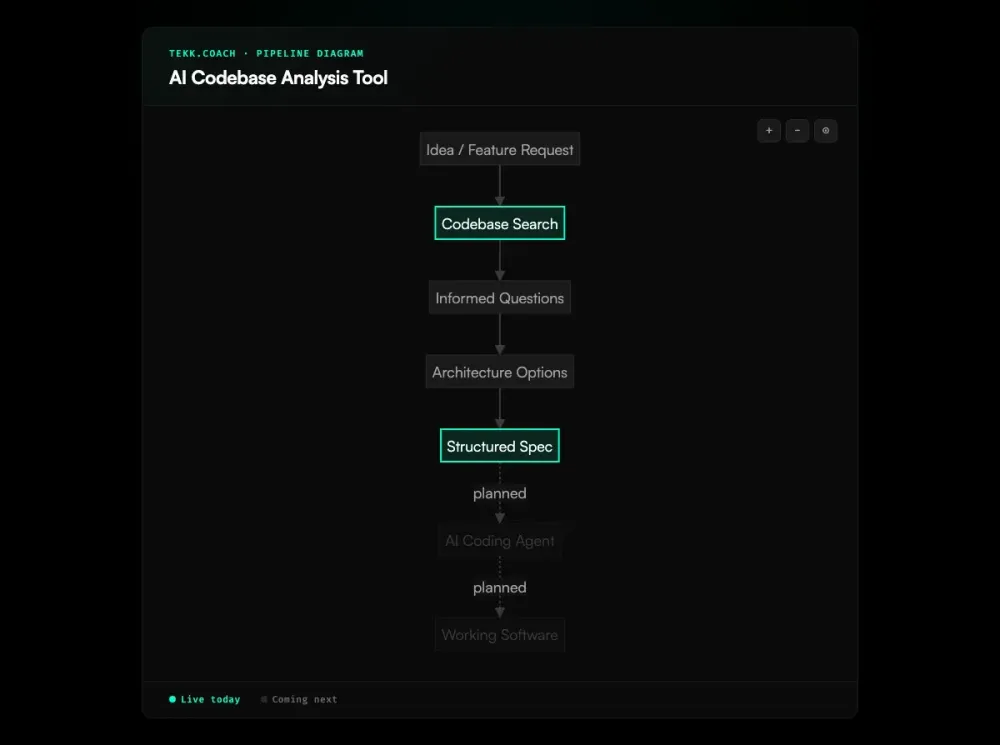
Step 3: Agent reads the codebase The agent searches your repository using semantic search, file search, regex patterns, and directory exploration — finding everything relevant to what you described. It does this before asking anything.
Step 4: Informed questions The agent asks 3-6 questions grounded in what it found. Not generic requirements-gathering questions. Questions that reference your actual service layer, your existing auth patterns, your current database schema.
Step 5: Options and plan The agent presents 2-3 architecturally distinct approaches with honest tradeoffs, then generates a complete spec: TL;DR, scope boundaries (Building / Not Building), subtasks with acceptance criteria and file references, assumptions with risk levels, and validation scenarios.
The output streams into a live document editor. It's the spec your team works from.
Who This Is For
Developers building with AI coding agents You're using Cursor, Claude Code, or Codex. According to GitHub's 2025 Octoverse report, 80% of new developers use Copilot in their first week — yet your agents are producing code that doesn't fit the existing system. Rework is piling up because the specs you're giving them don't account for what's already in the repo. Tekk fixes the spec layer — analysis first, then a plan the agent can actually execute correctly. For teams running multiple agents across a workflow, ai agent orchestration depends on this same codebase grounding at every stage.
Founders and solo builders You're the only engineer. You don't have a senior architect to review whether your plan fits the existing code. Tekk reads your codebase and acts as that second set of eyes before you build — not after.
Small teams without dedicated architects Your team moves fast. Nobody has time to manually review whether a new feature conflicts with existing patterns. Research from Faros AI found that teams with high AI adoption complete 21% more tasks but see PR review time increase by 91% — the bottleneck shifts to human approval. Tekk's codebase analysis surfaces those conflicts before they become bugs, rework, or production incidents.
What Is an AI Codebase Analysis Tool?
An AI codebase analysis tool reads a software repository and builds an understanding of how the system works — which functions call which, where dependencies live, what frameworks are in use, what patterns repeat across the codebase. The goal is to give an AI model the contextual knowledge that would otherwise require a developer to read the entire codebase manually.
In 2026, this category covers a wide range of approaches. File-packing tools like Repomix concatenate your repo into a single text blob you paste into a chat interface. Semantic search tools like Sourcegraph Cody index the repo using vector embeddings and let you ask natural language questions about it. Code graph tools like Greptile trace multi-hop dependency paths across your entire repository. Agentic tools actively search the codebase based on what they're trying to accomplish.
The underlying problem these tools address is well-documented: AI coding assistants that operate without codebase context produce code that duplicates existing logic, violates architectural conventions, and references deprecated APIs. A randomized controlled trial by METR found that AI tooling actually slowed experienced open-source developers by 19% on real tasks — largely because the AI lacked the contextual understanding to be helpful. Between 33% and 67% of AI-generated code requires manual fixes, and most of those fixes exist because the AI didn't know what was already in the system. Codebase analysis is the prerequisite for AI assistance that actually fits your software.
Frequently Asked Questions
What is an AI codebase analysis tool?
An AI codebase analysis tool reads a software repository and builds a model of how the system works — dependencies, patterns, frameworks, architecture. It gives an AI agent the contextual understanding needed to make suggestions that fit the existing codebase, not generic recommendations based on training data alone.
How does AI codebase analysis work?
Most tools use one of three approaches: context window stuffing (pack files into a prompt), embedding-based retrieval (index the repo into vectors, retrieve relevant chunks at query time), or agentic investigation (an agent actively searches the codebase using multiple strategies based on what it's trying to find). The differences in these approaches matter significantly for accuracy and usefulness on non-trivial codebases.
How does Tekk.coach analyze my codebase?
Tekk uses four mechanisms in combination: semantic search via embeddings (finds code related to what you're planning by intent), file search (precise lookups), regex search (pattern matching), and directory browsing (structural understanding). It also profiles the repository — languages, frameworks, services, package dependencies — before the planning session begins. The analysis happens automatically when you describe what you want to build.
What's the difference between Tekk.coach and Repomix?
Repomix packs your codebase into a text file for you to paste into a chat interface. It's passive — it gathers files, you decide which ones, you paste them, you do the planning in a generic chat window. Tekk's codebase reading is active and purposeful: the agent searches for specific things based on what you're planning to build, finds files you wouldn't have thought to include, and uses that understanding to generate a structured spec directly. No pasting, no manual file selection, no one-shot context.
Can I use Tekk.coach with GitHub, GitLab, or Bitbucket?
Yes. Tekk connects to GitHub, GitLab, and Bitbucket via OAuth. You authenticate once and the agent can read your repositories directly. No export, no file upload, no manual copy-paste step.
What are the limitations of AI codebase analysis tools?
Context window limits mean most file-packing tools become lossy on large codebases — they can't include everything and must truncate. Embedding-based tools retrieve relevant chunks but don't always surface cross-file relationships or architectural constraints. All AI tools face knowledge cutoff issues for rapidly-evolving libraries. There's also a comprehension gap: Anthropic's research on AI-assisted coding found that developers using AI scored 17% lower on code comprehension tests — suggesting that tools which offload understanding rather than building it can erode the very skills developers need. The biggest practical limitation is when a tool reads code but doesn't connect that reading to a concrete, actionable output — you get answers about your codebase but still have to build the plan yourself.
Is Tekk.coach a code search tool like Sourcegraph?
No. Sourcegraph is a code search and navigation tool — it helps you find and understand what's in your codebase. Tekk's codebase analysis is the means, not the end. The end is a structured spec that tells you exactly what to build, how to build it, what the scope boundaries are, and which files are affected. The analysis happens in service of the plan.
Who should use an AI codebase analyzer?
Anyone who's giving AI coding agents vague prompts and getting code that doesn't fit their system. If you're using Cursor, Claude Code, or Codex and finding that the output needs significant rework because the agent didn't know what was already in the repo — that's the problem a codebase analyzer solves. Tekk is specifically for developers, founders, and small teams who want to front-load that understanding into a structured spec before any code is written.
Ready to Try Tekk.coach?
Your coding agent is only as good as the spec you give it. Give it one grounded in your actual codebase.
Connect your repo, describe what you want to build, and get a structured plan in minutes.