
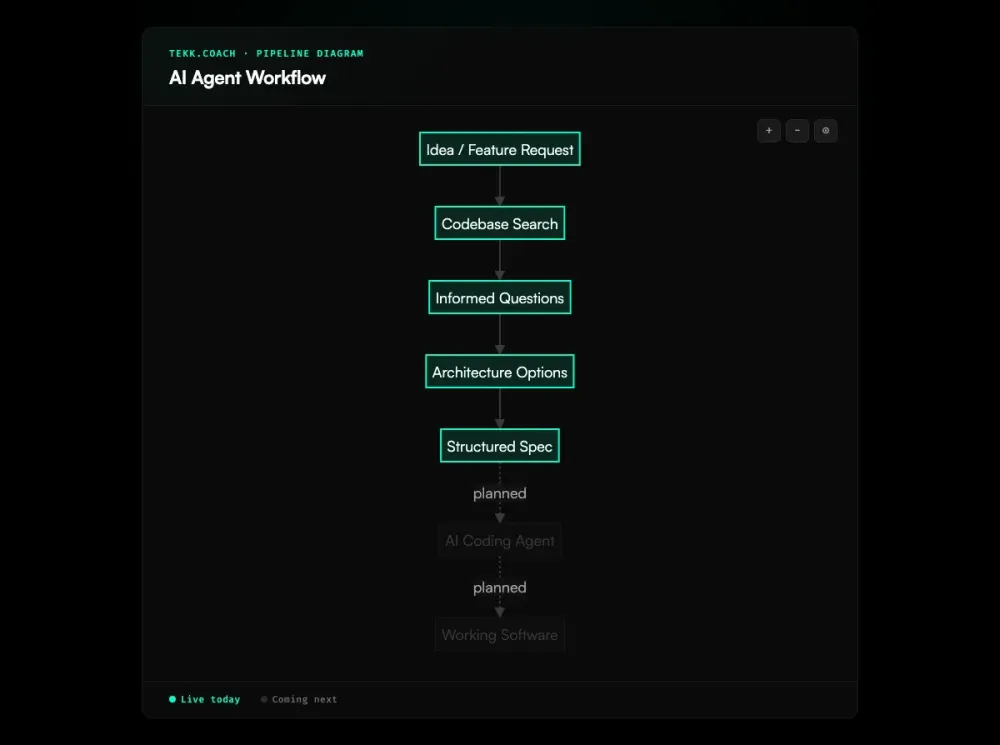
Most AI agent workflows for coding follow the same pattern: write a prompt, generate some code, find out it's wrong, fix it, repeat. That's not a workflow. That's trial and error with expensive tooling.
Tekk gives you a structured AI agent workflow with five stages, each grounded in your real codebase. The agent reads your code before asking a single question. It proposes distinct approaches before writing a line of spec. The output is a living document your coding agent can execute from — not a chat message you copy into a terminal and hope for the best.
[Try Tekk.coach Free →]
How Tekk.coach's AI Agent Workflow Works
Five stages. Each one builds on the last. Each one is grounded in your actual codebase — not generic patterns or training data guesses.
1. Search The agent reads your repository before engaging. It runs semantic search via embeddings, file search, regex search, and directory browsing. It profiles your languages, frameworks, packages, and services. By the time it asks you anything, it already knows your code.
2. Questions The agent asks 3-6 questions grounded in what it found. Not "what's your tech stack?" — it already knows. The questions surface hidden complexity, ambiguous requirements, and scope boundaries that need to be settled before anyone writes code.
3. Options The agent presents 2-3 architecturally distinct approaches with honest tradeoffs. You see what each path costs and what you give up. When there's one obvious path, this step is skipped. When the decision matters, you make it here — before code gets written.
4. Plan The complete structured spec streams into your task editor in real time. Every plan includes a TL;DR, explicit Building/Not Building scope boundaries, subtasks with acceptance criteria and file references, assumptions with risk levels, and concrete validation scenarios. This is the document your team and your coding agents work from.
5. Execute (coming next) Select your coding agent (Cursor, Claude Code, Codex, or Gemini) and confirm. Tekk decomposes the plan, batches subtasks by dependency order, and dispatches parallel execution waves. Progress tracks in real time on the kanban board. One PR at the end.
Steps 1-4 are live. Step 5 is the execution layer — in development now.
Key Benefits
Codebase-grounded at every stage The agent starts with your code, not your description. Every question, every option, every plan references specific files, patterns, and dependencies in your actual repository.
Questions that reveal real complexity The agent reads your code first, so it asks about things that actually matter: patterns that could conflict, dependencies that need updating, edge cases your codebase introduces. No boilerplate questions.
Multiple approaches with honest tradeoffs You get 2-3 options with clear tradeoffs — what each approach breaks, what it costs, what you lose. You decide before any code is written.
Structured spec output your agent can execute The plan is not a chat message. It's a living document with explicit scope, subtasks that reference real files, and acceptance criteria your coding agent can verify against. That's the difference between an agent that ships and one that flails. This is spec driven development applied at the workflow level — structured inputs that make autonomous execution reliable.
How It Works: The AI Agent Workflow Diagram
Tekk's AI agent workflow runs through five sequential stages:
| Stage | What Happens |
|---|---|
| 1. Search | Agent reads your codebase: semantic search, file search, directory structure, repo profiling |
| 2. Questions | Agent asks 3-6 codebase-informed questions to surface complexity and scope |
| 3. Options | Agent presents 2-3 architecturally distinct approaches with explicit tradeoffs |
| 4. Plan | Agent writes the complete structured spec, streamed into the task editor in real time |
| 5. Execute | Dispatch to your coding agent: Cursor, Claude Code, Codex, or Gemini (coming next) |
Sessions persist. The agent builds on prior context rather than starting fresh each turn. You can refine the plan, ask follow-up questions, and update scope — the living document stays current.
Who This Is For
Developers using Cursor, Claude Code, or Codex You already have a coding agent. The problem is what you're handing it. Vague specs produce rework. Tekk gives your agents what they need: structured specs grounded in your actual codebase.
Solo builders and small teams No senior architect on the team? Tekk fills that gap. It reads your code and searches for current best practices before it plans — across security, performance, API integrations, and AI agent setup.
PMs who need technically grounded specs Connect the repo. Describe the problem. Get a spec with scope boundaries, subtasks, and acceptance criteria. No 20-page PRD. No alignment meeting. No ceremony. Ai project planning grounded in the codebase is what turns a PM's description into something engineering can execute without back-and-forth.
Developers tired of inconsistent agent results If your agent sometimes ships clean and sometimes produces three hours of rework, the variable is spec quality. Tekk makes that consistent.
What Is an AI Agent Workflow?
An AI agent workflow is a structured, multi-step process where an AI agent gathers context, reasons through a problem, takes action, and iterates — rather than responding in a single turn.
The key difference from a one-shot prompt: the agent works across multiple stages. It gathers context, asks clarifying questions, considers alternatives, and produces structured output. Each stage feeds the next.
In software development, a proper AI agent workflow means the agent reads your codebase before doing anything. It identifies real complexity before code is written, not after something ships wrong. It produces a spec your coding agent can execute from, not a paragraph it has to guess from.
The space is moving fast. The shift from one-shot prompting to structured multi-stage workflows is the defining change in developer AI tooling right now. Tools like LangGraph, AutoGen, and the OpenAI Agents SDK handle the infrastructure for building agent systems. Cursor, Claude Code, and Codex handle code execution. The planning layer — structured, codebase-grounded, connecting your intent to your coding agent — has been the missing piece. That's what Tekk is built for. When multiple agents need to run in parallel, ai agent orchestration is the coordination layer that sequences and routes the work produced by this planning workflow.
FAQ
What is an AI agent workflow?
A structured sequence of stages an AI agent follows to complete a complex task: observe context, reason, act, iterate. In software development, it means the agent gathers codebase context, asks informed questions, proposes approaches, generates a structured plan, and dispatches to execution. The alternative — prompt, generate, fix, repeat — is not a workflow. It's unstructured trial and error.
What is an AI agent workflow diagram?
An AI agent workflow diagram maps the stages of an AI agent's process visually, showing how context flows from one stage to the next. Tekk's is: Search → Questions → Options → Plan → Execute. Each stage builds on the last. The agent searches your codebase, uses those findings to ask sharper questions, uses your answers to propose grounded options, then writes the complete spec from your selected approach. The table in the "How It Works" section above shows the full flow.
What is the best AI agent workflow builder?
It depends on what you're building. For general business automation: n8n, Zapier, and Make.com. For building your own agent infrastructure: LangGraph and AutoGen. For software development planning — getting from "I need to build X" to a structured spec your coding agent can execute — Tekk.coach is built for that workflow specifically. It's not a general-purpose builder. It's a purpose-built planning workflow grounded in your codebase.
How does Tekk.coach structure its AI agent workflow?
Five stages: Search (agent reads your codebase), Questions (3-6 informed questions based on what it found), Options (2-3 architecturally distinct approaches with honest tradeoffs), Plan (complete structured spec streamed into BlockNote), Execute (dispatch to your coding agent — coming next). Sessions persist. The agent builds context progressively rather than starting fresh each time.
How is Tekk different from other AI agent workflow builders?
Most AI agent workflow tools are general automation platforms (n8n, Zapier) or developer frameworks for building agents (LangGraph, AutoGen). Tekk is neither. It's a purpose-built structured workflow for software development planning. The agent reads your actual codebase — not a description of it — before doing anything. The output is a living document with scope boundaries, file references, and acceptance criteria. It works with any coding agent and isn't locked to one IDE.
Can I use Tekk's AI agent workflow with Claude Code or Cursor?
Yes. Tekk works with Cursor, Claude Code, Codex, and Gemini. The planning workflow (Steps 1-4) is live. You take the structured spec Tekk generates and hand it to your agent of choice. The direct execution dispatch (Step 5), where Tekk sends the plan to your agent automatically, is in development. GitHub, GitLab, and Bitbucket are all supported for codebase connection.
What makes an AI agent workflow effective?
Three things: codebase grounding, structured output, and scope discipline. Grounding means the agent reads real context before planning. Structure means the output is a working document with subtasks, acceptance criteria, and file references — not a chat message. Scope discipline means explicit "Not Building" boundaries are defined before code is written, not discovered during rework. Most AI agent workflows fail on all three. Tekk is built around all three.
Start Planning Free
Connect your repo. Describe what you're building. Get a structured spec your coding agents can execute from.
[Start Planning Free →]